Inspiring
March 2, 2017
Answered

UI mouseover tooltip

  • March 2, 2017
  • 2 replies
  • 7337 views

Hey all,

Does anyone know of a way to have a mouseover tooltip in the UI?  Mainly, I have a set of IconButton's and instead of using text on the buttons, I'm using an image and want the user to be able to mouseover the button and get a description of what it does.  This is easily done for the web, but I didn't see anything in ScriptUI that allowed for it.  I looked into the helpTip property but that didn't seem to be it.

I haven't really thought about if it would be possible to add manually.  The biggest thing to overcome I would think would be creating a floating StaticText/Window/Group/something that you could hide/show when the mouse was over the button.  Anyone ever try something like that?

Thanks!

Calvin
This topic has been closed for replies.
Correct answer phlexib

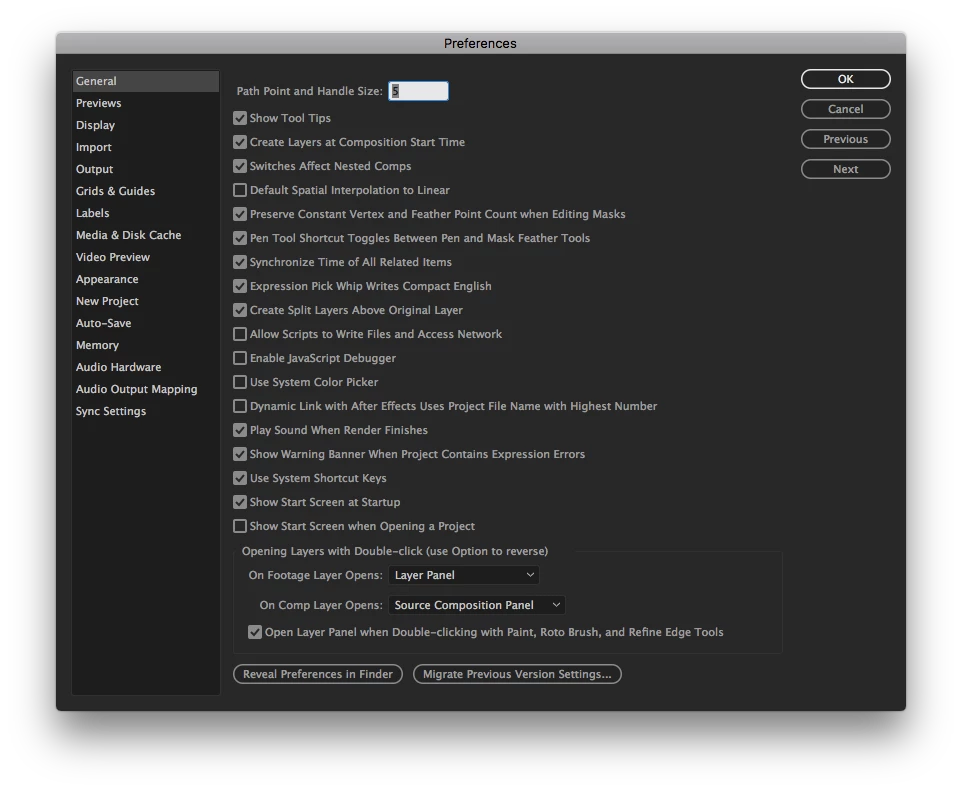
Did you check your After Effect Preferences ?

After Effect > Preferences > General > Show Tool tips

The very first one

Ben

2 replies

phlexib
phlexibCorrect answer
Inspiring
March 5, 2017

Did you check your After Effect Preferences ?

After Effect > Preferences > General > Show Tool tips

The very first one

Ben

Inspiring
March 5, 2017

Welp, looks like I'm a big ol' dumb dumb.  That's EXACTLY it.  The silver lining is that it illuminates a use case I need to account for...when the user doesn't have "Show Tool Tips" set.

THANK YOU!

Inspiring
March 5, 2017

Does anyone know the name of the Preference to check for this one?  Scanned through all the files located in ~/Library/Preferences/Adobe/After Effects/<VERSION>/ and couldn't find one that jumped out at me. 

It's important for me to at least be able to check for this pref because my UI is going to be 99% button/icon based to avoid using text and save on screen real estate.

THANKS!

UQg
Legend
March 3, 2017

cswaim080880  wrote

I looked into the helpTip property but that didn't seem to be it.

Normally, that's the one:

myButton.helpTip = "Please click me";

Xavier

Inspiring
March 3, 2017

Yup, it's spec'd out in the Javascript Tools Guide as part of IconButton but I just can't seem to get it to work.  I've found a way to override onDraw for the IconButton and evaluate when the mouse is over but can't figure out how to popup a tooltip.

iconbutton.onDraw = function(drawState) {

     if(drawState.mouseOver) {

          //do mouse over stuff

     }


     this.graphics.drawImage(this.image, 0, 0);

}

I know in HTML/CSS you could use a <div> and explicitly set it's position to that of the mouse.  To my knowledge, this isn't possible and while I haven't tried this using a window...it's not exactly what I want so I'd like to avoid if at all possible.

My absolute backup is to have a StaticText in the UI that I can use as a console to display any messages from program to user.

Thoughts?

UQg
Legend
March 3, 2017

myControl.helpTip = "some piece of string" has always worked for me, regardless of the control type, the os, and the after effects version, and even when the control has a custom onDraw associated to it. Going the popup window route seems overkill, and definitely unncessary.