Known Participant
February 2, 2020
Question

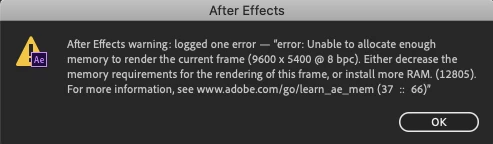
Unable to allocate enough memory to render current frame

  • February 2, 2020
  • 17 replies
  • 1690 views

I've been trying to render a composition that is less than 30 seconds long but at the same spot I keep getting this message. How do I fix this?
This topic has been closed for replies.

17 replies

lilyput04Author
Known Participant
February 3, 2020

So if my computer apparently "doesn't meet the minimum requirements for After Effects", what can I do in order to fix my problem?

Mike_Abbott
Legend
February 2, 2020

...particularly for such a large video frame (9,600 X 5,400 px).  The length of the composition is irrelevant, but Ae needs enough memory to render each frame. Do you have effects applied to that layer as well? If so, which?

Peru Bob
Community Expert
Community Expert
February 2, 2020

Your computer doesn't meet the minimum requirements for After Effects:

https://helpx.adobe.com/after-effects/system-requirements.html


You need at least 16 GB RAM.

lilyput04Author
Known Participant
February 2, 2020

My macbook air has 8 GB of RAM installed. I went to that link and tried almost everything and it still fails at the same place. 

Mike_Abbott
Legend
February 2, 2020

How much memory (RAM) does your computer have?

Mylenium
Legend
February 2, 2020

Aside from Peru Bob's link, sift through the project whether any effects have crazy settings. effects running amok is the most likely cause for such errors, after all.


Mylenium

Peru Bob
Community Expert
Community Expert
February 2, 2020