

Unable to edit expression on property after dragging a link
I’m new to expression controls in After Effects, so please be kind if I am missing something here.
I am trying to rotate a bezier triangle distributed around a circular path.
To do this, I set the copies property expression to a Slider Expression Control (with a bunch of math to make the slider go from 0 to 100% of the maximum number of triangles that can rotate around the circle.)
When I create a second repeater, I open the Transform Repeater Rotation control and click the spiral button to drag it to the previous Transform Repeater control Rotation value. (so they both rotate the same)
But now, I want to add a value to the control, so I should be able to expand the Rotation Control and see the expression under it. Clicking on the expression allows me to edit the expression. HOWEVER, I can only see half of the expression level under my rotation. It’s not clickable or accessible. All you can see are the tops of the word “Expression Control” because the line is ½ height or smaller. I have tried clicking on rotation and using the arrow keys to activate it. I’ve resized the UI, closed all the opened properties and returned back to it. No matter what I do, I can no longer access the Rotation Expression Controls.
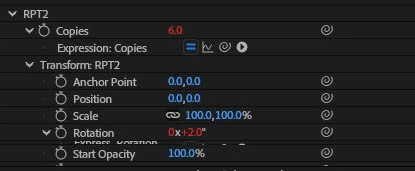
Am I doing something wrong here? Any help would be greatly appreciated. I have come a long way with expression controls, and this is just stumping me.


 AdChoices