
Participant
March 21, 2025
Answered

Unable to execute script at line 74. null is not an object ERROR message

  • March 21, 2025
  • 1 reply
  • 297 views

I am strugging to import my KML files from Google Earth pro into After Effects. I am unsure if the error message is from the KML import script or with the KML script itself. Or something else completley. 
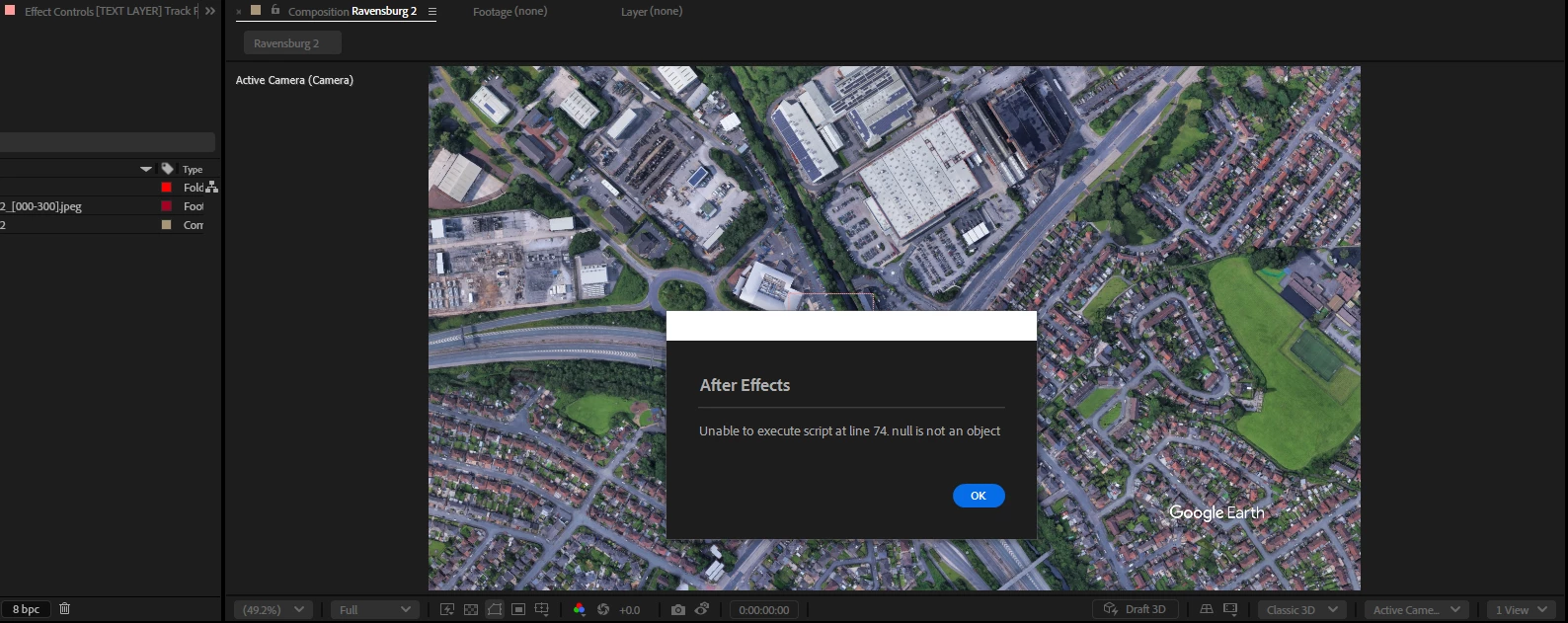
 

Every KML I produce I recieve the same error message.  The same script file is working fine on other team members computers. I am the only one with this message which is making me think the issue isnt with the script.


The script below is from my Kml_GES_import_script:


{
// This script file will open a KML file and create a route path with Google Earth Studio project created with
// with the Google Earth Studio .jsx file.
// Note: 1) there is no elevation data contain in the file, all points are on the same 3D plane. 2) the KML route
// is limited to about 30km area (limitation of After Effects).
 
    // Developed by: Rob Jolly, Imagiscope
 
// This script is provided free to use. Commercial benefit is prohibited.
 
    function doDrawKmlPath(thisObj){
        SelectedFile = File.openDialog("open file","KML:*.kml",false)
        if (SelectedFile){
            kmlFile = new File(SelectedFile);
            kmlFile.open("r");
            var xString = kmlFile.read();
            xString = xString.replace(/<kml[^>]*>/g,'').replace(/<\/kml>/g,'');
            var xRoot = new XML (xString);
            kmlFile.close();
            pmRows = xRoot.Placemark.length();
            
            var xData = "";
            for (p = 0; p < pmRows; p++) { 
                if (xRoot.Placemark[p].LineString.coordinates.toString() !==""){
                    xData = xRoot.Placemark[p].LineString.coordinates;
                } else {
                    xData = xRoot.Placemark[p].Point.coordinates;
                    
                }
                xData = xData.toString().replace(/^\s+/, ""); // remove leading white space
                array = xData.split(" ");
                rows = array.length;
                
                var earth = 6371010.1 ; // radius of earth (google earth value)
                vertices = [];  // reset vertices
                sa = array[0].split(","); // first point
                sx = parseFloat(sa[0]); // starting point  x (lon)
                sy =  parseFloat(sa[1]); // starting point  y (lat)
                sz =  0; // starting point  z (no altitude provided - amount over sea level)
            
                if (xRoot.Placemark[p].LineString.coordinates.toString() !==""){
                    var ox, oy, oz, olon, olat;
                    adj =   Math.cos((sy * Math.PI / 180)) * earth; // adjacent angle of starting lat
                    
                    for(i=0; i < rows; i++) { // cycle all points
                        inar = array[i].split(","); // split x,y,z
                        if (!isNaN(parseFloat(inar[0]))) {
                            lon = inar[0]; // lon value
                            lat = inar[1];  // lat value
                            overlay = Math.PI * (adj * 2); // overlay width & height (projected flat surface to curved globe)
                            x = (lon + 180) * (overlay / 360); // calculate x from lon to AE/GES world space
                            latRad = lat * Math.PI / 180;  // calcuate latitude in radians (degrees to radians)
                            merc = Math.log(Math.tan((Math.PI / 4) + (latRad / 2))); // calcuate to Mercator projection value
                            y = (overlay / 2) - (overlay * merc / (2 * Math.PI)); // fit Mercator value onto overlay
 
                            if (i === 0) { // set zero point (for placment)
                                sx = x; // start (x)
                                sy = y; // start (x)
                                olon = lon; // origin lon
                                olat = lat; // origin lat
                                phi = (90 - lat) * (Math.PI / 180);
                                theta = (lon + 180) * (Math.PI / 180);
                                ox = ((earth) * Math.sin(phi) * Math.cos(theta)); // origin points on 3D earth
                                oy = ((earth) * Math.sin(phi) * Math.sin(theta));
                                oz = ((earth) * Math.cos(phi));
                            }
                            vertices.push([(x - sx), (y - sy)]); // position, relative to start position (0,0)
                        } 
                    }
                    t1 = []; // empty tangents
                    t2 = [];
                    pathShapeLayer = app.project.activeItem.layers.addShape(); 
                    pathShapeGroup = pathShapeLayer.property("ADBE Root Vectors Group");  // select the vector shapes PropertyGroup object
                    pathShapeGroup.addProperty("ADBE Vector Shape - Group"); // add a path
                    pathShapeGroup.addProperty("ADBE Vector Graphic - Stroke"); // add a stroke
                    var pathShape = new Shape();  // create shape
                    pathShape.vertices = vertices; // set the path (verticies)
                    pathShape.inTangents = t1; // set tangents to empty
                    pathShape.outTangents = t2;
                    pathShape.closed = false; // don't auto close the path
                    pathShapeLayer.threeDLayer = true;  // put shape in 3D space
                    pathShapeLayer.position.setValue([ox, oy, oz]); // set start of shape to first point
                    pathShapeLayer.orientation.setValue([270,((-90) - olon) , 0]); // set orentiation 
                    pathShapeLayer.xRotation.setValue(-1 * olat); // rotate x to first latitude
                    // set the value of the path too the shape object
                    pathShapeGroup.property(1).property("ADBE Vector Shape").setValue(pathShape); // put the path in the shape group
                } else if (xRoot.Placemark[p].Point.coordinates.toString() !=="") {
                    adj =   Math.cos((sy * Math.PI / 180)) * earth; // adjacent angle of starting lat
                    lon = sx; // lon value
                    lat = sy;  // lat value
                    phi = (90 - lat) * (Math.PI / 180);
                    theta = (lon + 180) * (Math.PI / 180);
                    ox = -((earth) * Math.sin(phi) * Math.cos(theta));
                    oy = -((earth) * Math.sin(phi) * Math.sin(theta));
                    oz = ((earth) * Math.cos(phi));
 
                    var newNull = app.project.activeItem.layers.addNull();
                    newNull.threeDLayer = true;
                    newNull.position.setValue([ox, oy, oz]); // set position of null to origin lat/lon - altitude set to sea level
                    newNull.orientation.setValue([270, ((-90) - lon), 0]); // set orentiation 
                    newNull.xRotation.setValue(-1 * lat); // rotate x to latitude
                }
            }
        }
    }
    doDrawKmlPath(this);
}


This is an example KML scrip I have used: 


<?xml version="1.0" encoding="UTF-8"?>
<kml xmlns="http://www.opengis.net/kml/2.2" xmlns:gx="http://www.google.com/kml/ext/2.2" xmlns:kml="http://www.opengis.net/kml/2.2" xmlns:atom="http://www.w3.org/2005/Atom">
<Document>
<name>Route.kml</name>
<StyleMap id="dir_route">
<Pair>
<key>normal</key>
<styleUrl>#dir_route0</styleUrl>
</Pair>
<Pair>
<key>highlight</key>
<styleUrl>#dir_route1</styleUrl>
</Pair>
</StyleMap>
<Style id="dir_route0">
<LineStyle>
<color>ffa00000</color>
<width>6</width>
</LineStyle>
</Style>
<Style id="dir_route1">
<LineStyle>
<color>ffa00000</color>
<width>6</width>
</LineStyle>
</Style>
<Placemark id="1.3.2">
<name>Route</name>
<styleUrl>#dir_route</styleUrl>
<LineString>
<coordinates>
-2.1592233,53.5279225,0 -2.1592233,53.5279225,0 -2.1591768,53.52796080000001,0 -2.1594551,53.528284,0 -2.1594163,53.5283085,0 -2.1593805,53.5283311,0 -2.1592381,53.5284173,0 -2.1592367,53.5284167,0 -2.1592005,53.52840479999999,0 -2.1590375,53.528355,0 -2.1589664,53.5283254,0 -2.158873,53.52828239999999,0 -2.158865,53.5282784,0 -2.1587352,53.52821399999999,0 -2.1586357,53.5281647,0 -2.1585583,53.52809479999999,0 -2.1584957,53.5280233,0 -2.1585239,53.5280026,0 -2.1585764,53.5279633,0 -2.1586856,53.5278613,0 -2.1587743,53.527778,0 -2.1588523,53.5277213,0 -2.1589362,53.5276524,0 -2.1589569,53.5276352,0 -2.1590208,53.52758289999999,0 -2.1591469,53.5274797,0 -2.1592678,53.52738170000001,0 -2.1593085,53.5273488,0 -2.1594361,53.5272745,0 -2.1595257,53.5271975,0 -2.1595876,53.5271535,0 -2.1596529,53.5271081,0 -2.1598692,53.5269597,0 -2.160016,53.5268632,0 -2.1600855,53.52681119999999,0 -2.1601376,53.52678299999999,0 -2.1603332,53.5266634,0 -2.1603944,53.52662779999999,0 -2.1604595,53.5265868,0 -2.1605995,53.5265106,0 -2.1607282,53.5264415,0 -2.1609345,53.526342,0 -2.161257,53.5261652,0 -2.1613913,53.5260888,0 -2.1613943,53.5260869,0 -2.1614034,53.5260813,0 -2.1614591,53.52604729999999,0 -2.1616113,53.52595430000001,0 -2.1617986,53.5258263,0 -2.1618478,53.5257927,0 -2.1621936,53.5255403,0 -2.1623312,53.52543549999999,0 -2.1624113,53.52537569999999,0 -2.1624503,53.52534960000001,0 -2.1624821,53.5253251,0 -2.1625667,53.5252608,0 -2.1626983,53.525159,0 -2.162899,53.5249991,0 -2.1629731,53.5249256,0 -2.1630406,53.52487129999999,0 -2.1630997,53.5248374,0 -2.1631804,53.5248049,0 -2.1633702,53.5245783,0 -2.163525,53.52438530000001,0 -2.1640285,53.5237692,0 -2.1643368,53.5233919,0 -2.1647126,53.5229315,0 -2.1647991,53.5228257,0 -2.1651492,53.5223977,0 -2.165209,53.5223206,0 -2.166011,53.5213445,0 -2.1660236,53.5213289,0 -2.1660919,53.5212447,0 -2.166145,53.5210801,0 -2.1663261,53.52084490000001,0 -2.1664247,53.52071680000001,0 -2.1666698,53.5203985,0 -2.1670239,53.5199308,0 -2.1670701,53.5198697,0 -2.1672884,53.5195365,0 -2.167347,53.519447,0 -2.1673471,53.5194469,0 -2.1675868,53.51909430000001,0 -2.1680354,53.5183796,0 -2.1680915,53.518275,0 -2.1682634,53.51796350000001,0 -2.1684241,53.51767220000001,0 -2.1686108,53.5173172,0 -2.1686869,53.5171596,0 -2.1688332,53.5168566,0 -2.1690974,53.5162403,0 -2.1692872,53.515818,0 -2.169541,53.5152662,0 -2.1695694,53.5151834,0 -2.1696132,53.5150428,0 -2.1696466,53.5149074,0 -2.1696527,53.51487970000001,0 -2.1696824,53.5147461,0 -2.1696941,53.5146443,0 -2.1697041,53.51453040000001,0 -2.1697071,53.5144236,0 -2.1697051,53.5142572,0 -2.1696901,53.5139286,0 -2.1696651,53.5135106,0 -2.169658,53.5133376,0 -2.1696561,53.51329260000001,0 -2.1696533,53.5132247,0 -2.1696195,53.5125322,0 -2.1695996,53.51212,0 -2.1695704,53.5115721,0 -2.1695614,53.5113921,0 -2.1695503,53.5110898,0 -2.1695459,53.5109203,0 -2.1695402,53.51070369999999,0 -2.1695544,53.5104533,0 -2.1695588,53.5103769,0 -2.1695609,53.51033919999999,0 -2.1695985,53.509991,0 -2.1696297,53.50978430000001,0 -2.1696725,53.5095558,0 -2.1697075,53.5093988,0 -2.1697476,53.5092383,0 -2.1698178,53.50899030000001,0 -2.1698573,53.50885120000001,0 -2.1699911,53.5083801,0 -2.1700156,53.5081919,0 -2.1700274,53.5080499,0 -2.1700352,53.507973,0 -2.1700472,53.50785439999999,0 -2.1700606,53.50770279999999,0 -2.1700969,53.5072939,0 -2.1700997,53.5072443,0 -2.1701088,53.50707499999999,0 -2.1701497,53.5065414,0 -2.1701834,53.5061006,0 -2.1701884,53.5060357,0 -2.1701897,53.5060205,0 -2.1701918,53.5059973,0 -2.1702043,53.5058561,0 -2.1703976,53.5058037,0 -2.1705623,53.5057494,0 -2.1713414,53.5055213,0 -2.1712296,53.5053729,0 -2.1711986,53.5053318,0 -2.1710897,53.5051873,0 -2.171004,53.505063,0 -2.1708379,53.5047963,0 -2.1707623,53.5046931,0 -2.1705885,53.5043944,0 -2.170476,53.5042154,0
</coordinates>
</LineString>
</Placemark>
</Document>
</kml>


Correct answer Dan Ebberts

I think you'll get that message if you don't have a comp active when you run the script. The script's error checking doesn't seem to be very robust.

1 reply

Dan Ebberts
Community Expert
Dan EbbertsCommunity ExpertCorrect answer
Community Expert
March 21, 2025

I think you'll get that message if you don't have a comp active when you run the script. The script's error checking doesn't seem to be very robust.