Participant
July 12, 2017
Question

"Unable to obtain dynamic link server connections" 3d camera tracker

  • July 12, 2017
  • 7 replies
  • 16345 views

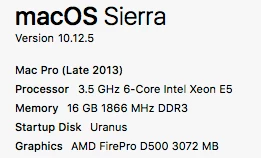
System Specs:

Running AE 2017.2 (14.2.1.34)

When adding the camera tracker to footage it seems to be analyzing the footage for a few minutes then stops and returns the following error:
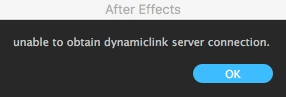
I have tried uninstalling/reinstalling using the cleaner tool, browsed countless forum's and still can't seem to get it working. It just randomly stopped working one day. Any ideas?

Thanks

James

This topic has been closed for replies.

7 replies

Participating Frequently
March 19, 2020

I just had this problem fixed via tech support. Both versions of Pr and Ae need to be the same (I'm not sure exactly why). I installed Pr 14.0 and Ae 17.0 and it works fine now. 


From support:"PR 14 and AE 17 are both CC 2020 versions but .0.1 OR .0.2 versions have to be the same"


So in theory, you could also have PR 14.0.1 and AE 17.0.1 and that should work as well. 


Lastly, I was told the dynamic link would not work with the trial version of AE. 

Participant
May 10, 2020

Just disovered I'm unable to use Warp Stabilizer and 3D Camera Tracker, getting same error as above under latest CC20 builds on a Mac Pro (2013 ver trashcan) under Catalina 10.15.4.  I just checked my AE ver (17.0.6) and Premiere Pro ver (14.1) are indeed different, but CC Manager shows everything up-to-date.  What's the solve to get things aligned and working?

Participant
February 13, 2019

hello

I had the same problem , I was working in the trapcode Tao and when I try to track some footage the propleme happened (unable to Obtain dynamiclink server link connection)

simply I closed the project and creat a new project then do the tracking only in the project and its worked for me and for a friend 

try to not use any 3d plugins or effects in the same project and may be it will works for you as me

thanks

Participant
October 10, 2019
I hace the same problem. It only appears when using Trapcode Tao. Did you find any solution! Cant start a new project for every shot I have to track haha thanks!
Welli
Participant
November 24, 2018

I also have same problem! And I tried everything mentioned above. Today I even downloaded latest update for AE CC 2019, but still no luck and I got the same error message. So, I had to download earlier version AE CC 2018 where stabilizing and camera tracking are working.

nilleg57851248
Inspiring
December 13, 2018

But how to innstall an older version?

Participating Frequently
January 31, 2019

Hi there!
Go into adobe creative cloud and scroll down to the app you want to downgrade to. On the right or the left side, there should be an arrow that you can click. Older options should then show up. Hope this helps. That's the only workaround that actually works for me, to use the 2018 version...

Bjørn

angie_taylor
Legend
April 27, 2018

Have you tried creating a new project, reimporting the file into this clean project, and then running the camera tracker again? Does it work in the clean project?

Also, is the project you were originally working in a dynamic link project?

Lynn741956
Inspiring
April 27, 2018

I downloaded cc14 and it works great! My only question is can you not “ extrude” the text? I don’t see any Geometry options like in 18.

Lynn741956
Inspiring
April 27, 2018

Forget that question....just had to change to ray trace, which stopped working for me in 18. I had to change to 4d in 18 to make it work....anyway all is good for now

Participant
September 11, 2017

Hey, the adobe support just helped me solve this. Rename the folders of the preferences in Library/Preferences/Adobe to "_old" or move them so after effects has to write them again.

These are the folders in the lib/prefs that tech support renamed:

DyanmicLinkMediaServer

dynamiclinkmanager

dynamiclinkmediaserver

After Effects

Same goes for the folder in user/Documents/Adobe/dynamiclinkmediaserver - add an old or whatever you want to that folder name and it resets with the next start of after effects.

Good Luck!

Lynn741956
Inspiring
April 27, 2018

I have the same problem and it is driving me nuts. I found the second part and renamed it but am trying to find the files in the first step you mentioned?????

Community Expert
April 27, 2018

Have you made sure your version of AE is up to date? Lots of recent bug fixes.

Kevin J. Monahan Jr.
Legend
August 2, 2017

Hi jamesl,

Are you still facing this problem? If not, let us know how you solved it. If so, please let us know so we can assist you further.

Thanks,

Kevin

Kevin Monahan - Sr. Community and Engagement Strategist – Adobe Pro Video and Audio
beardownAuthor
Participant
August 2, 2017

No, I have still not been able to figure it out. Any suggestions?

Thanks

Szalam
Community Expert
Community Expert
August 4, 2017

Have you tried it in CC 2014 as I suggested? (Your CC subscription includes older versions including CS6, CC, CC 2014, CC 2015, and CC 2015.3 - all of which can be installed simultaneously alongside each other with no issues.) Here's a page on downloading older versions (the option is not where it looks like it should be).

Szalam
Community Expert
Community Expert
July 13, 2017

What sort of footage are you using it on?

You can try transcoding it to ProRes, Cineform, or DNxHD and then try using the new footage in there.

beardownAuthor
Participant
July 13, 2017

Unfortunately, I have tried it on all different types of footage/codecs and it still won't track any of them.

Szalam
Community Expert
Community Expert
July 15, 2017

Well that's just odd.

Try an older version (like CC 2014) and see if it behaves. If so, great! You can carry on working in the older version or simply save your project and open it in the new version.