
Participant
September 26, 2019
Question

Unable to remove object using content aware fill

  • September 26, 2019
  • 3 replies
  • 925 views

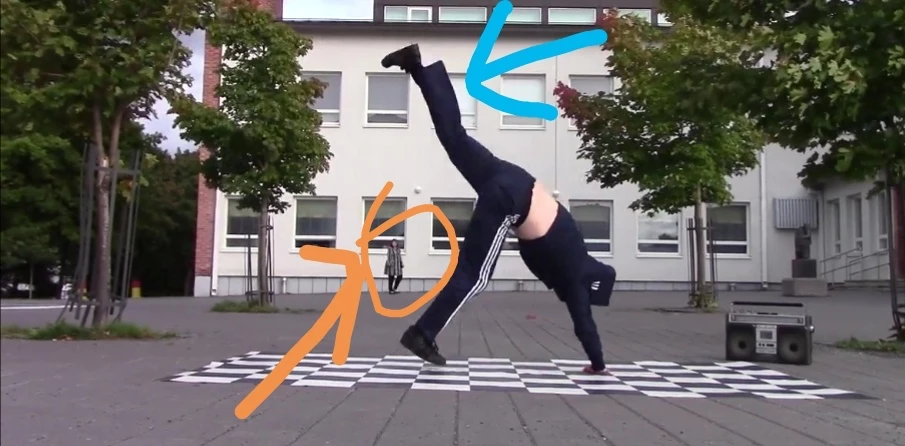
Hi, i have a video clip in which one object overlap other at certain frame, i have to remove the inner object , but when i use the content aware fill, it is unable to remove the inner object and also the outer object vanishes, please help me how can i remove the inner object in an overlapping video


Here the orange is the object to be removed and the blue one is outer object which vanishes while using content aware film.
This topic has been closed for replies.

3 replies

gupta shivangi
Legend
September 27, 2019

Hi Gagan, 


I understand content aware fill is not working as you want. Do not worry! We're here to help.


  • Did you try the suggestions shared by @Rick Gerard above?
  • I believe you would need to mask out the front object if it is overlapping the object behind. Could you share a  screen recording of your workflow that shows the mask which you have created?


Looking forward to your response.


Thanks,

Shivangi

Community Expert
September 27, 2019

Content-aware fill is NOT going to be able to figure out what is going on when the dancer's body moves in front of the person in the background. You are going to need to do some roto and you are going to have to create an animated mask around the actor in the background. CAF is a great tool but it is not magic. You will have to properly prepare the clip to get it to work.


If it were me I would just do some roto on a duplicate layer of the dancer and put a fill made in Photoshop between the original and a seriously cropped shot of the dancer. You'll only have to keyframe the roto for the few frames where the dancer moves in front of the patch. Something like this:

I used a green solid as the track matte and drew a mask only over the patch. I added a glowing edge to the patch so you could see that it is just big enough to cover the person in the background. The mask on the duplicate footage layer (faked so the leg is over the background) does not need to be any bigger than the patch and only a few keyframes should be required because if the dancer is moving at all they will only cover the background for a couple of frames.


If there is camera movement you'll have to do some tracking. Even if you decide to use CAF, you are going to have to roto the mask that pokes a hole in the layer when the leg passes in front of the person in the background.


OussK
Community Expert
Community Expert
September 26, 2019

did you try to creat a Reference Frame using photoshop?

Participant
September 27, 2019
I don't know how to use it. Did you have any other method of removing object, please urgently tell