
Abdelkrim Ibrahim
Participating Frequently
December 23, 2021
Answered

Unexpected error while comparing time variable to other variables

  • December 23, 2021
  • 2 replies
  • 744 views

I run into a weird issue and something non intuitive:
I applied this simple simplified expression to a property, however I get an unexpected error message.

if ((time >=0) && (time <2.5))
{var res=1500}
[res, res]
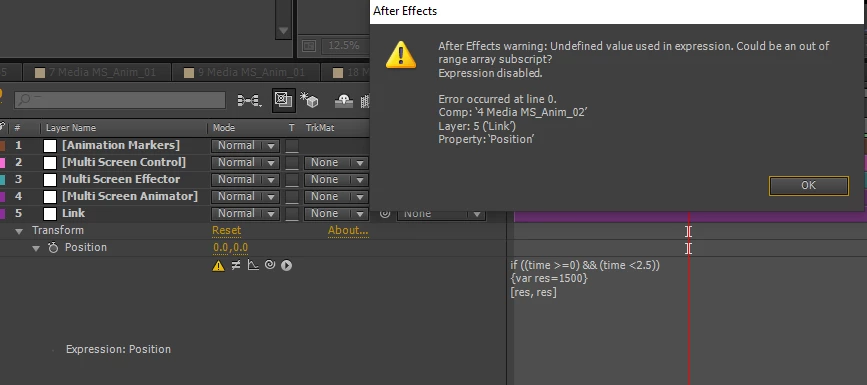
"Undefined value used in expression. Could be an out of range array subscript?"

I wonder what's causing this issue, aren't we allowed to compare the "time" variable to other values and use in a conditional statement?
I appreciate your help, if you can point me on how to correct this, or how to use someting else to get the same result.
Thanks for passing by this post.

This topic has been closed for replies.
Correct answer Mylenium

Well, the code does not have an else() statement or any other fallback, so naturally the expression will break if the time is larger than 2.5 seconds or similar conditions. I suggest you brush up on generic JavaScript syntax and expand your code. You can't be sloppy with these things.


Mylenium

2 replies

Mylenium
MyleniumCorrect answer
Legend
December 23, 2021

Well, the code does not have an else() statement or any other fallback, so naturally the expression will break if the time is larger than 2.5 seconds or similar conditions. I suggest you brush up on generic JavaScript syntax and expand your code. You can't be sloppy with these things.


Mylenium

Community Expert
December 23, 2021

Your if statement does not make any sense. Time cannot be less than zero so the first part of the if statement does not make any sense and the structure is wrong anyway. You also need something else to happen when time is something other than 2.5 seconds. 


This should jump a layer  from 1500, 1500 to its original position at 2.5 seconds.

if (time < 2.5){
   v = 1500;
   p = [v, v];
else
   p = value;
}
p

If you want to make something happen in between two times you would write something like this:

t = time;
value1 = value[0];
value2 = 1500;
if (t < 1){
    newP = ease(t, 1, 1.5, value1, value 2);
}
else if (t > 2){
    newP = ease(t, 2, 2.5, value2, value 1);
}
[value[0] + newP, value[1];

 This should start a move from the original position to of x at 1-second and move x to 1500 by 1.5 seconds, then at 2-seconds the position of x would change from 1500 back to the original x value by 2.5 seconds. They position would stay the same. 


I'm not sure what you are trying to do but this should get you started. The original expression makes no sense and results in no values being generated.


(there may be a typo in my expressions, I wrote them on an iPad and didn't check)

Abdelkrim Ibrahim
Participating Frequently
December 23, 2021

Yeah you're absolutley right about the else statement.
I figured it out, there should be defined values all over the time of the composition, leaving some parts of the compositions's time without defined values will cause such error.

This is the solution that came up with.

var markerIn = thisComp.layer("Animation Markers").marker.key(1).time;
var tStart = markerIn-1/2 ;
var tEnd = markerIn+1/2;

var markerInA = thisComp.layer("Animation Markers").marker.key(2).time;
var tStartA = markerInA-1/2 ;
var tEndA = markerInA+1/2;

var valueMin =thisComp.layer("Multi Screen Animator").effect("Position 01")("Point").value;
var valueMax =thisComp.layer("Multi Screen Animator").effect("Position 02")("Point").value;
var valueFin =thisComp.layer("Multi Screen Animator").effect("Position 03")("Point").value;

var res = valueMin;
tVar = time;

if ((tVar >=0) && (tVar < tStart))
{res = valueMin}
if ((tVar >= tStart) && (tVar <= tEnd))
{res=ease(time, tStart, tEnd , valueMin, valueMax)}
if ((tVar > tEnd) && (tVar < tStartA))
{res=valueMax}
if ((tVar >= tStartA) && (tVar <= tEndA))
{res=ease(time, tStartA, tEndA , valueMax, valueFin)}
if (tVar > tEndA)
{res = valueFin}	
res

Thanks for you help.

Dan Ebberts
Community Expert
Community Expert
December 23, 2021

I think you can reduce that whole last part from this:

tVar = time;

if ((tVar >=0) && (tVar < tStart))
{res = valueMin}
if ((tVar >= tStart) && (tVar <= tEnd))
{res=ease(time, tStart, tEnd , valueMin, valueMax)}
if ((tVar > tEnd) && (tVar < tStartA))
{res=valueMax}
if ((tVar >= tStartA) && (tVar <= tEndA))
{res=ease(time, tStartA, tEndA , valueMax, valueFin)}
if (tVar > tEndA)
{res = valueFin}	
res

to this:

if (time < tEnd)
  ease(time, tStart, tEnd , valueMin, valueMax)
else
  ease(time, tStartA, tEndA , valueMax, valueFin);