
Participant
July 13, 2021
Question

Unexpected token 'if' and more (picture included)

  • July 13, 2021
  • 3 replies
  • 571 views

I am trying to do a few things.

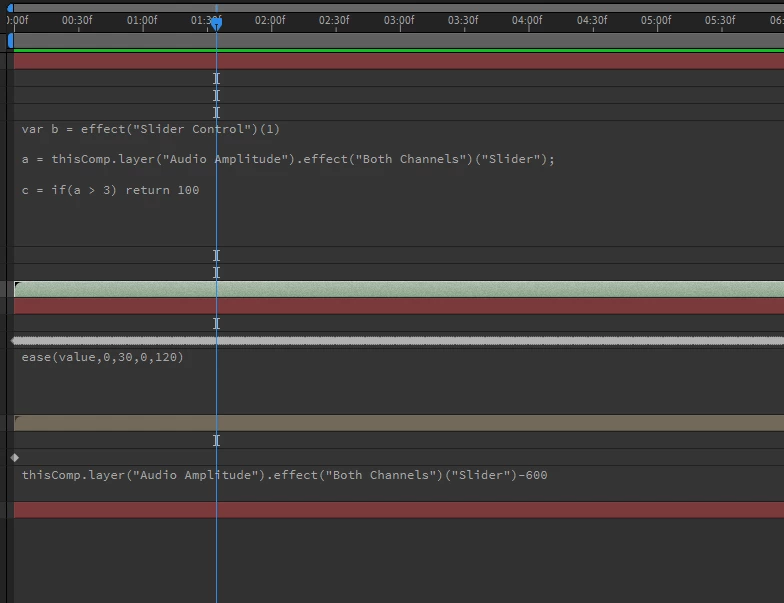
I want to have the slider hold a value if the beat from [ ease(value...)] is 120 (the value being 120).

So I am trying to write an expression to read from ease(value) , then have it reflected in the slider so the layer at the bottom can be rewritten to have a mask expand each time the value 120 comes up.


This is riddled with problems for now, but I gotta take it one step at a time.
 

This topic has been closed for replies.

3 replies

Community Expert
July 15, 2021

Maybe this will help a bit:

Something like this would expand the existing mask pixels every time the Both Channels slider passed 25 by up to 120 pixels and it would not care what the starting mask expansion was. 

src=thisComp.layer("Audio Amplitude").effect("Both Channels")("Slider");
exp = linear(src, 0, 25, 0, 120);
value + exp;

I used 25 because the top range of most audio is 30. 


If you want a switch that causes the expansion to happen over a certain number of frames every time the value hits the target it's going to take a recursive expression that is a lot more complicated. 


Your screenshot shows no reference to the Audio Amplitude layer so it can't do anything.


ShiveringCactus
Community Expert
Community Expert
July 14, 2021

I think it might help to write out the full expressions, rather than shorthand.  Are you trying to recreate a max meter, so that each time the value jumps above 120, the layer stays on for a while.

When expressions run, they run for each frame and you cannot set a property value in an expression.  But you can use a layer marker or a keyframe to trigger a property change.


Dan Ebberts helped me out with this expression, to fade a layer up everytime a keyframe appeared:

fadetime = 0.5;
dur = 1.5;
p = effect("Circle 2")("Center");
val = 0;
if(p.numKeys > 0){
    n = p.nearestKey(time).index;
    if(p.key(n).time > time) {
	    n--;
    }
    if(n > 0){
        t = p.key(n).time;
        if(time < t+dur){
            val = linear(time, t, t+fadetime, 0, 100);
        } else {
	val = linear(time, t+dur, t+dur+fadetime, 100, 0);
        } 
    } 
}

val

There's work you need to do to reconfigure this, but what this expression is doing is using the time of the trigger (in my case a keyframe, in your case it could be the value exceeding 120) to set the fade up and fade out animation running.


Mylenium
Legend
July 14, 2021

Not how it works. Not in AE expressions, not in JavaScript/ ECMA Script in general. You need to start with the basics and educate yourself about dos and donts, elementary syntax and what AE can actually do. Like for instance it can't simply "hold" a value because the engine doesn't store persistent values and variables and things have to run in while() and for() loops to re-evaluate every frame and accumulate values. That and of course for simple audio trigger stuff there is no need to reinvent the wheel. Aside from Dan Ebberts' classic examples (http://www.motionscript.com/design-guide/toc.html) there are literally hundreds of tutorials on this out there.


Mylenium