
Participant
December 22, 2021
Answered

Unknown layer is visible
  • December 22, 2021
  • 2 replies
  • 940 views

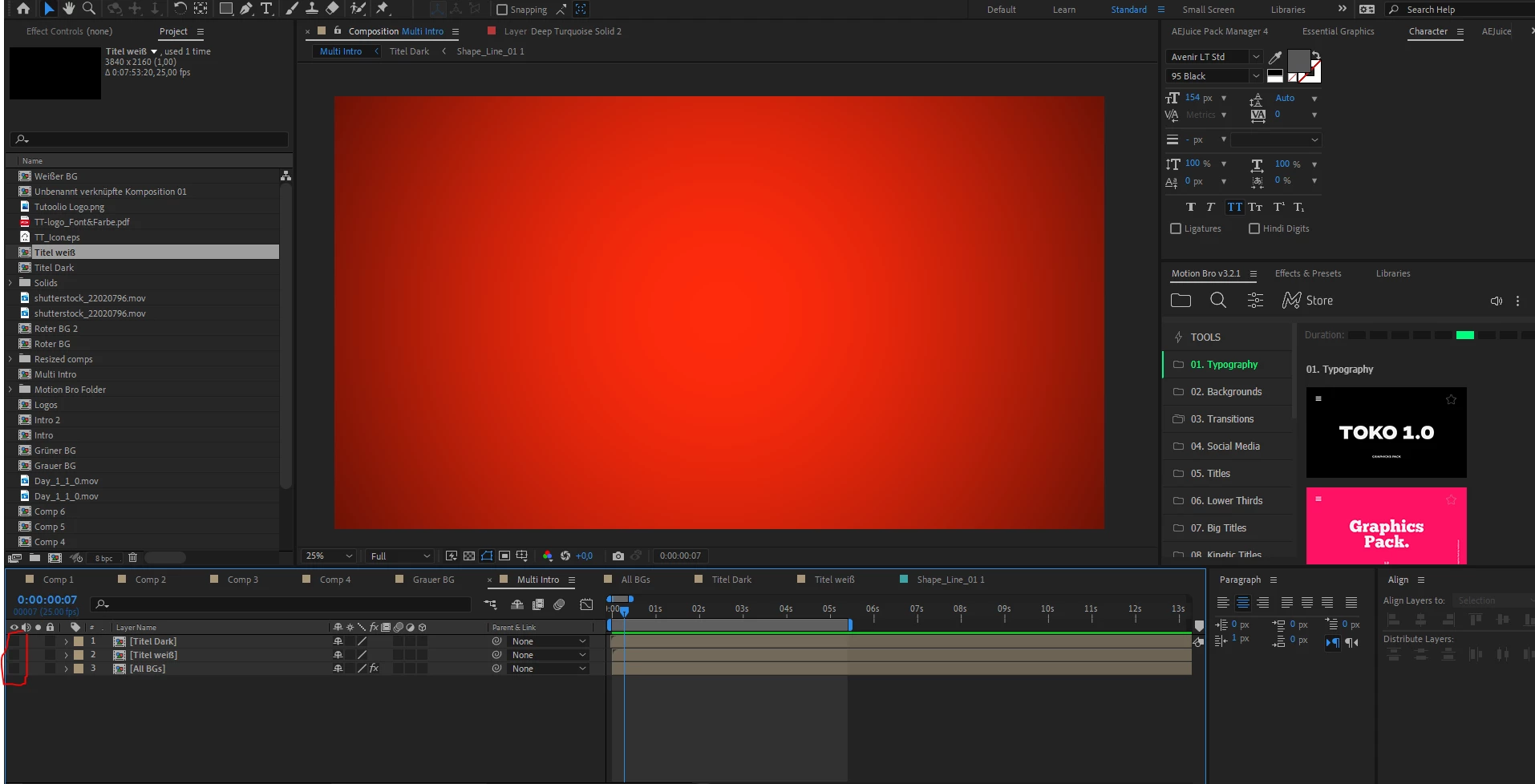
So i have this comp with no layer visible (see left down corner) though a solid I used with a vignette effect can be permanent seen. And even with "Toggle transperency grid" set to on, the strange Layer can be seen. Does anynone know this problem? (Specs: Windows 10, AMD Ryzen 9 5900X, 32 GB RAM, AE Version: 22.0.1 (Build 2))

This topic has been closed for replies.
Correct answer David Arbor

You likely have a frame stuck in the cache, as indicated by the green Preview bar in the Timeline. Go to Edit > Purge > All Memory & Disk Cache and this should remove the frame after a few seconds.

2 replies

gupta shivangi
Legend
December 24, 2021

Hi there,


We appreciate you writing in. Did you try the suggestion given by the expert above?

Let us know.


Regards,

Shivangi

David ArborCorrect answer
Inspiring
December 22, 2021

You likely have a frame stuck in the cache, as indicated by the green Preview bar in the Timeline. Go to Edit > Purge > All Memory & Disk Cache and this should remove the frame after a few seconds.