
Update the Viewer under a dialog window
Looking for some scripting tips: I'm currently working on a script to edit keyframes, very similar to After Effect's own 'Edit Value...' popup but I'm running into an issue with live-previewing changes in the Viewer.
If you edit a keyframe using AE's built in 'Edit Value...' dialog (with 'Preview' checked), the item in the viewer updates as well as the property values in the timeline.
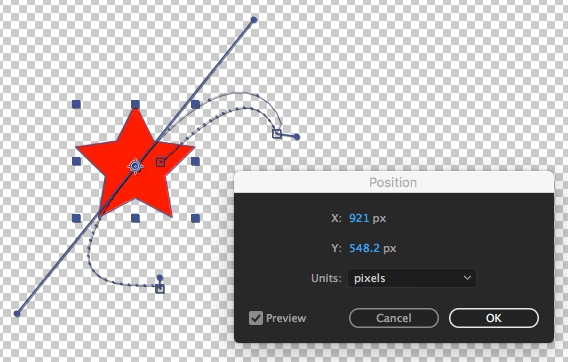
When I build my own dialog however, only the timeline values update; the viewer remains static until I close the dialog (even though the values were being updated). I assume this is an issue with the new AE split threading architecture ... any chance there's a scripting way to refresh the viewer? Any other suggestions?
If I change the script to a 'palette' instead, the viewer updates correctly but that's less than ideal since keyframe selections and values can change while the palette is still open and I haven't figured out a way to track real-time changes to the active keyframe selection. Any ideas on that too?
Proof of concept script below, just select a position keyframe before running to see what I mean:
{
app.beginUndoGroup("Change XYZ Values");
// super NOT resilient, just for testing: set one position keyframe and just select that
var layer1 = app.project.activeItem.selectedLayers[0]; // first selected layer
var selprop1 = layer1.selectedProperties[0]; // first selected property
var firstKeyIndex = selprop1.selectedKeys[0]; // selected keyframe indicies
var firstKeyValue = selprop1.keyValue(firstKeyIndex); // value of the first selected keyframe
// create dialog with groups
var res =
"""dialog
{
text: 'Edit Values',
inpts: Group
{
orientation: 'row',
valuesGroup: Group
{
label: StaticText{text: 'Value'},
orientation: 'column',
editX: Group {_: StaticText{text:'X'}, valueX: EditText{characters: 8}},
editY: Group {_: StaticText{text:'Y'}, valueY: EditText{characters: 8}},
editZ: Group {_: StaticText{text:'Z'}, valueZ: EditText{characters: 8}},
}
},
btns: Group
{
c: Button{text: 'Cancel'},
o: Button{text: 'OK'},
},
}""";
var dlg = new Window(res);
// add variables for edit fields
var valueX = dlg.inpts.valuesGroup.editX.valueX;
var valueY = dlg.inpts.valuesGroup.editY.valueY;
var valueZ = dlg.inpts.valuesGroup.editZ.valueZ;
// initilize the edittext values
valueX.text = firstKeyValue[0];
valueY.text = firstKeyValue[1];
valueZ.text = firstKeyValue[2];
// updates keyframe with edit-text values
function updateKeyValue () {
selprop1.setValueAtKey(firstKeyIndex, [Number(valueX.text), Number(valueY.text), Number(valueZ.text)]);
}
// register onChange events
valueX.onChange = updateKeyValue;
valueY.onChange = updateKeyValue;
valueZ.onChange = updateKeyValue;
// dlg.show() runs only when window closes
if ( dlg.show() != 1)
{
// if didn't click 'ok', reset back to the initial value
selprop1.setValueAtKey(firstKeyIndex, firstKeyValue);
}
app.endUndoGroup();
}
Thanks in advance!
 AdChoices