MahaB82A
Legend
July 14, 2022
Answered

User Preset Folder

  • July 14, 2022
  • 1 reply
  • 24659 views

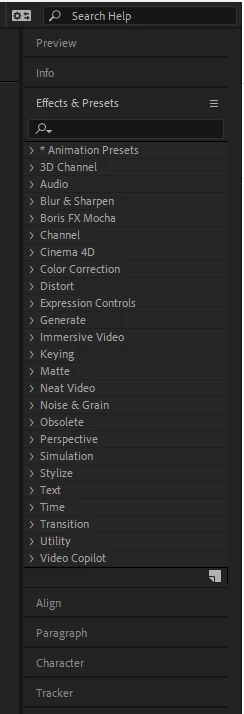
I use many same prestes often. Is it possible to create a User Preset Folder here? 


Correct answer Kyle Hamrick

It totally is! The structure you see here is just referencing folders on your hard drive. 

  • The animation presets that are installed with After Effects are in the Presets folder located in the Program Files\Adobe\Adobe After Effects CC\Support Files (Windows) or Applications/Adobe After Effects CC (Mac OS) folder.
  • Animation presets that you create are saved by default in the Presets folder located in
    My Documents\Adobe\After Effects CC (Windows) or Documents/Adobe/After Effects CC (Mac OS

    The user presets folder (second bullet point) is the intended location for presets you create, but if desired, you can create your own folders in AE's Presets folder, and they'll show up alongside everything else. 

1 reply

Kyle Hamrick
Community Expert
Kyle HamrickCommunity ExpertCorrect answer
Community Expert
July 14, 2022

It totally is! The structure you see here is just referencing folders on your hard drive. 

  • The animation presets that are installed with After Effects are in the Presets folder located in the Program Files\Adobe\Adobe After Effects CC\Support Files (Windows) or Applications/Adobe After Effects CC (Mac OS) folder.
  • Animation presets that you create are saved by default in the Presets folder located in
    My Documents\Adobe\After Effects CC (Windows) or Documents/Adobe/After Effects CC (Mac OS

    The user presets folder (second bullet point) is the intended location for presets you create, but if desired, you can create your own folders in AE's Presets folder, and they'll show up alongside everything else. 
MahaB82A
MahaB82AAuthor
Legend
July 14, 2022

Thanks for the explanation.
