Using Roto Brush With Animation Footage
Hello,
I do post-production work with animation footage (ie, cartoons) and a lot of the work I do requires lots of Roto, which means LOTS of masking. (And before you ask, no, I do not have access to any of the animation production files. All we get to work with are the final -flat- video files.)
I've experimented with the new Roto Brush 2 and it is excellent except for one major flaw that makes it unusable for me: the border created by the Roto Brush shifts nearly every frame even when there's no animation. Most of the animation that we work with is on 2's or 3's, meaning there's motion every 2nd or 3rd frame at 24 fps.
The example below hopefully illustrates the problem. (Disclaimer: I do not work on Spider-Man or for Marvel Animation. I simply downloaded this image from The Interwebs and it's provided here as a visual aid to further explain the problem I'm having.)
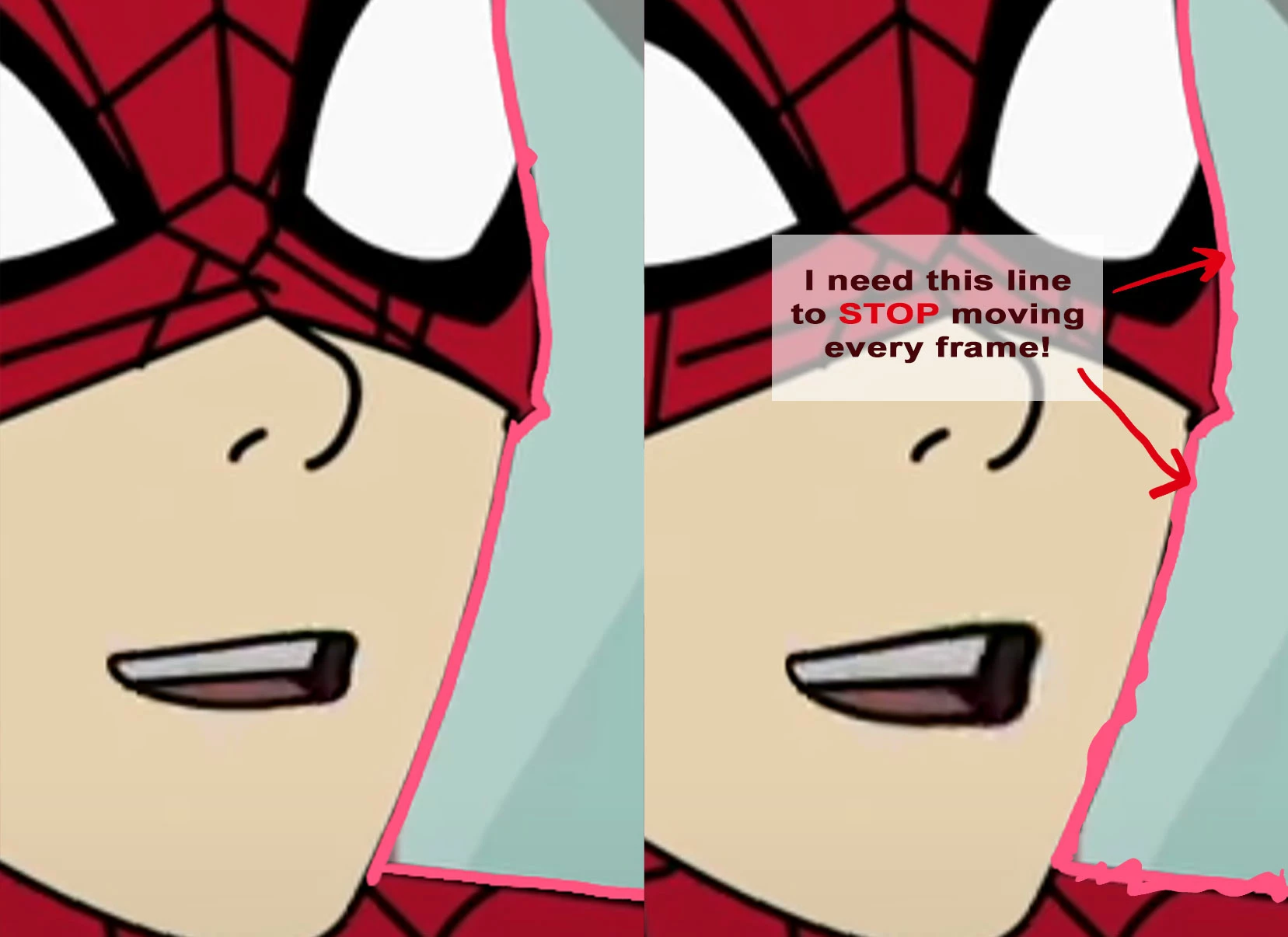
My question: Is there a way to get the Roto Brush mask to STOP moving every single frame? The "Freeze" button does not get the line to actually...well, freeze.
I need the line to stop moving/propogating during the frozen frames or it's completely useless to me because otherwise the Mask will be moving while nothing else does. I hope this is clear and that there's some way to do this. Thanks in advance.
-Not Spidey
 AdChoices