
In The Corn Productions
Known Participant
January 24, 2023
Answered

Using sourceRectAtTime expression to recreate comments section

  • January 24, 2023
  • 3 replies
  • 914 views

Hello!


I am currently working on a project where I have to recreate the comments section of a youtube live video. I am trying to create a situation where I can type in each comment individually and have the layers adjust to the "posting" of a new comment as though it would on a platform like youtube / tiktok /etc.

I have never used sourceRectAtTime, but it was recommended to me for this. I am also open to any plugins that might solve this conundrum for me as well.


I have attached a reference sample of what I'm looking to do (which was created manually).

Any help would be much appreciated!
This topic has been closed for replies.
Correct answer Rick Gerard

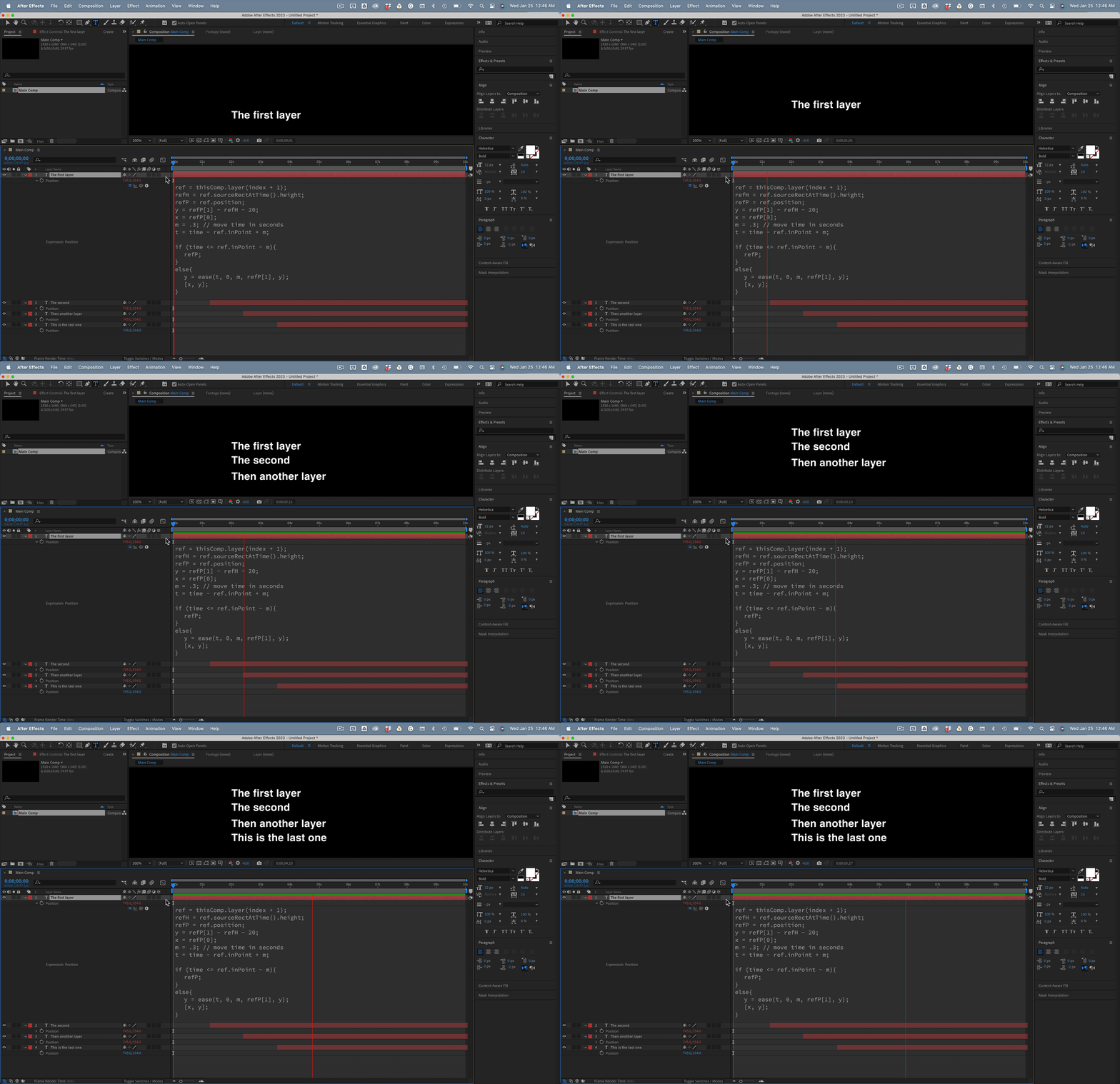
You can use sourceRectAtTime() to calculate the height of a text layer. Add inPoint to the end and some padding, and you can easily make a layer jump up when another layer starts. All you need is an expression on the text layer's position property. If you throw in an if statement and interpolate the movement, and put the expression on all but the bottom layer, you can get something like this:


Here's the expression:

ref = thisComp.layer(index + 1);
refH = ref.sourceRectAtTime().height;
refP = ref.position;
y = refP[1] - refH - 20;// 20 is the padding between layers
x = refP[0];
m = .3; // move time in seconds
t = time - ref.inPoint + m;
if (time <= ref.inPoint - m){
	refP;
}
else{
	y = ease(t, 0, m, refP[1], y);
	[x, y];
}


3 replies

Mylenium
Legend
January 25, 2023
In The Corn Productions
Known Participant
January 25, 2023

I mostly was unfamiliar with changing the mode to line, but I have used text animators before. I will do some reading - thank you!

Rick GerardCommunity ExpertCorrect answer
Community Expert
January 25, 2023

You can use sourceRectAtTime() to calculate the height of a text layer. Add inPoint to the end and some padding, and you can easily make a layer jump up when another layer starts. All you need is an expression on the text layer's position property. If you throw in an if statement and interpolate the movement, and put the expression on all but the bottom layer, you can get something like this:


Here's the expression:

ref = thisComp.layer(index + 1);
refH = ref.sourceRectAtTime().height;
refP = ref.position;
y = refP[1] - refH - 20;// 20 is the padding between layers
x = refP[0];
m = .3; // move time in seconds
t = time - ref.inPoint + m;
if (time <= ref.inPoint - m){
	refP;
}
else{
	y = ease(t, 0, m, refP[1], y);
	[x, y];
}


In The Corn Productions
Known Participant
January 25, 2023

This might just be exactly what I need! thank you so much 🙂


Mylenium
Legend
January 24, 2023

Completely unnecessary. A simple text layer with a text animator that has its mode set to Line would do everything you need. This isn't anything like those messaging apps with text bubbles.


Mylenium 

In The Corn Productions
Known Participant
January 24, 2023

Ah! after looking into sourceRectAtTime more I was hoping the answer would be a bit simpler. However, I am still relatively new to AE. Would you mind explaining in further detail?