Participant
October 21, 2022
Answered

Vector path from AI is converting to a filled shape and not a stroke path

  • October 21, 2022
  • 2 replies
  • 308 views

There are many articles out there for this, but then of them have helped or made sense in my case, I understand the principle that in order for Trim paths to be used, it needs to be a path and not a solid shape and for a vector path to be converted "remotely well" to a path in after effects it needs to just be a simple stroke.


So my problem is that I have a simple stroke "wind" that looks like this: 
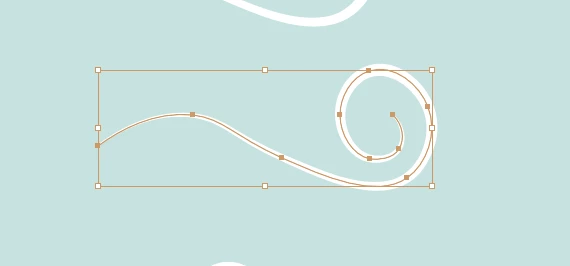
As you can probablt see the path is there, its a stroke and nothing else, so when I convert it to a shape in AE. "Create shapes from vector layer" it outlines it into a shape and not the path. 
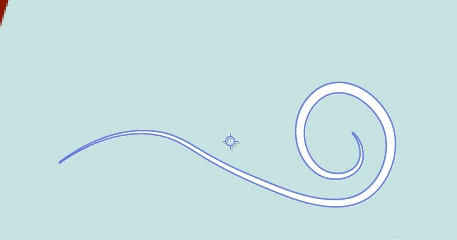


So when I use, trim paths it thinks its a solid and not a stroke. So for example, trim paths at 70% end:
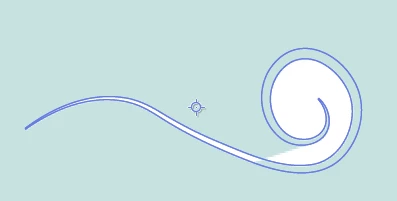


Any help will be greatly appreciated, I am just trying to make it look like the wind is blowing from left to right with trim paths. I know I can do this with the pen tool, but I am experimenting using AI and AE as companions not enemies. 


This topic has been closed for replies.
Correct answer Mylenium

This is to be expected. Variable width strokes are not supported because apparently AE has no way of creating them natively. Simple rule: What AE doesn't have itself cannot be converted to an editable feature. In order to get your swirl wiped on, you have to use the traditional method of copy & pasting your path spine ofer to AE, applying a stroke to it and using that as a track matte for your tapered stroke. Any old "logo reveal", "handwriting" or "swirls" tutorial can teach you those techniques.


Mylenium

2 replies

Community Expert
October 21, 2022

My solution to this kind of problem is to copy the path with the brush applied, create a new layer named Track Matte, then Paste In Front (Ctrl/Cmnd + F) to keep everything lined up, move the duplicate path to the Track Matte layer, and then remove the brush and change it to a simple stroke. 


When you import your AI file the only Vector Layer you need to convert to a Shape Layer is the Track Matte layer. Add Trim Paths to the converted Track Matte layer and use it to reveal your brush stroke. It just needs to be wide enough to cover the shape.

Participant
October 23, 2022

This is an incredibly smart idea, that I will test when I get back to my macbook tomorrow. 


Thank you very much. 

Mylenium
MyleniumCorrect answer
Legend
October 21, 2022

This is to be expected. Variable width strokes are not supported because apparently AE has no way of creating them natively. Simple rule: What AE doesn't have itself cannot be converted to an editable feature. In order to get your swirl wiped on, you have to use the traditional method of copy & pasting your path spine ofer to AE, applying a stroke to it and using that as a track matte for your tapered stroke. Any old "logo reveal", "handwriting" or "swirls" tutorial can teach you those techniques.


Mylenium

Participant
October 21, 2022

Thank you very much @Mylenium


I thought that was much the case, but here was hopeful to AE having a change in the last couple years. After all the MAX event was all about collaborating between softwares! Appreciate your time and help.