
Participating Frequently
Sep 10, 2023 4:38 PM UTC
Question

Very slow performance - Why??

Good morning,

I have a problem with After Effects performance:
When AE reaches a certain number of levels in the timeline everything becomes very slow (selecting keyframes in the timeline, moving program windows etc... it's as if the whole program is lagging)
To do a test I created 30 solids of 50px per side (so quite light) in an FHD composition and the performance drop is incredible!

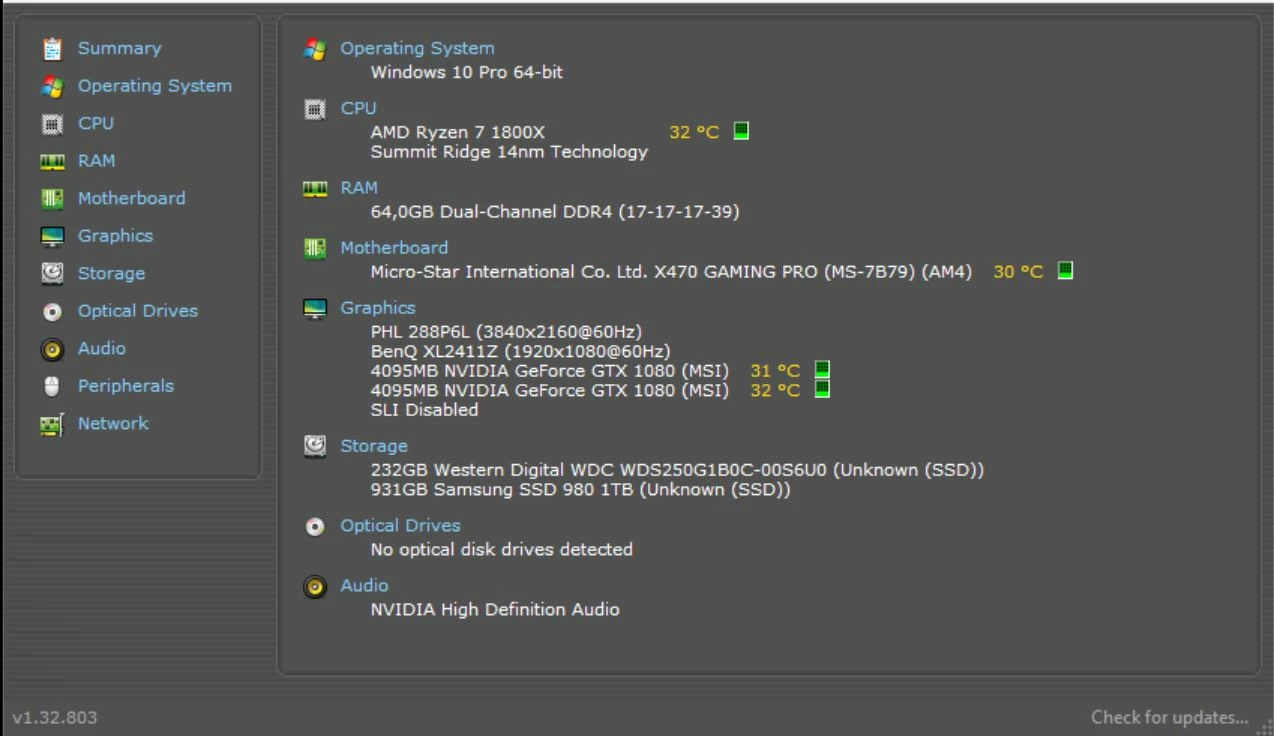
I attach my PC specifications which, although not high-end, should not cause problems of this type in such light projects.
Thanks in advance;

Davis
This topic is closed to new replies. Start a new post to keep the conversation going.

12 replies

ShiveringCactus
Community Expert
Community Expert
Sep 20, 2023 8:51 AM UTC

I made a video a while back to explain what's going on with slow playback and all the different options you can try to improve it:

https://youtu.be/tdaT81eVbcQ

Translate
Kartika Rawat
Community Manager
Community Manager
Sep 20, 2023 2:52 PM UTC

Sorry to hear that you are still having issues. Can you share the screen-recording of the issue? ^KR

Translate
Participating Frequently
Sep 20, 2023 4:30 PM UTC

Yeah buy only in this weekend.

Thanks for the reply.


Davis

Translate
ToolfarmJP
Community Expert
Community Expert
Sep 11, 2023 1:25 AM UTC

I guess the reason is shortage of VRAM.

Translate
Participating Frequently
Sep 11, 2023 5:33 AM UTC

Very strange, with 30 small solids AE don't use VRAM.

Also in the task manager i can see that it's not stressed at all 😕😕

Translate
nishu_kush
Legend
Sep 19, 2023 5:28 PM UTC

Hi Davis,


Thanks for writing in.

Does it happen on a new project as well? Can you try running After Effects in Safe Mode and see if that brings any change? If it doesn't, share a screen recording of the issue so that we can understand it better.


Thanks,
Nishu

Translate