
Participating Frequently
July 12, 2021
Answered

Video being clipped in After Effects

  • July 12, 2021
  • 1 reply
  • 504 views

Hi,


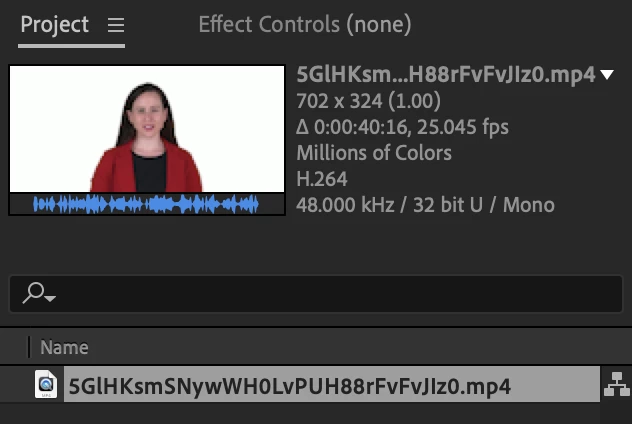
When I try to edit the attached video in after effects, it clips the length so that the last word isn't fully spoken. If you view the waveform you'll see that it drops of a cliff rather than naturally tapering out. When I play the video using Quicktime it plays fine i.e. there is no clipping. I get this clipping effect in Premiere Pro too.

One of the things that I have noticed is that the video has a very non-standard framerate 25.045. Could this be causing this issue? And is there a workaround? I have thousands of these videos and I am interested in a way to configure after effects to correctly handle these. I tried changing the framerate (to 25) using python but it screwed up the audio.

Thanks in advance.


This topic has been closed for replies.
Correct answer Mylenium

Start by checking the footage interpretation. Other than that there's really not much you can do. As is clearly recognizable from your screenshot this is "hack stuff" with the footage not complying to any industry standards, so problems are inevitable, as for better or worse Adobe products strictly adhere to those and are terrible at dealing with non-standard resolutions and framerates, variable data rates, dynamic frame-rates and so on. You may simply face endless conversions in a tool like Handbrake or another commercial product that deals with this. To avoid this in the future, you may want to adjust your camera and recording settings for better compatibility.


Mylenium

1 reply

Mylenium
MyleniumCorrect answer
Legend
July 12, 2021

Start by checking the footage interpretation. Other than that there's really not much you can do. As is clearly recognizable from your screenshot this is "hack stuff" with the footage not complying to any industry standards, so problems are inevitable, as for better or worse Adobe products strictly adhere to those and are terrible at dealing with non-standard resolutions and framerates, variable data rates, dynamic frame-rates and so on. You may simply face endless conversions in a tool like Handbrake or another commercial product that deals with this. To avoid this in the future, you may want to adjust your camera and recording settings for better compatibility.


Mylenium