

AntDX316
Inspiring
June 12, 2022
Question

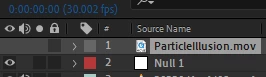
Video doesn't show an "eye" show button??
  • June 12, 2022
  • 2 replies
  • 920 views

It plays fine but for some reason there is no eye?
I have put other videos after and they show the eye but this doesn't.


edit: renaming the file fixes it because I'm deleting and putting a new one in and sometimes it works, sometimes it doesn't

This topic has been closed for replies.

2 replies

nishu_kush
Community Manager
Community Manager
June 12, 2022

Hi AntDX316,


Is it happening with a particular file? Please try resetting the preferences of After Effects: https://community.adobe.com/t5/after-effects-discussions/faq-how-to-reset-trash-preferences-in-after-effects/td-p/10634342

Let us know if it helps.


Thanks,

Nishu

AntDX316
AntDX316Author
Inspiring
June 12, 2022

If I rename the file to something else then try again later without restarting the problem is fixed.

Community Expert
June 12, 2022

Try to update as much as possible the application whatever version you are using.

Byron.
AntDX316
AntDX316Author
Inspiring
June 12, 2022

They are the latest versions of course. It's because I probably deleted too fast so the software got confused. I delete it and replace it with another render with the same file name so I don't have to go through the renaming process everytime I want to see a change in Mocha AE Particle Standalone.