Participant
January 24, 2021
Question

Video import error

  • January 24, 2021
  • 1 reply
  • 175 views

Hey guys,
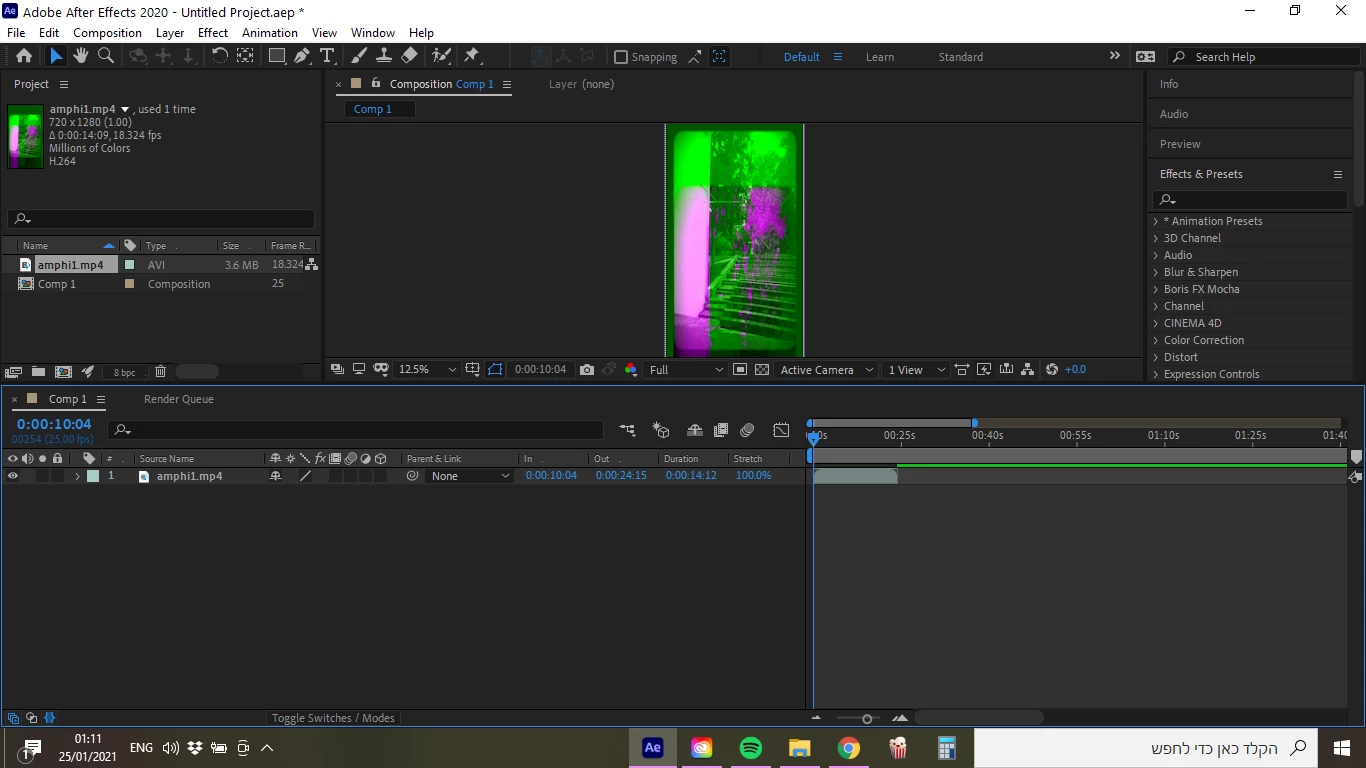
when i import a a MP4 video to after the colors are wrong and neony/
The file is for sure MP4 but when I import it to the library it says AVI, please help!!
Thanks!!

 

This topic has been closed for replies.

1 reply

Community Expert
January 25, 2021

The frame size is standard HDV/HDTV but vertical instead of horizontal. The frame rate is so far off from any standard that I believe this footage is variable frame rate footage from a mobile device or a screen capture program. After Effects is probably having a difficult time decoding the H.264 compression. This often happens with variable frame rate footage. I'll try to explain why. 


MPEG compression uses IPB inter-frame compression. What that means is that at the lowest compression settings the first frame is a real frame. The color is compressed, but all of the data is there and the pixels are where they were when that frame was recorded. That is an "I" frame. That means Intra Coded, so all of the information in that frame is compressed, but it is still there. The next frame is always a "P" or predicted frame. That means the compressor looks at the previous I frame and the next "I" frame and any other Predicted frames forward of the current frame and makes and predicts where the pixels should be. The information stored in that frame is a prediction, not the actual pixels. The next frame is the "B" frame and the prediction in that frame looks forward and backward to make the prediction. It's amazing that this works at all. 


The problem is that After Effects, and many other apps, don't like variable frame rates so when the CPU looks forward and backward to predict where the pixels should be it gets confused. The time between frames 1 and 2 may not be the same as the time between frames 2 and 3 or 3 and 4. You end up with a fouled up interpolation of those frames because too much is moving.


You can try forcing a constant frame rate by selecting the problem footage in the Project Panel and choosing File/Interpret Footage/Man from the menu or a right-click and set the frame rate to the nearest standard frame rate. Because your footage is 18.324fps I would set the frame rate to 18 if you have to maintain the real-time playback and audio pitch, or set it to 23.976 or 24 if you can stand to have it playback a little faster thana real-time with a little higher pitch in the audio.


If that does not work and the footage will load into a media player or the Adobe Media Encoder you can usually fix the problem by rendering a visually lossless production master from the original MPEG file. It is not a good idea to use H.264 compression for this DI (digital intermediate) because color and luminance compression builds up every time you re-compress so it is better to transcode your DI using Cineware, or ProRez, or some other visually lossless frame-based format. 

Participant
January 25, 2021

I put it in the media encoder as you suggested and it worked!
Thank you!