

VR Comp Editor shadow catcher renders white
Short version: Working in the VR Comp Editor, my shadow catcher layer won't preserve transparency when going to Open Output/Render.
Long version: I'm working with some VR footage in the VR Comp Editor. I added a 3D edit, masked a portion and 3D camera-tracked it. Worked just fine.
I added a logo and then right-clicked one of the track points to add a shadow catcher and light. Again, it worked just fine. The logo shadowed exactly as expected.
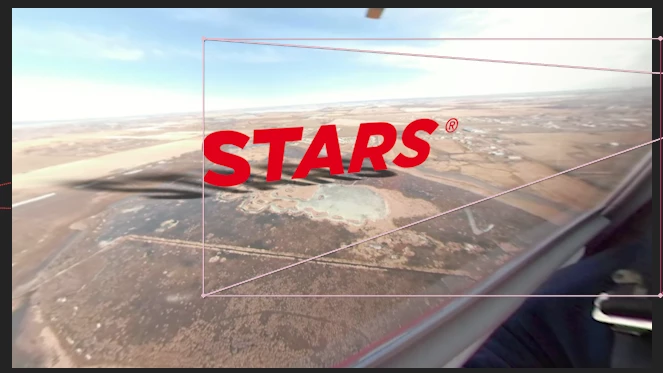
Then the problem: I tap Open Output/Render and the shadow catcher is white in the VR2 Output.
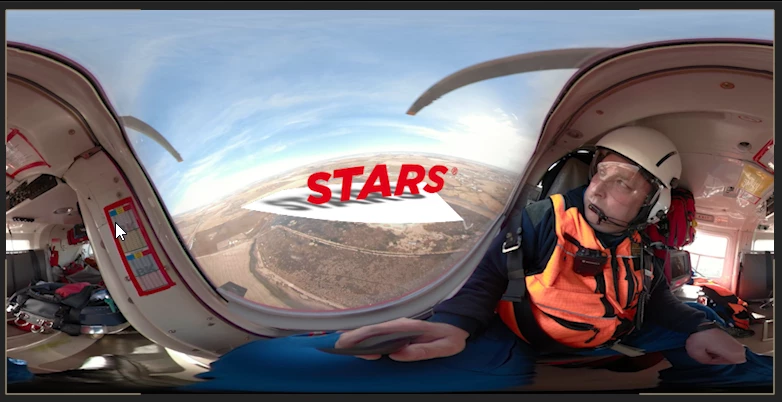
I manually adjusted the settings that were automatically applied when I clicked 'Create Shadow Catcher.' I set the shadow layer's blending mode to Multipy (in fact, I tried all blending modes, just in case), I toggled the Accepts Lights option between Off and On; I toggled Accepts Shadows between Only and On.
These are the settings I last tried, with no difference.
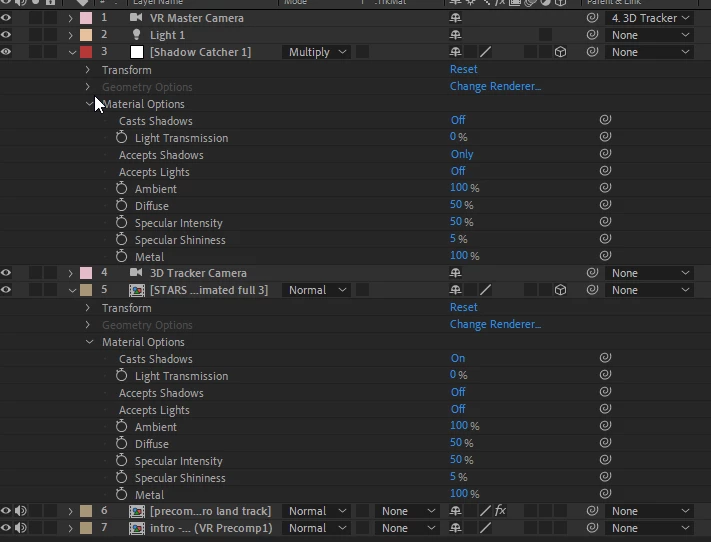
I tried scrapping the shadow catcher and light and creating new ones, both manually and automatically via the right-click on a track point.
I also updated my graphics card driver to the latest version.
Really don't know what else to try.
Specs: After Effects CC 2020 Version 17.0.2 Windows 10 Enterprise LTSC (OS build 17763.737) Intel(R) Xeon(R) CPU E5-1660 v4 @ 3.2GHz 32 GB RAM
Graphics: NVIDIA Quadro M2000 v442.50
 AdChoices