
Participant
June 9, 2021
Question

Warp Stabilizer Crashes After Effects
  • June 9, 2021
  • 3 replies
  • 2211 views


Hi


I'm having issues with After Effects and it's Warp Stabilizer.
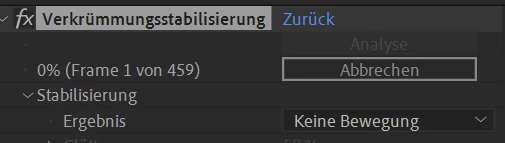
I export files from lightroom and want them to be stitched together as a timelapse in After Effects, to be encoded in Adobe Media Encoder in different formats. This works great, but as soon as I try to add the warp stabilizer  to remove slight camera shakes, After Effects freezes at the first frame (0%), as displayed in the picture above, and will stay there forever. If I try to abort/cancel the effect, the whole program crashes. I tried different formats, but it keeps crashing. (I usually use TIFF, but it also doesn't work with JPG or DNG).

After Effects as well as my Graphic Card Driver are up to date, and it used to work a few days ago. I have no clue why it keeps crashing...


Any idea what might be the problem?

Best

This topic has been closed for replies.

3 replies

Community Expert
June 9, 2021

I took about 15 minutes and made a tutorial using your footage. I'd use Mocha AE to stabilize the layer, add a null, then scale it up a bit to fix the jitters. Here's the tutorial:

It should be available in just a few minutes.

Community Expert
June 9, 2021

It is incredibly difficult for Warp stabilizer's algorithms to work on timelapse footage because any significant movement in any of the geometry in the scene makes it impossible for the software to figure out where the edges have moved. It is also very tempting to shoot timelapse with a 20 MP or better camera and then use those huge compared to even 4K video frames as the source material. The large files can easily overwhelm the calculations.  For many kinds of motion, Warp Stabilizer is the wrong tool because it tries to warp the geometry to stabilize it and that can lead to some very unusual artifacts, especially with timelapse footage.


You can often use Mocha to track a part of the geometry in the shot that has no movement like a building or a bunch of rocks, then invert the corner pin track and apply it to lock that building in place. Then all that is required is to slightly crop the comp or attach the shot to a null and scale it up to fit the frame. 


If you can share your footage I can point you directly to the solution that I would use. The specific workflow depends entirely on the shot.

Tobey_1Author
Participant
June 9, 2021

Hi Rick


Thank you for your answer, I uploaded a 1080p version of a timelapse that fails over and over again when it comes to warp stabilisation.

https://vimeo.com/manage/videos/560989102


What method would you recommend?


Community Expert
June 9, 2021

You posted a link to the manage videos section of Vimeo, not the video.


Mylenium
Legend
June 9, 2021

Depending on what yopur timelapse actually looks like this may simply be a genuine hard crash due to the footage not being consistent enough for the analysis. It needs to have soem sense of spatial and temporal plausibility and if the changes from frame to frame are too drastic, it simply won't work. Otherwise this could of course be hardware related, but since you haven't offered any system info or details from the crash info we can't realyl answer that.


Mylenium

Tobey_1Author
Participant
June 9, 2021

Hi Mylenium


My Hardware is the following:


Windows 10 64Bit

Threadripper 3970x

128GB Ram

Nvidia 2080 GTX Super

2TB SSD and about 10TB of normal Harddrive


The shakes in the footage are suptle and small, but still they are visible. More of a "bounce" due to a shake in the tripod all 50 frames or so.