
Participant
November 21, 2024
Answered

Weird artboard mask situation.

  • November 21, 2024
  • 2 replies
  • 320 views

This strange thing has started to happen in After Efftects 24 and 25. I have uninstalled and reinstalled both and cleared my preferences to no avail. I will try to explain but I have also recorded my screen to give an example. 


In the 300x250 composition, you can see that I have the select tool selected. When I scroll over the content with no layers selected, instead of a curser icon, I have a weird looking crosshair. It won't let me select anything and when I try to drag the mouse, it creates what looks like a mask. The mask covers the entire composition, not just one layer.


I toggle over to the 300x600 composition because it doesn't have that happen and I made no changes. I hit no shortcuts.


It seems to be happening randomly and I can't figure out how to make it stop. It is disrupting my ability to use the select tool in certain ways. 


Has anyone else had this experience?
This topic has been closed for replies.
Correct answer Brian C Carter

Hi Nancy


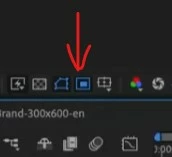
You have the Region of Interest option enabled on your Comp Viewer. This lets you select only a part of the comp to render to save time. When you first turn it on, it changes your cursor into a crosshair so you can define the region of interest. Just click the button below (the one to the right of the Toggle Mask and Shape Visibility button) and it will be disabled!

2 replies

Participant
November 22, 2024

Thank you! That was driving me mental!

Brian C CarterCommunity ManagerCorrect answer
Community Manager
November 21, 2024

Hi Nancy


You have the Region of Interest option enabled on your Comp Viewer. This lets you select only a part of the comp to render to save time. When you first turn it on, it changes your cursor into a crosshair so you can define the region of interest. Just click the button below (the one to the right of the Toggle Mask and Shape Visibility button) and it will be disabled!