

Shebbe
Community Expert
Community Expert
October 9, 2025
Answered

Weird error message Illegal XML data after .aep import

  • October 9, 2025
  • 3 replies
  • 262 views

There's some kind of messed up stuff going on. I needed a simple text animation from another project. I reduced it down to just that comp plus a few pngs. After importing it into the main project I get this message.
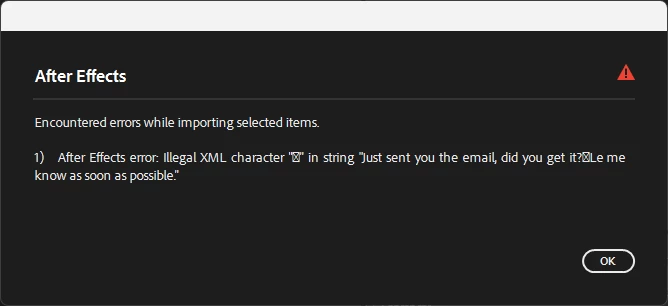
 

This data is coming from nowhere. Feels like some f-ed up cache shenanigans going on somewhere. I've had another messed up situation once with generating proxies that one frame in the proxy file suddenly had a black fill with random white text about some prompt. 


This is starting to feel really awkward because it feels like Adobe may be logging data from outside it's apps and now accidentally leaking that via these errors. Happy to share the file to DM of whoever at Adobe reaches out to investigate.


Win 11

AE 25.5.0 build 4

Correct answer Shebbe

Hey @JohnColombo17100380 ,

I check the proj again before sending it to you and notice that the error isn't popping up anymore. I then checked the proj it came from (it was reduced to be imported into another) and there the msg was present. Maybe somehow the data lingered in the smaller file? I found the string on a text layer in the original proj. I think the problematic characters may have been emojis done on a Mac. So problem solved for now ... sorry for the slight panic and suspicion.

3 replies

Shebbe
Community Expert
ShebbeCommunity ExpertAuthorCorrect answer
Community Expert
October 13, 2025

Hey @JohnColombo17100380 ,

I check the proj again before sending it to you and notice that the error isn't popping up anymore. I then checked the proj it came from (it was reduced to be imported into another) and there the msg was present. Maybe somehow the data lingered in the smaller file? I found the string on a text layer in the original proj. I think the problematic characters may have been emojis done on a Mac. So problem solved for now ... sorry for the slight panic and suspicion.

JohnColombo17100380
Community Manager
Community Manager
October 13, 2025

No worries, @Shebbe. I appreciate the follow-up. We are looking at better ways to handle these XML errors to avoid causing concern.


Thanks again,

- John, After Effects Engineering Team  

Shebbe
Community Expert
ShebbeCommunity ExpertAuthor
Community Expert
October 13, 2025

Tnx @JohnColombo17100380 , that could be nice. Perhaps it makes sense to have a warning in the style like expression errors allowing you to also click a loupe icon to jump to the problematic item. The same goes actually for warnings if files cannot be read due to permission errors or offline media. The big popup window doesn't cleanly parse them on a single line per error because of it's fixed width and is also not a scrollable list, the popup just becomes longer and longer and if it doesn't all fit another one comes up....


If the popup is more desireable because of level of urgency, the design needs to be improved.

Shebbe
Community Expert
ShebbeCommunity ExpertAuthor
Community Expert
October 10, 2025

Tnx @JohnColombo17100380 ,

The text layer inside the project did not contain any of the text in said string and there was only one text layer in the project. It looks like a message from someone's chat or email rather than being part of the project which feels concerning..


Not at my workmachine now, I'll DM you as soon as I get back.

JohnColombo17100380
Community Manager
Community Manager
October 10, 2025

Hi @Shebbe,
Thank you for reporting this issue. From the error, I would guess that there is a Text layer in the project you imported that contains an illegal characters (illegal in that it cannot be safely read in XML). Potentially a soft return character based on the placement in the sentence?


Please send me the project in a DM and I can confirm, or, open the project and retype that Text layer while ensuring no special characters are being used and then re-import it.


Thanks again for reporting,

- John, After Effects Engineering Team