


Legend
Jan 2, 2021 11:40 AM UTC
Answered

Weird problem using Rotobrush 2.0 , 1st frame stinks, 2nd frame nice.

Hi all,

When I take a simple image, actor's face, and use rotobrush 2.0 , it outlines it just fine, but......  (always a but)

...The very first frame is ripply. 

The rotobrush doesn't look good until the 2nd frame.

I start the rotobrush on the first frame, and I do a little tester, so the settings appear, and I select "quality best" prior to doing the full outline.

I'm still on frame one...

I do a full rotobrush and as always, the first frame stinks, the 2nd one is nice, as well as all others to the end.

I can't figure this one out.  

Please tell me I don't have reinstall the entire program for this type of glitch. 😞


Here is an example  (it's doing it for other clips as well.)


First frame:  (top of actor's head) note:  it's all ripply
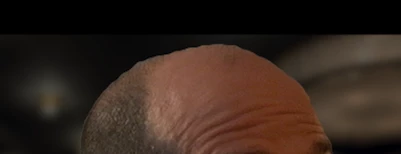
 

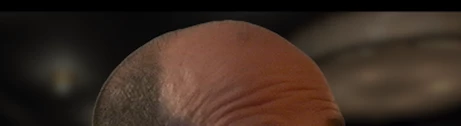
Then the 2nd frame to the end... it looks fine:
 

I made sure the 'caps lock' is off, caz I know AE is alergic to that button.

Using standard DV clips, latest AE version, 32gb ram, 1050ti gpu, Ryzen 7.


I read the 2.0 'learns' where to install the border, but can't it learn on the first frame as well?


Thanks for your advice on this one.  Very agravating.  

Letty


This topic is closed to new replies. Start a new post to keep the conversation going.
Letty2019Correct answer
Legend
Feb 4, 2021 2:26 PM UTC

If anybody had this problem, I found a simple solution. (by accident)


I flushed out the cache (disk and database) and re rendered.


The 2.0 worked like a charm.


Letty

6 replies

Participating Frequently
Jul 25, 2024 1:13 PM UTC

Just encoutered the same problem. The frame where the rotobrush starts is off, the rest is fine. The solution I came up with is to lengthen your footage further than use (if the clip is longer). Then start the rotobrush on a frame you will not use. After using rotobrush, trim the clip back to the frames you do want to use. Now the off frame is in a part which you don't use.

Translate
TheYeager
Inspiring
Aug 20, 2024 6:51 PM UTC

Yep. That is the only solution I have been able to come up with too. Adobe needs to address this, as it is quite annoying. It is clear that the "Ai" doesn't kick on until the 2nd frame, because it is basing everything off of the first frame. But then it doesn't apply the same roto mask "smoothing" to the first frame like it does to the rest of the frames.

Translate
Participant
Nov 1, 2024 9:53 PM UTC

So, I noticed if you start your roto on anything but the first frame and let it come back around it appears to resolve this issue - let me know if its the same for you guys


Translate
Inspiring
Nov 18, 2021 6:55 PM UTC

Unfortunately, clearing cache and database and rerendering the selection with rotobrush 2 didn't fix it. The first frame of the roto no matter where I start rotoing, the first frame is ALWAYS OFF. Every other frame is perfect. It's the first keyframe that jumps, only for 1 frame. It was a problem in the version of AE I HAD. Just updated AE and it's STILL an issue.........

Translate
Letty2019AuthorCorrect answer
Legend
Feb 4, 2021 2:26 PM UTC

If anybody had this problem, I found a simple solution. (by accident)


I flushed out the cache (disk and database) and re rendered.


The 2.0 worked like a charm.


Letty

Translate
Letty2019Author
Legend
Jan 5, 2021 12:27 PM UTC

No tips on this one?  How can I make the rotobrush 2.0  learn backwards for the first frame?

Translate