


Participant
September 19, 2023
Answered

what do the icons in project mean?

  • September 19, 2023
  • 1 reply
  • 304 views

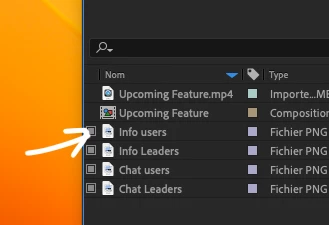
Hi, I would like to know what the square icon on the left of a file mean pls?
Even if I click on it or not nothing change in my composition.
Is it important to have it selected or not for the export?
Thanks in advance 🙂

This topic has been closed for replies.
Correct answer nishu_kush

Hi RomainIB,


Welcome to the community.

That icon identifies that the footage has a proxy attached.

Hope it helps.


Thanks,

Nishu

1 reply

nishu_kush
nishu_kushCorrect answer
Legend
September 19, 2023

Hi RomainIB,


Welcome to the community.

That icon identifies that the footage has a proxy attached.

Hope it helps.


Thanks,

Nishu

RomainIBAuthor
Participant
September 20, 2023

Hi Nishu, 


Thank you, I think I understand, it's because I changed the footage to replace with an other version of the .pgn (text in the image).

I still don't know if there is an incidence if the icon is selected or not, I can't find the answer is the documentation.

Thank you anyway I'll figure it out when I'll be less novice with AE 😉