
Participant
August 21, 2021
Answered

What does square brackets around a comp name mean?

  • August 21, 2021
  • 1 reply
  • 4553 views

I am editing a template and it seems I screw some part up. Comparing the edited version and the original version the only visible difference I could spot is that the editable version now has a square bracket around its name.


As seen below:
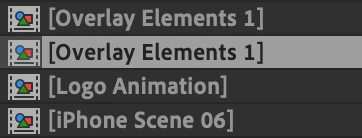
 

Does this mean anything? Why are the square brackets now there?

This topic has been closed for replies.
Correct answer ShiveringCactus

At the top of the timeline panel, the column with the names in is showing Layer Name.  If you click that it changes to source name.  Any layer can be renamed by selecting it and hitting ENTER.  The square brackets denote that the layer hasn't been renamed in the comp and is the original name. 

1 reply

ShiveringCactus
Community Expert
ShiveringCactusCommunity ExpertCorrect answer
Community Expert
August 21, 2021

At the top of the timeline panel, the column with the names in is showing Layer Name.  If you click that it changes to source name.  Any layer can be renamed by selecting it and hitting ENTER.  The square brackets denote that the layer hasn't been renamed in the comp and is the original name.