MahaB82A
August 12, 2022
Answered

What does this mean?

  • August 12, 2022
  • 2 replies
  • 588 views

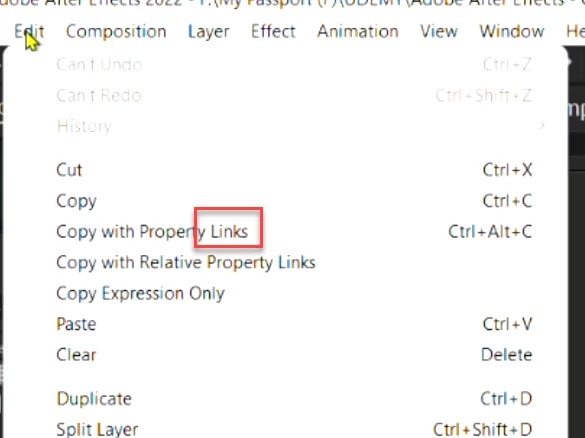
What is the meaning of this Links? In a big project how to find out whether a property has links or not. I assume a link is created after copy and paste.


This topic has been closed for replies.
Correct answer P.M.B

To expand a bit on your question of how do you know whether or not a property has "links".


select the layer and double tap "u" on the keybord to rveal modified properties.  Any properties with expresions will show up in red and you will see the expression to the right in the timeline area

2 replies

P.M.B
P.M.BCorrect answer
Legend
August 12, 2022

To expand a bit on your question of how do you know whether or not a property has "links".


select the layer and double tap "u" on the keybord to rveal modified properties.  Any properties with expresions will show up in red and you will see the expression to the right in the timeline area

~Gutterfish
MahaB82A
MahaB82AAuthor
August 12, 2022

Thanks for the explanation of the remaining issue.

Inspiring
August 12, 2022

This is a great feature that allows you to connect any property of a layer or an effect to another via expressions. One simple example is if you apply an effect to one layer but you want the same settings on multiple layers, you can select the effect, go to Edit > Copy With Property Links, then paste the effect anywhere in your project. You'll notice that the pasted effect has expressions linking each parameter back to the original instance you copied from.


A great practical use of this technique is to do the above, but on a null layer. Say you're working with drop shadows and you want to apply the same settings on 10 different layers. Instead of having your main drop shadow on one of your ten identical layers that you might lose track of later, you create a Null Object at the top of your layer stack called "Controller." Apply a the Drop Shadow effect here, copy it with property links, then paste it to your 10 layers. Now all the drop shadows can easily be controlled by one instance on your controller layer.

MahaB82A
MahaB82AAuthor
August 12, 2022

Thanks for the explantion.