


When I bring a clip from premiere into after effects through dynamic link, the color is off
Hi,
I’ve been trying to bring iphone clips into After Effects via Dynamic Link from Premiere (“Replace with After Effects Composition”).
The iphone clips color seems ok before I bring them into After Effects:

But after I click “Replace with After Effects Composition” - if my After Effects “Working Color Space” is set to None then it causes issues in Premiere and often I have to restart Premiere.
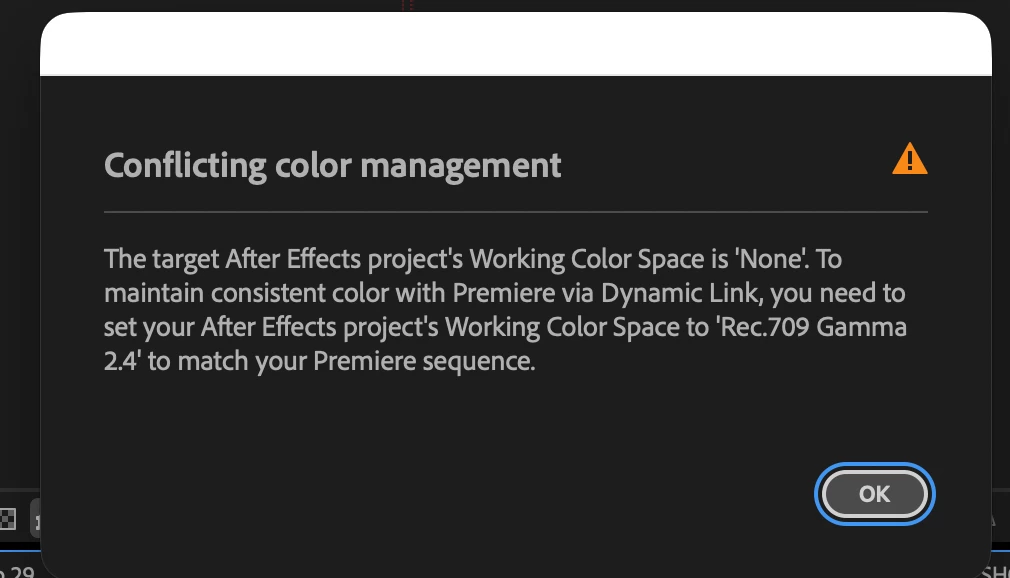
If I set the Working Color Space to Rec 709 Gamma 2.4, then I don’t get an error message but the iphone clips show up extremely over-exposed and weirdly colored in After Effects:

I imagine that that if I just convert the clips to Prores or something then I won’t have this error, but is there a way that I can avoid these error messages and issues without having to convert the clips to prores for every project I work on? This doesn’t seem to be an issue with non-iphone clips and this wasn’t happening at all with any clips until the past couple years. I’ve tried disabling the color in Premiere, but that doesn’t seem to stop the error messages. I’d also experiment with the Working Color Space settings, but figured that would screw up the other footage that was filmed on various cameras in Log and other formats.
Thanks in advance for any help you can provide.
I’m using After Effects Version 26.5.0 (Build 89) and
MacBook Pro with Apple M4 Pro chip, 48GB memory, and MacOS 26.6.2.
For Premiere I’m using 26.5.1 (Build 1)
Dan
 AdChoices