



Peter J Kovacs
Inspiring
June 30, 2022
Question

When importing a project... sometimes all the parenting gets reset to "None"

  • June 30, 2022
  • 7 replies
  • 1202 views

I just discovered a bug where if you import a project that contains parented layers... those parents will suddenly be set to None. However, it only does if you previously imported 2 other projects. Here's an example:


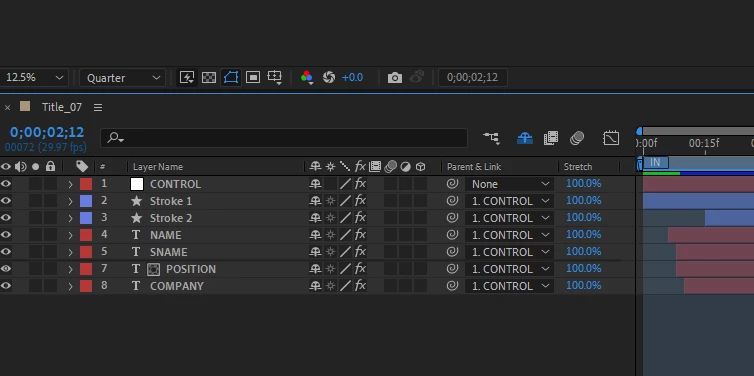
Here's a title project I imported... notice the parenting seems fine.


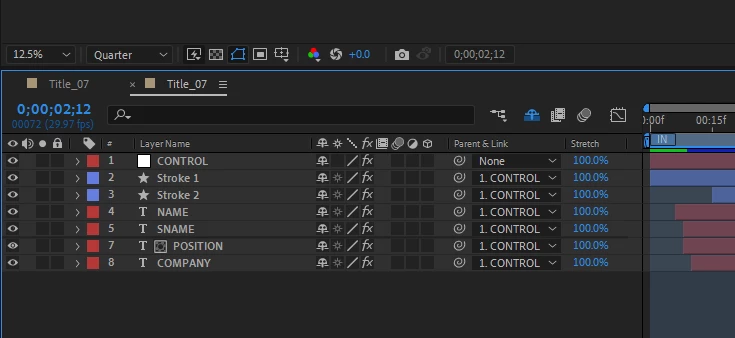
And here's the same project imported a second time... it's parenting is also fine.


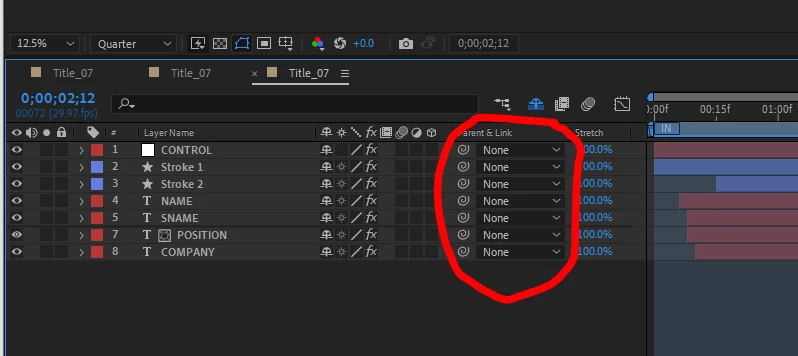
But now I import the exact same project a 3rd time and now the parent is set to none which completely messes up the project (none of the layers are where they should be):
 

I used the same project in my example, but it happens any any project I import on that 3rd time.

Anybody else notice this?


UPDATE: Make sure the null layer is the top layer. If the null layer you're parenting to is not the top layer, then the issue will happen on the 4th time you import, not the 3rd.

This topic has been closed for replies.

7 replies

Participant
September 13, 2022

Fixed in 22.6

Peter J Kovacs
Inspiring
September 13, 2022

Thanks for the heads up. I'll update now.

Participant
August 22, 2022

I have also been experiencing the same issue- same versiopn (22.5). The issue happened with multiple imported comps, of varing complexity, a lot of times with comps that have no null/control layers at all, simply one shape layer parented to another. Fingers crossed Adobe looks into this.

Participant
August 17, 2022

Yes, same problem here! - Version 22.5.0 (Build 53)

PetePLTR
Participating Frequently
August 17, 2022

same here - reeeaally annoying


Participant
July 21, 2022

I have the same problem in the same version of AE (22.5.0 (Build 53))

Peter J Kovacs
Inspiring
July 21, 2022

My only solution was to downgrade After Effects back to 22.4 and the problem went away. Hopefully it'll be fixed in 22.6

Mylenium
Legend
July 1, 2022

Any expressions involved anywhere or effects that reference other layers in dropdowns? That would be the only times when I can rember something liek this happening because AE can't resolve some name conflicts and cyclic references.


Mylenium

Peter J Kovacs
Inspiring
July 4, 2022

Hi, yes most of the layers contain an expression that references a color picker on the CONTROL layer. However, I did a test where I removed all the expressions but it didn't make a difference. Those layer still lose their parenting to the CONTROL layer

nishu_kush
Legend
June 30, 2022

Hi Peter,


Thanks for reporting this.

Which version of After Effects you're using? I am on After Effects 22.5 and I can reproduce the issue at my end.

Let me get back to you on this.


Thanks,

Nishu

Peter J Kovacs
Inspiring
July 4, 2022

Version 22.5.0 (Build 53)

Community Expert
June 30, 2022

I have never seen that behavior and could not reproduce it with a simple comp that has 3 layers and a null. 

Peter J Kovacs
Inspiring
July 4, 2022

I'm on 22.5 and tried it again and the same thing happened. Here's what I did:

  • created a new 1920x1080 project with a null and 1 text layer
  • set the null as layer 1 and the text as layer 2
  • parent the text layer to the null
  • save the project
  • then import that project into itself 3 times
  • on the 3rd imported version the text layer will no longer be parented to the null
  • also the text will probably be shifted to the side of the screen

For some reason if the null is the second layer... then the issue will happen on the 4th time it's imported, not the 3rd. But as soon as the null is the top layer, then the issue happens on the 3rd import.