Participant
October 16, 2026
Question

whenever i press space bar to play a scene in after effects it stuck and don't play and when i press spacebar again to stop it goes 1 frame back and nothing else happens

when i start working on my project after applying some effects or working for a few times in it. the playhead not move when playing video and when i stop playing my playhead just goes 1 frame back and everything is stuck in after effects. i can move my playhead with cursur but video is not playing 

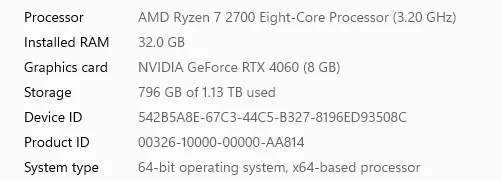
these are my pc specs.

    2 replies

    Nishu Kushwaha
    Community Manager
    Community Manager
    October 16, 2026

    Hey, sorry you’re running into this! Could you share your exact AE version and which effects you’re using when the preview gets stuck? Does this also happen in a new project with just a video and no effects?

    Also, try testing in Safe Mode with third-party plug-ins disabled and let us know if playback still stops working. Please share any fixes you’ve already tried so we don’t repeat them.


    Thanks,
    Nishu

    Translate
    Participant
    October 16, 2026

    That "playhead snaps back a frame and then everything freezes" behaviour is AE
    telling you it can't render the preview in real time — it's caching, not playing.
    Cursor scrubbing still works because that only reads already-cached frames. So
    it's a cache/driver problem, not a broken project.

    One thing missing from your specs: what After Effects version are you on? You
    listed your Windows build but not AE. 25H2 is very new, and if your AE build
    predates it that alone can cause playback like this.

    Try these in order:

    1. Edit > Purge > All Memory & Disk Cache, then fully restart AE.
    2. Preferences > Media & Disk Cache — if the cache folder sits on your C: drive
       or a slow drive, move it to a fast SSD and hit Empty Disk Cache. Your free
       space is fine, but a full or corrupt cache folder causes exactly this symptom.
    3. Test with GPU off: File > Project Settings > Mercury GPU Acceleration >
       Software Only. Your 4060 is more than capable, so if playback recovers with
       GPU off, it's a driver problem — update to the NVIDIA Studio Driver, not
       Game Ready.

    Also drop the Preview panel to Quarter resolution while you diagnose, and if your
    footage is H.264 MP4, convert it to ProRes — AE really struggles with long-GOP
    playback.

    I've been collecting fixes for playback/performance issues like this here:
    [Arc Ignite]

    Did this start after a Windows update or after an AE update? That narrows it down
    a lot.

    Translate