kelly_knowles
Inspiring
October 25, 2016
Answered

Where is the "Convert To Bezier Path" option?

  • October 25, 2016
  • 1 reply
  • 69022 views

(Actually what I really need to do is "Convert a shape path to a mask path by copying the shape’s path to the Mask Path property" but I've tried this eight billion different ways and it just doesn't work... from what I've gathered from extensive Googling, these need to be bezier paths and not parametric paths? Is that what's preventing me from converting shape paths into a mask path?)

You can convert a parametric path to a Bezier path after the parametric path has already been created by context-clicking (right-clicking or Control-clicking on Mac OS) the property group for the parametric path (e.g., Rectangle Path 1) and choosing the Convert To Bezier Path command from the context menu.

No I can't! I've right clicked everything everywhere (and CTRL+clicked, and Option+Clicked, and CMD+Clicked), I can't find any "Convert To Bezier Path" option anywhere. I feel like I'm taking crazy pills, this is a huge road block that I've been fighting for months. I just keep finding the same answers - the ones that don't work for me. Can I assume I keep finding outdated information and the command has moved elsewhere?

In After Effects CC 2015 version 13.8.1.38, where is the "Convert To Bezier Path" option?

What are all the conditions that need to be met in order for this option to be available?

Are there any other secret tricks or conditions that need to be met in order for me to be able to "Convert a shape path to a mask path by copying the shape’s path to the Mask Path property"?

Thanks for the help!

This topic has been closed for replies.
Correct answer kelly_knowles

Thanks Szalam!

As it turns out, my shapes are already Bezier. Which is why I don't have the option to convert to bezier

Convert a shape path to a mask path by copying the shape’s path to the Mask Path property

^ This was literally all the information I could find, just reworded in different ways... OH MY GOD I JUST FIGURED IT OUT. That's usually how it goes, I'll fight with it for ages but I won't solve it until I post a question about it.

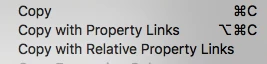
I had been using the keyboard shortcut for copy, I had no idea there were other kinds of copying...

I need to be using the second one. Can't believe this wildly important detail was left out of literally every post/video I could find! Which was a lot. Thank god this is over.

Thanks again for the help!

1 reply

Szalam
Community Expert
Community Expert
October 25, 2016

A Bezier path is one that has not been created with the parametric shape tools. That is, circle/oval, square/rectangle, star, etc.

These things are not Bezier paths:

If you've created your shape with one of those, you might need to convert it to Bezier.

Here is the option for it:

Note that you have to right-click on the path itself, not the shape group.

That being said, I'm not sure this is the problem you're experiencing. If this isn't what you're looking for, let us know. Screenshots of your attempts to do things can be very helpful.

kelly_knowles
kelly_knowlesAuthorCorrect answer
Inspiring
October 25, 2016

Thanks Szalam!

As it turns out, my shapes are already Bezier. Which is why I don't have the option to convert to bezier

Convert a shape path to a mask path by copying the shape’s path to the Mask Path property

^ This was literally all the information I could find, just reworded in different ways... OH MY GOD I JUST FIGURED IT OUT. That's usually how it goes, I'll fight with it for ages but I won't solve it until I post a question about it.

I had been using the keyboard shortcut for copy, I had no idea there were other kinds of copying...

I need to be using the second one. Can't believe this wildly important detail was left out of literally every post/video I could find! Which was a lot. Thank god this is over.

Thanks again for the help!

Szalam
Community Expert
Community Expert
October 25, 2016

I'm glad you got it working!