
Peter J Kovacs
Inspiring
October 14, 2023
Question

Where is the freeze button for new RotoBrush 3.0?

  • October 14, 2023
  • 2 replies
  • 4415 views

Update: I figured it out... in the same windows I didn't have View set to "Roto Brush & Refine Edge"


I just used RotoBrush 3.0 to track a person and now I want to freeze the results. But the freeze button is missing. Here's a screenshot from a YouTube video talking about RotoBrush 3.0 beta which shows the freeze button:
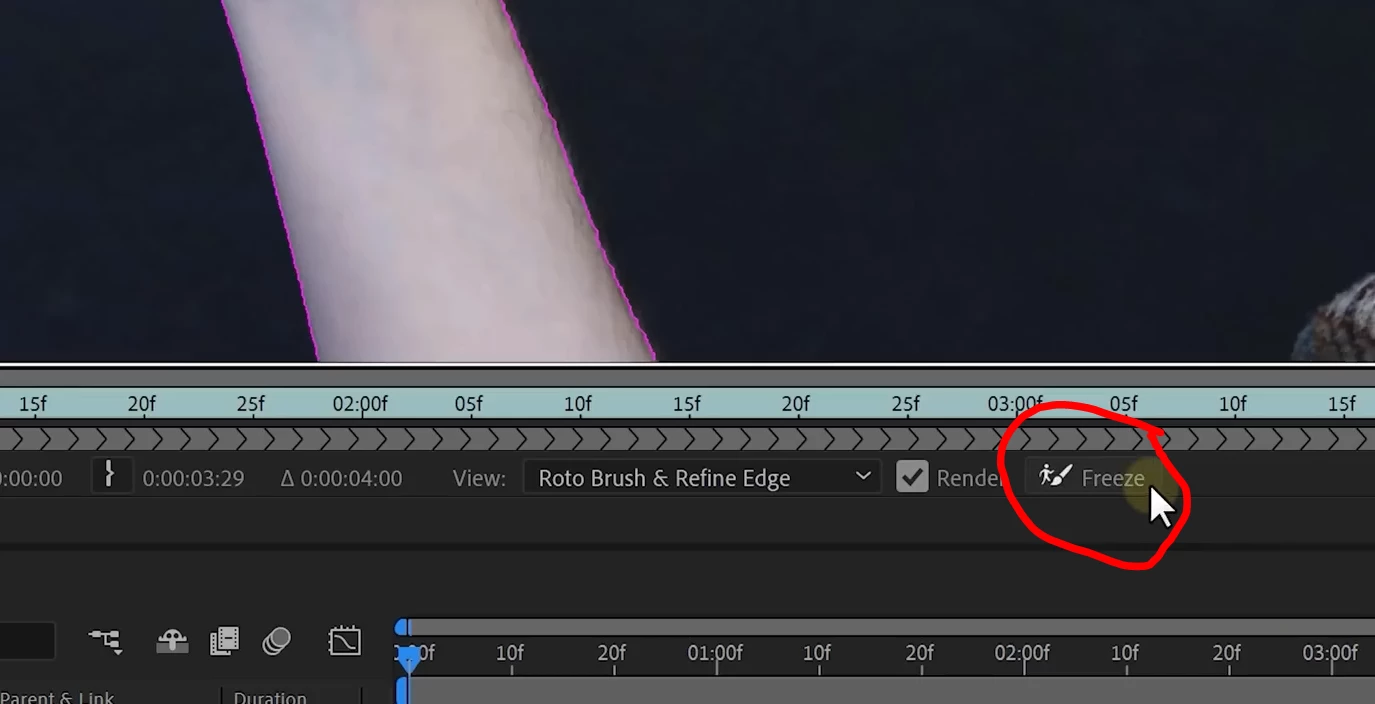


But in the actual release version the button is missing. Is the buttom moved somewhere else now?

Thanks, Pete.

2 replies

Participant
February 6, 2025

Mine had disappeared too. To solve this, I clicked on "View" and made sure that "Roto Brush & Refine Edge" was selected. In your screenshot you can see that it IS selected. My AE kept defaulting to "Mask" and that's why the "Freeze" button was gone in my case.

ShiveringCactus
Community Expert
Community Expert
October 16, 2023

Thanks for coming back on and posting the resolution, I bet you're not the first person won't be the last either to get thrown by this.

Participant
June 7, 2024

I have the same prob, is there an update to this?

Peter J Kovacs
Inspiring
June 7, 2024

Most likely it's there but hidden because the window size is too small. So just expand the window frame and it'll be there.