
Legend
October 24, 2020
Answered

Why can't Adobe fix the ability to save your Workspace and Preferences in the cloud???

  • October 24, 2020
  • 3 replies
  • 1451 views

For no reason at all, today I booted up After Effects (v17.5) and all my Preferences have been reset and my custom Workspaces are gone.  Of course, I previously uploaded them all to the Cloud, but when I tried downloading them, I GET NOTHING.

No workspace and no preferences are in the cloud.


WHY???? 


Why can't Adobe fix this insane problem??? 


AND, WHY IN HELL DID ALL MY PREF AND WORKSPACES GET DELETED TO BEGIN WITH???  Some kind of new bug???


ADOBE, YOUR SOFTWARE IS SO EXPENSIVE NOW,  IT SHOULDN'T HAVE THESE SIMPLE PROBLEMS.
 

This topic has been closed for replies.
Correct answer Roland Kahlenberg

Migrate, - fly away towards the yonder my fair feathered friend.

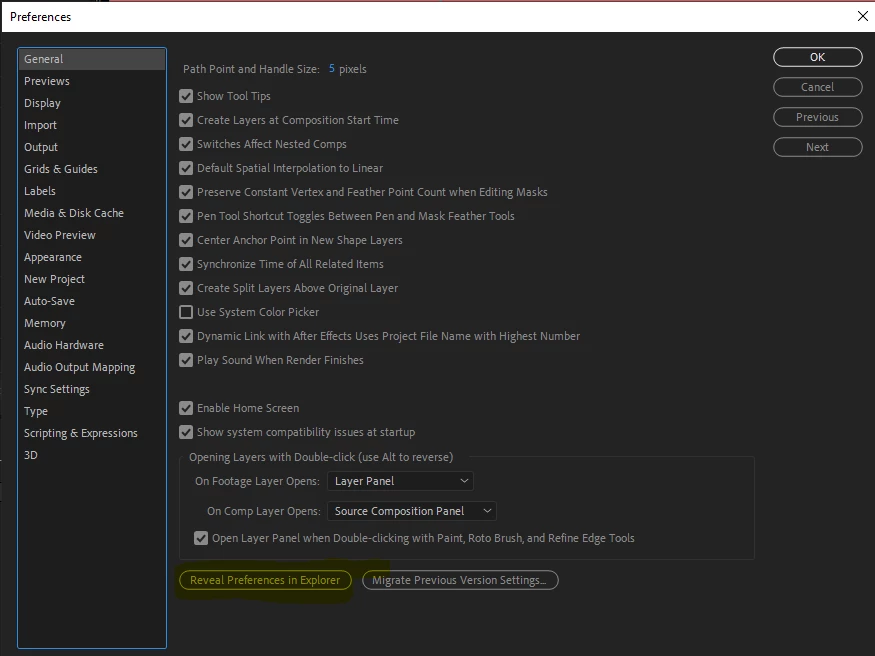
Below is a screengrab of AE's Prefs. Hit the Migrate Button and AE will look for the most recent copy of AE and use its Prefs and Workspaces. AND ... to save your Prefs and Workspaces, hit the Reveal Prefs button - all will be clear when your OS displays the main folder containing your Prefs and Workspaces. HTH


3 replies

Known Participant
February 3, 2021

After an upgrade and being faced with a workspace reset I'm so glad I took the time to do a quick search for a solution.  This worked for me and has saved me a long time getting things just where I want them and where I expect them to be.


Many thanks.

Roland Kahlenberg
Legend
February 3, 2021

You're most welcome.

Very Advanced After Effects Training | Adaptive & Responsive Toolkits | Intelligent Design Assets (IDAs) | MoGraph Design System DEV
Roland Kahlenberg
Legend
October 25, 2020

AE's Preferences and Workspaces are store locally and these from a previous version can be migrated to the version you are updated/upgrading to during installation.


More info here -

https://community.adobe.com/t5/after-effects/migrating-after-effects-version-to-version/td-p/8605408?page=1


https://helpx.adobe.com/after-effects/user-guide.html/after-effects/using/whats-new-12-2.ug.html#main-pars_header


And send a User Feature Request if you'd like to use the Cloud for storing/retrieval of these settings.

Very Advanced After Effects Training | Adaptive & Responsive Toolkits | Intelligent Design Assets (IDAs) | MoGraph Design System DEV
Letty2019Author
Legend
October 26, 2020

thanks, but we are on 2 different pages.


I'm not migrating.  


IF the Preferences and the Workspaces are stored locally, WHERE ARE THEY?  Where is the local mystery file????


How can I update it, and how can I use it when I need it?


I can't understand why this is so difficult.


I create the Settings in After Effects, and where are they save to?  And how can I back them up so I can use them in the future??

Roland Kahlenberg
Roland KahlenbergCorrect answer
Legend
October 26, 2020

Migrate, - fly away towards the yonder my fair feathered friend.

Below is a screengrab of AE's Prefs. Hit the Migrate Button and AE will look for the most recent copy of AE and use its Prefs and Workspaces. AND ... to save your Prefs and Workspaces, hit the Reveal Prefs button - all will be clear when your OS displays the main folder containing your Prefs and Workspaces. HTH


Very Advanced After Effects Training | Adaptive & Responsive Toolkits | Intelligent Design Assets (IDAs) | MoGraph Design System DEV
ToolfarmJP
Community Expert
Community Expert
October 25, 2020

I updated v17.1.* to v17.5 today. The issue did not happen to my PC. Would you try to log-in After Effects with the same Adobe ID if you have another PC?

Letty2019Author
Legend
October 25, 2020

HI, I only have one pc.  It's very odd.  All I did was boot it up, and preferences and workspaces gone.


But the bigger issue is this:

What happened to my cloud back up for preferences and workspaces?


The preferences were there for Premiere Pro, but not After Effects.

After manually reinstalling all the preferences and new workspaces in After Effects, I again, uploaded to the cloud. But how can I verify that the uploads are in the cloud?  There is no verification, no way to confrm and when I needed the backups, they were not there. 

Beyond agravating.