Participating Frequently
November 12, 2020
Question

Why can't I get my expression to work?

  • November 12, 2020
  • 4 replies
  • 424 views

I added the proper keyframes to the position layer. But when I play the animation, nothing happens. Am I supposed to enable something in the settings?

This is the code:

nearestKeyIndex = 0;

if (numKeys > 0){

nearestKeyIndex = nearestKey(time).index;

if (key(nearestKeyIndex).time > time){

nearestKeyIndex--;

}

}

if (nearestKeyIndex == 0) {

currentTime = 0;

} else {

currentTime = time - key(nearestKeyIndex).time;

}

if (nearestKeyIndex > 0 && currentTime < 1) {

calculatedVelocity = velocityAtTime(key(nearestKeyIndex).time - thisComp.frameDuration / 10);

amplitude = 0.1;

frequency = 2.0;

decay = 4.0;

value + calculatedVelocity * amplitude * Math.sin(frequency * currentTime * 2 * Math.PI) / Math.exp(decay * currentTime);

} else {

value;

}
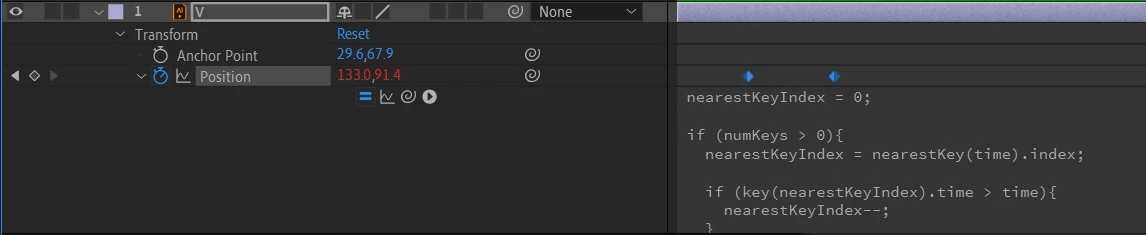
 

The layer with the keyframes and expression input open.
This topic has been closed for replies.

4 replies

Mylenium
Legend
November 13, 2020

As the others said already, there simply appears to be not enough motion in your setup, so the expression at best calculates some sub-pixel jitter. As for your other questions it might help if you actually started reading the help instead of blindly following whatever tutorials.


After Effects User Guide


Mylenium

Community Expert
November 12, 2020

As the others have pointed out, this expression creates a bounce when motion stops. If the motion is very small or the motion is slow, the bounce is very small. If the motion is fast and moves a long way, the bounce is bigger. With the expression disabled you should get no bounce and the layer should move. If the layer doesn't move then the value of the two keyframes is the same.

M.T.Author
Participating Frequently
November 13, 2020

How would you know if the expression is disabled?

OussK
Community Expert
Community Expert
November 12, 2020

Are you sure your keyframes have different values? also what is the time between these 2 keyframes, mostly you will not notice the spring effect if your animation is to slow, try to speed up your animation 

M.T.Author
Participating Frequently
November 13, 2020

What do you mean by different values? All I do is copy and paste the expression in the input layer. I'm new to AE, so I'm trying to figure a lot of things out.

Dan Ebberts
Community Expert
Community Expert
November 12, 2020

It works for me. How far apart are your keyframes in value and time? What does it look like in the graph editor (value)?

M.T.Author
Participating Frequently
November 13, 2020

The keyframes are only a second apart. There is practically nothing going on in the graph editor.

These are the letters I am trying to animate:

I am animating each letter one at a time. They are individual objects. I'm just focusing on the V right now, but they will all have the same effect, just different timing. I imported all of the objects from Illustrator. Do think that there is something wrong with the objects themselves?

Dan Ebberts
Community Expert
Community Expert
November 13, 2020

The expression is depending on the keyframes to establish the motion. The expression will generate the overshoot and oscillation, but it is based on the velocity coming into the second keyframe. From the graph editor, it appears that your keyframes may have the same value and aren't generating any motion. You should have the keyframes set for the start and end postions, and then apply the exprssion to generate the overshoot.