
Participant
October 16, 2019
Question

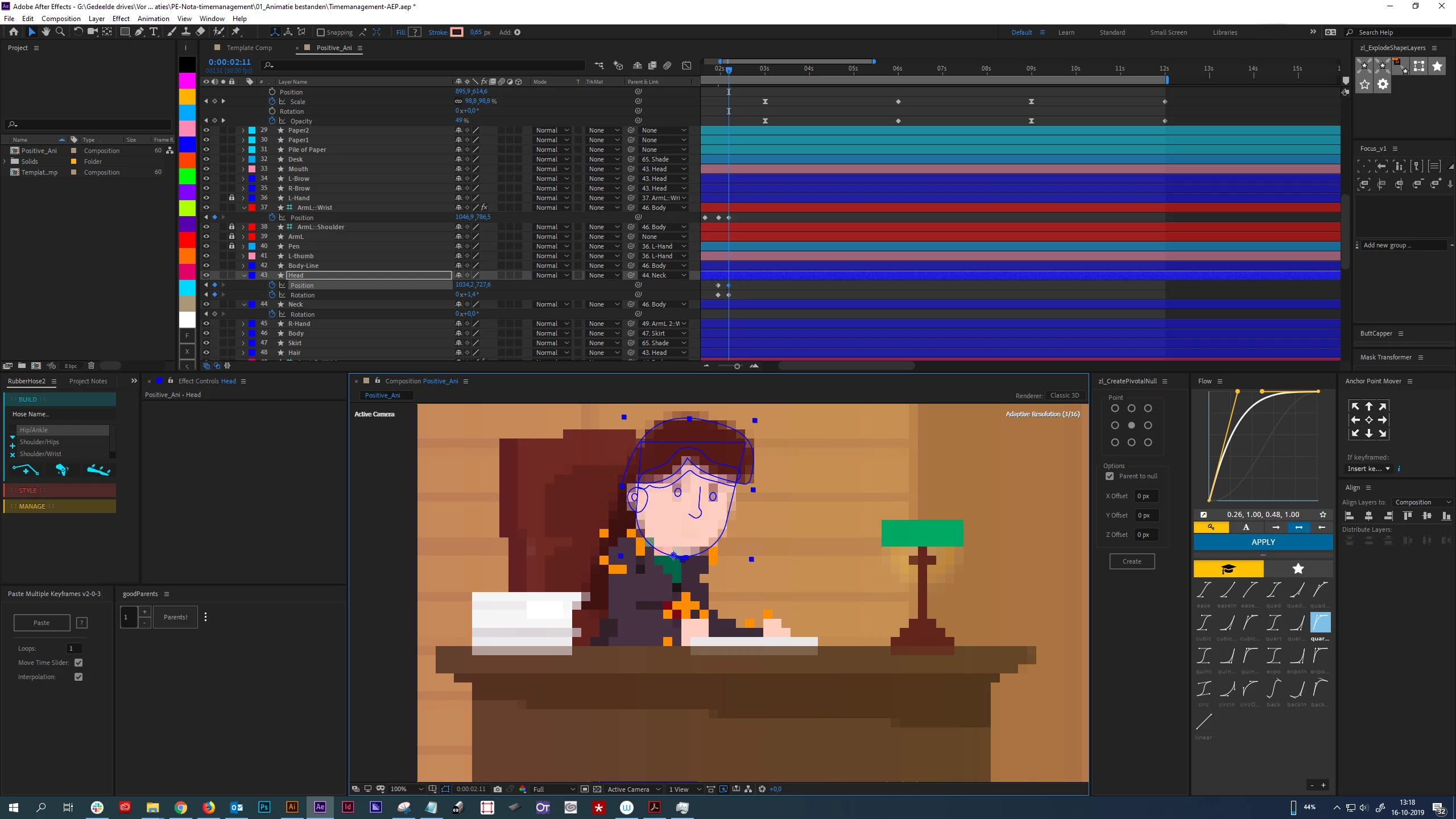
Why does editing become so pixelated and laggy, and how can I solve it?
  • October 16, 2019
  • 5 replies
  • 1643 views


Basically, whenever I try to edit or move something, my resolution gets really pixalated and editing is really choppy. I'm just editing vector shapes (using Rubberhose as well, though I had the problem prior as well). What's causing this? Any ideas?

I'm using the latest version of AE. Specs of machine are:
Intel(R) Core(TM) i7-7700K CPU @ 4.20GHz, 4201 MHz, 4 core, 8 processors
32GB RAM
NVIDIA GeFORCE GTX 1060 6gb


Any advice or tips would be welcomed.


This topic has been closed for replies.

5 replies

Martin_Ritter
Legend
October 16, 2019

I keep the AI files and use DUIK for rigging. Works well for HD, but get's sloppy on 4k. For rubber-bends, I take the puppet tool.

Maybe you can try to work with smaller comps (1/2 HD or less) and scale them up in the main comp.


*Martin

Martin_Ritter
Legend
October 16, 2019

"Cheers for the reply. I stopped using that feature after you mentioned it, but now my project is very slow. Any ideas on how I can speed it up?"


Yes, you can activate adaptive resolution, because that's what it was build for. 🙂


I'm almost on the same machine as you but I have no clue how your project is setted up, I don't know your workflow. Working with IK, a lot of expressions and shape layers is always a slow down. If you provide more details about your project set up and workflow, we might find something which can be optimized.


*Martin

RaengAuthor
Participant
October 16, 2019

Ha! Fair enough! Regarding my workflow. I make my illustrations first in Illustrator, which I then push to After Effects using Overlord. I connect these together (parents) to animate them. For limbs like legs and arms I use Rubberhose. And that's it really. Sometimes when I have to animate a complicated scene I use the Focus plugin to filter out uncessary elements temporarily. I use the Flow plugin to give my keyframes the easing they need.

NOTE: apparently Shift+Enter posts...okay.

Mylenium
Legend
October 16, 2019

Aside from what Martin said, try to go light on using expressions and all that stuff. Just looking at your screenshot it's clear that all those nifty panels apply a ton of expressions and extraneous keyframes and evaluating those will inevitably slow down things considerably even if the project otherwise seems easy/ light.


Mylenium

RaengAuthor
Participant
October 16, 2019
Possible. I use a lot of plugins. Do unused plugins (so just their open windows) slow the software down as well?
Mohammad.Harb
Community Expert
Community Expert
October 16, 2019

sometines this happens when while working on heavy projects, usuall I do the steps


Purge All memory and Disk Cache,

Edit -> Purge -> All memory and Disk Cache


and switching between Adaptive Resolution/Off ( Final Quality )


and sometimes I have to restart windows/Mac

RaengAuthor
Participant
October 16, 2019
Ha! I actually have that action hotkeyed because I use it so much (purge). The full reset I tend to do sometimes. Weird that we have to do this.
Martin_Ritter
Legend
October 16, 2019

That's the adaptive resolution as it shows up in right top corner. You an switch it to "off" in the comp-window. In the bottom line, it's the icon which is currently blueish.


*Martin

RaengAuthor
Participant
October 16, 2019
Cheers for the reply. I stopped using that feature after you mentioned it, but now my project is very slow. Any ideas on how I can speed it up? My machine is pretty good as I recall, do you have recommendations?