Nemo-
Known Participant
April 3, 2019
Question

Why does the Exposure effect behave differently in the latest version of AE?

  • April 3, 2019
  • 2 replies
  • 1441 views

I opened one of my previous projects and it looks different in the latest vesrion of AE (16.1.0, build 204).

The Exposure effect in the latest version gives a different result with the same exposure values as before. For example, in my project I have the Exposure effect with the Exposure value set to 3. If I open the project in the latest AE version it looks so much brighter. To get the same look in CC 2014, I have to set the Exposure value to 15 instead of 3.
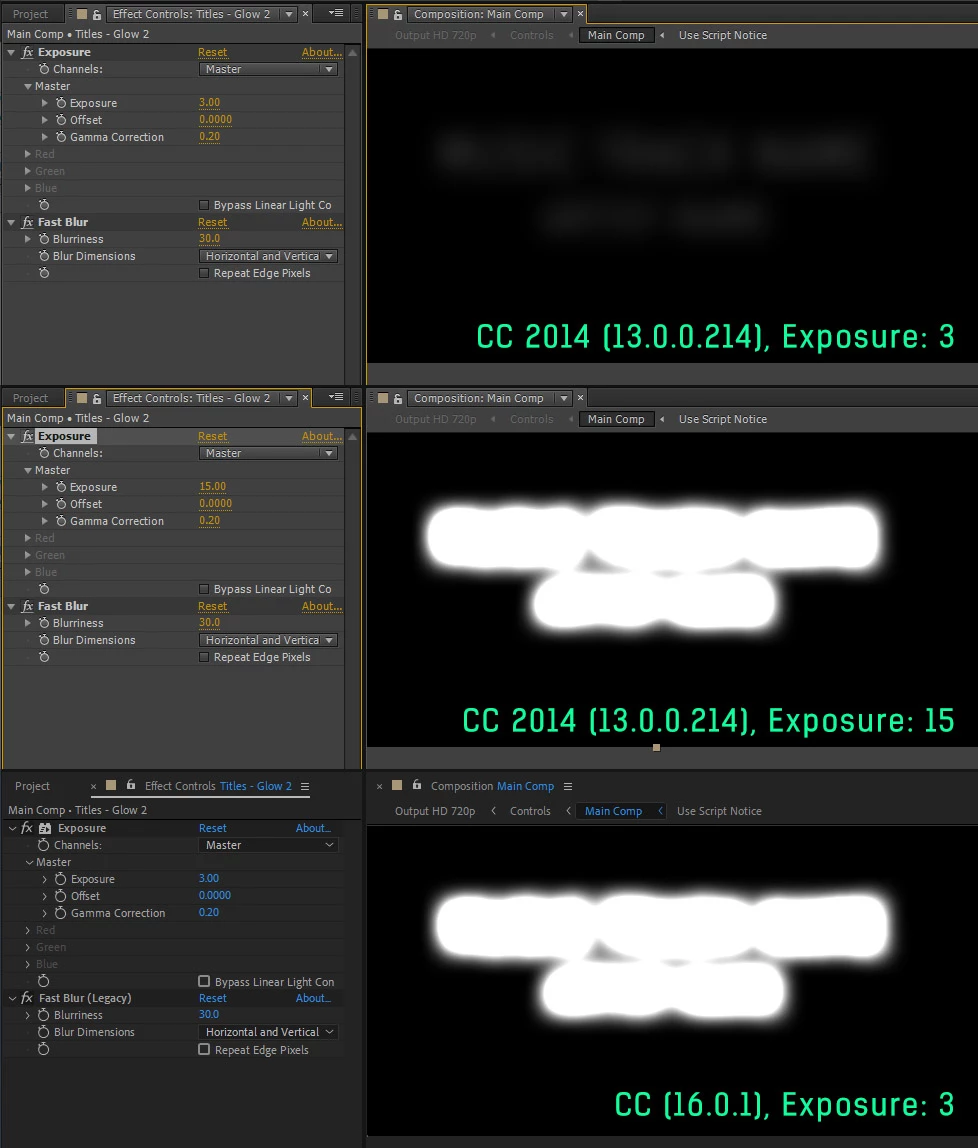
Does the Exposure effect broken in the latest AE version? Am I doing something wrong?

P.S. I see this inconsistent behavior in the 32-bit project.

This topic has been closed for replies.

2 replies

Inspiring
April 3, 2019

A couple things are going on here that are probably contributing to the different look. First, the Exposure effect has been re-written to be GPU-accelerated, which you can tell by the accelerated plug-in icon next to the name. Second, you're using the now out-of-date Fast Blur effect. Try switching it out for the new Fast Box Blur (there's also a script in the File>Scripts menu to Update Legacy Blurs.

Also, check your project settings to see if you're rendering with your CPU only (Mercury Software) or your GPU (Mercury Hardware).

Nemo-
Nemo-Author
Known Participant
April 4, 2019

Thank you for your help!

Also, check your project settings to see if you're rendering with your CPU only (Mercury Software) or your GPU (Mercury Hardware).

I tried both of them with the same result.

Try switching it out for the new Fast Box Blur (there's also a script in the File>Scripts menu to Update Legacy Blurs.

Thanks for the tip! Yes, the Fast Blur is outdated, but it's used in this project when it wasn't legacy. I believe it should continue working as before. Anyway, it's not the case.

the Exposure effect has been re-written to be GPU-accelerated

I also updated the NVidia driver to the latest version to check if it's a driver related issue, but the problem persists.

I found that the Gamma Correction slider in the Exposure effect behave inconsistently with the previous versions of AE. If the Exposure value is set to 0 and you drag the Gamma Correction slider down it looks like everything is working as it should. But once you increase the Exposure value, Gamma Correction is broken. I try to lower the Gamma Correction value, but the color values increase dramatically for some reason. In my case Gamma Correction was set to 0.2 and that ruins everything. That makes no sense, it looks like a bug!

Inspiring
April 4, 2019

If you think you found a bug you should report it on the UserVoice site: After Effects: Hot (1416 ideas) – Adobe video & audio apps

My general thought is that the team tries to preserve the look of effects when rewriting them for the GPU, when possible, but the math or code is just different when using those different devices to process effects. In the case of Fast Box Blur and the legacy one, you'll see that you need a much lower value to achieve a similar blur on the new effect. That being said, switching your project back to CPU processing would switch the math used by the effect, and if you don't see what you expect, then something else might be wrong.

gupta shivangi
Legend
April 3, 2019

Hi Nemo-,

That does not look ideal. I tested the issue at my end with all the versions. Exposure effect has not been changed. I would recommend you to reset the preferences for After Effects once. It will make the settings default.

Refer: Reset After Effects Preferences | Welcome to kevinmonahan.net

Let me know if that helps.

Thanks,

Shivangi

Nemo-
Nemo-Author
Known Participant
April 4, 2019

Thank you, I reset the prefs, but unfortunately it hasn't fixed the issue.