
j.khakase
Inspiring
February 1, 2023
Answered

Why getting vector shape edges blur in AE

  • February 1, 2023
  • 2 replies
  • 626 views

Hello Friends,

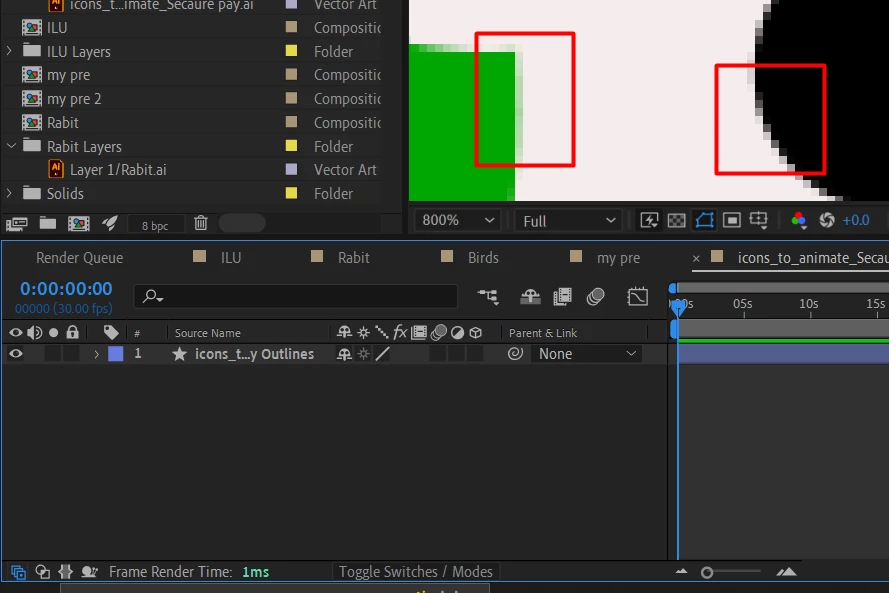
Coould you please help me to resolve blur edges issue in After Effects. Its a vector shape and switches is on but still unable to resolve this issue?

 

This topic has been closed for replies.
Correct answer Mylenium

You are not scaling the layer, you are zooming in. You have a fundamental misunderstanding how this works. I suggest you actualyl read the online help instead of exclusively relying on tutorials that leave out many of those basic things.


Mylenium

2 replies

Mylenium
MyleniumCorrect answer
Legend
February 2, 2023

You are not scaling the layer, you are zooming in. You have a fundamental misunderstanding how this works. I suggest you actualyl read the online help instead of exclusively relying on tutorials that leave out many of those basic things.


Mylenium

j.khakase
j.khakaseAuthor
Inspiring
February 3, 2023

Thank You, I have just basic understanding about AE, and was expecting view like IA. will go through the online help.

Mylenium
Legend
February 1, 2023

You are zoomed in 800%. This makes no sense and you seem to misunderstand how this works. AE is not Illustrator and does not re-rasterize content upon zoom. All that matters is how it looks at 100%. This is perfectly normal.


Mylenium 

j.khakase
j.khakaseAuthor
Inspiring
February 2, 2023

I have seen many video tuts on the internet that they are getting solution, no matter how much we scale the vector graphics in AE, but that doesn't work at my system.

The video tuts are as follow:

https://www.youtube.com/watch?v=aSWWq-PNMMs&t=528s

https://www.youtube.com/watch?v=1aKmTWyfN38

https://www.youtube.com/watch?v=tQYUAbFbnfM

https://www.youtube.com/watch?v=B_FBWnUQzEY