This topic has been closed for replies.
Correct answer DigitalSpatula

Hi

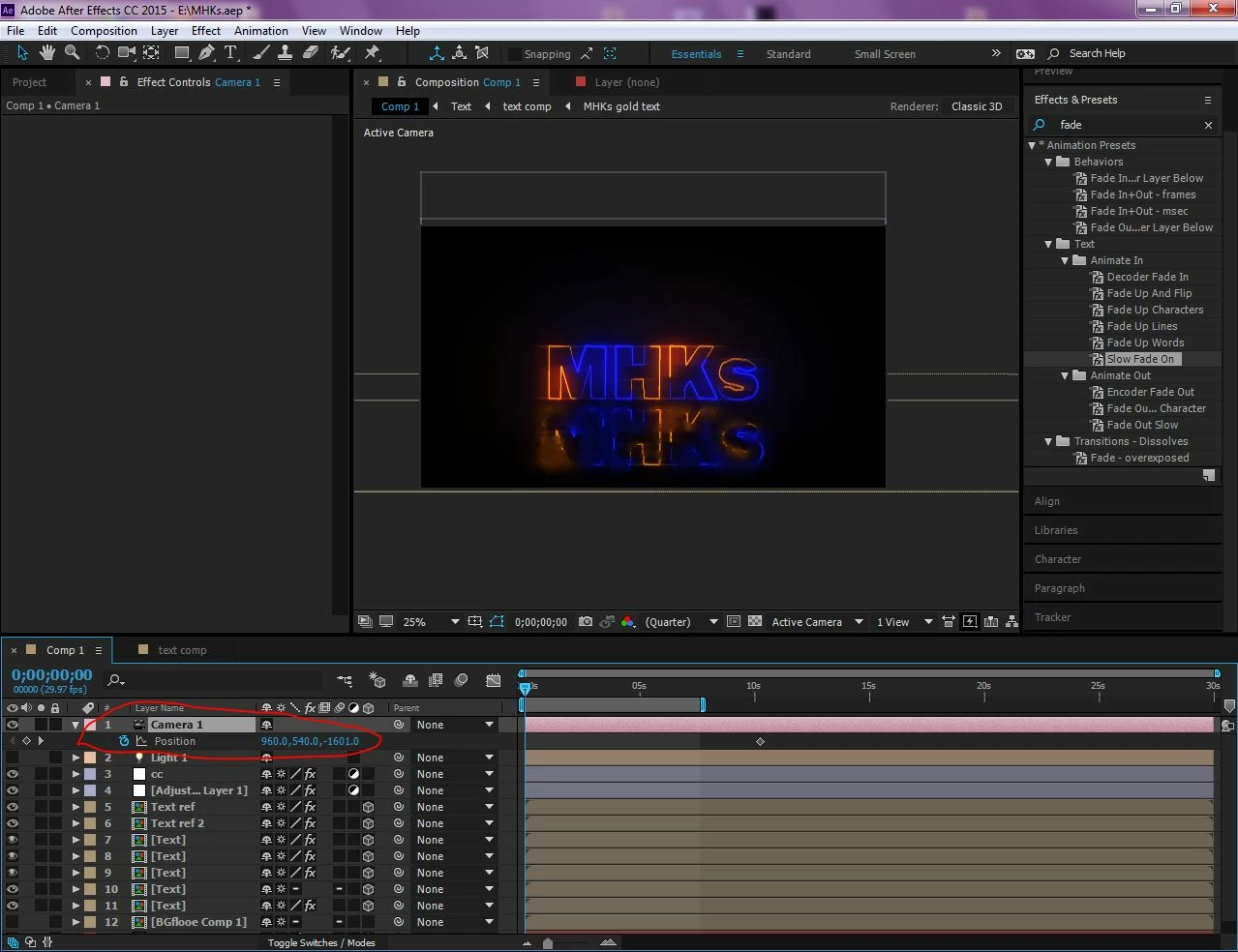
You'll need to turn off collapse transformations (the star next to the shy face icon) for 3D to work.

Steve

3 replies

Dave_LaRonde
Inspiring
June 20, 2019

I don't see anything in that screen shot that dictates the use of 3D.  It appears a simple animation of scale in 2D would work.

If you don't HAVE to use 3D, 2D is always easier.

DigitalSpatula
DigitalSpatulaCorrect answer
Inspiring
June 20, 2019

Hi

You'll need to turn off collapse transformations (the star next to the shy face icon) for 3D to work.

Steve

Community Expert
June 20, 2019

Collapse transformations will not prevent the camera from effecting a nested comp. Collapse transformations will let the camera see a 3D layer inside a nested comp even if the nested comp layer is 2D.

I think the problems is that I only see one keyframe for the camera. It's not moving.

If the layers in all of those nested comps (pre-comps) were all 3D you would not have to make the compositions in the Timeline 3D for the camera to work.

I suggest that you spend some time with the User Guide or run through the tutorials on the After Effects Product page. The screenshot and the problem indicates a lack of understanding, not a bug.

June 20, 2019