omer47
Inspiring
March 13, 2019
Answered

Why no seeing my media running

  • March 13, 2019
  • 2 replies
  • 871 views

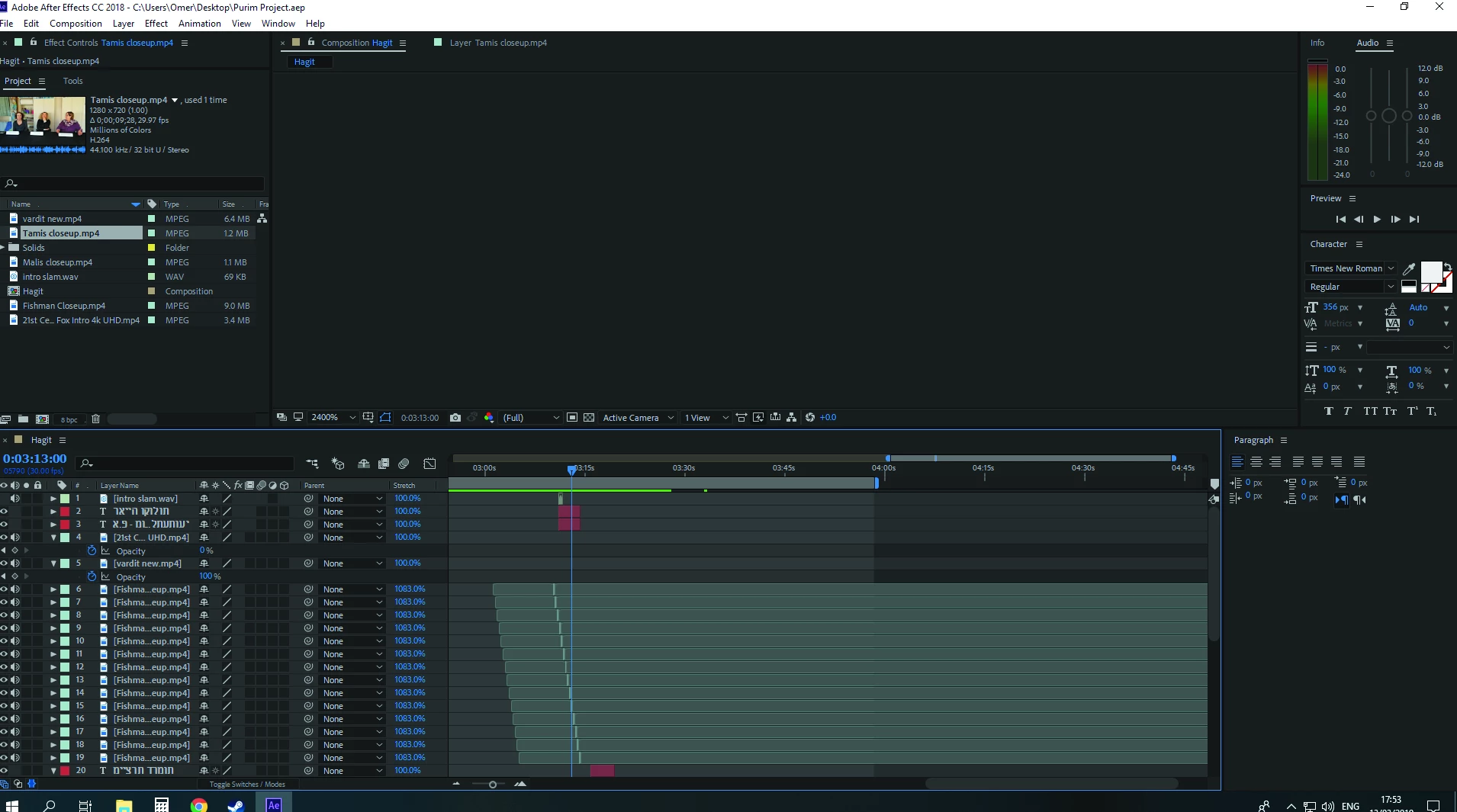
Hi, Usually whenI render my work, I see my media on the main screen.

Now, nothing is shown.

Can someone please explain how to solve this unfortunate workplace ?

TY
    This topic has been closed for replies.
    Correct answer Dave_LaRonde

    I see that you have the comp's zoom set to 2400%.  Wow!  That's a LOT!  Set it to 100% and see what happens.

    2 replies

    Dave_LaRonde
    Dave_LaRondeCorrect answer
    Inspiring
    March 13, 2019

    I see that you have the comp's zoom set to 2400%.  Wow!  That's a LOT!  Set it to 100% and see what happens.

    Kyle Hamrick
    Community Expert
    Community Expert
    March 13, 2019

    I suspect Dave's hit the nail on the head here. You're zoomed in so far (and likely off the edge of the canvas) that you just can't see any of your work.

    Vinay Dwivedi
    Adobe Employee
    Adobe Employee
    March 13, 2019

    Go to Edit menu>Purge and purge all Media Cache and Memory.

    omer47
    omer47Author
    Inspiring
    March 13, 2019

    Hi, nothing happened for me. still dont see my main screen

    Vinay Dwivedi
    Adobe Employee
    Adobe Employee
    March 13, 2019

    Check the Media cache and Media cache database location under Edit>Preferences Media.

    Shut down AE and go to the location manually. Rename Media Cache and Media Cache Files to old_Folder name.

    Restart AE, wait till the previews are regenerated and check.

    Default location of Media cache is : C:\Users\username\AppData\Roaming\Adobe\Common