S_ A
Inspiring
December 1, 2023
Answered

why wiggle expression cant affect path proprerties

  • December 1, 2023
  • 1 reply
  • 468 views

Hello,


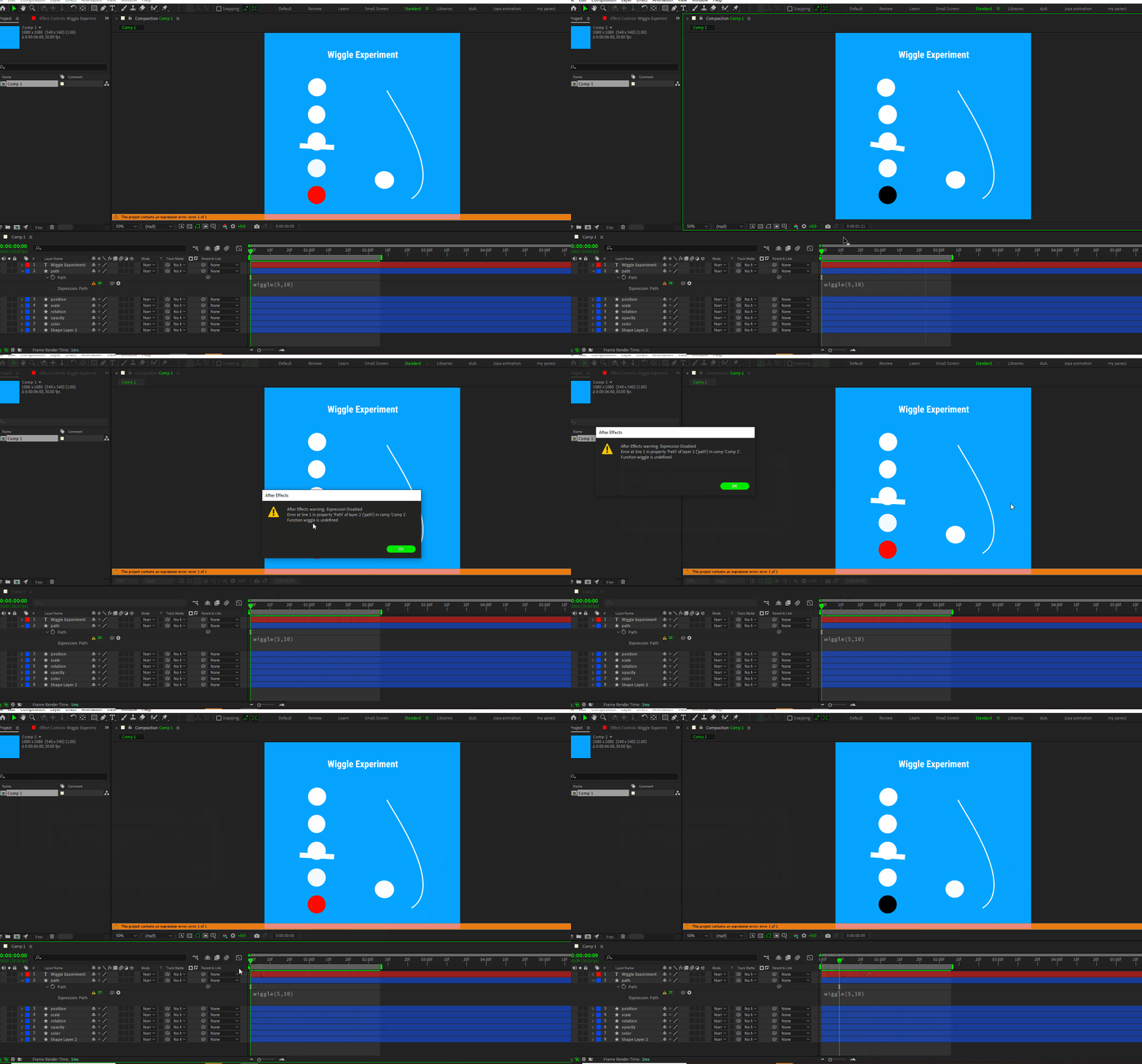
I am practicing wiggle experssion.  I  applied it  also in a path property and expected some movements like other properties did (scale, opacity, position, rotation etc). but path didnt move and AE shows errors that function is disabled. 


what does it mean? what is function?


why it works on others but not on path property?  and what does that error telling me? 


This topic has been closed for replies.
Correct answer Dan Ebberts

Paths have special data structure that doesn't work with wiggle(). If fact the options that you have with path expressions is somewhat limited. You can link to another path, you can link to another path and use valueAtTime() to get a time-offset version of that path, and you can use createPath() to build a path. So theoretically, you could harvest the points of the path and apply a wiggle to them on a point-by-point basis (by actually borrowing wiggle from another property, like position). So you end up with a somewhat convoluted expression like this:


p = content("Shape 1").content("Path 1").path;
pts = p.points(); // harvest all the componets of the path
iT = p.inTangents();
oT = p.outTangents();
c = p.isClosed();
for (i = 0; i < pts.length; i++){
  seedRandom(i,true); // makes sure each point gets a different wiggle
  w = position.wiggle(5,10) - position; // use position property to calculate the wiggle
  pts[i] = pts[i] + w;
}
createPath(pts,iT,oT,c) // rebuild the path with wiggled points




1 reply

Dan Ebberts
Community Expert
Dan EbbertsCommunity ExpertCorrect answer
Community Expert
December 1, 2023

Paths have special data structure that doesn't work with wiggle(). If fact the options that you have with path expressions is somewhat limited. You can link to another path, you can link to another path and use valueAtTime() to get a time-offset version of that path, and you can use createPath() to build a path. So theoretically, you could harvest the points of the path and apply a wiggle to them on a point-by-point basis (by actually borrowing wiggle from another property, like position). So you end up with a somewhat convoluted expression like this:


p = content("Shape 1").content("Path 1").path;
pts = p.points(); // harvest all the componets of the path
iT = p.inTangents();
oT = p.outTangents();
c = p.isClosed();
for (i = 0; i < pts.length; i++){
  seedRandom(i,true); // makes sure each point gets a different wiggle
  w = position.wiggle(5,10) - position; // use position property to calculate the wiggle
  pts[i] = pts[i] + w;
}
createPath(pts,iT,oT,c) // rebuild the path with wiggled points



S_ A
S_ AAuthor
Inspiring
December 1, 2023

Thank you so much, I guessed path is different, Now I know why.