Participating Frequently
August 21, 2021
Answered

Wie lasse ich mein Audio-Spektrum passender aussehen? / How do i make my audio-spectrum look better?

  • August 21, 2021
  • 2 replies
  • 502 views

Hallo liebe Community,

hat evtl. jemand Tipps & Ideen, was ich machen kann, damit mein Audio Spektrum besser zum Bild passt? Gibt es da noch irgendwelche Effekte, die ich benutzen könnte, damit es mehr so aussieht als würde das Audio Spektrum zum Bild gehören?


Ich wäre auf jeden Fall für jede Anregung dankbar, liebe Grüße 🙂


-------------------------------------------------------------------------------------------------------------------


Hello dear community,

does anyone have any tips & ideas on what I can do to make my audio spectrum better match the picture? Are there any effects I could use to make it look more like the audio spectrum is part of the picture?


I would be very thankful to every suggestion! Greets 🙂


-------------------------------------------------------------------------------------------------------------------


This topic has been closed for replies.
Correct answer Rick Gerard

The rest of the clip looks like you have applied a chromatic aberration effect to shift the red, green, and blue channels a little bit in time. If you applied the effect to the layers below your Audio Spectrum effect try pre-composing the Audio Spectrum and a copy of the audio track, then use the same technique for offsetting the color channels. 


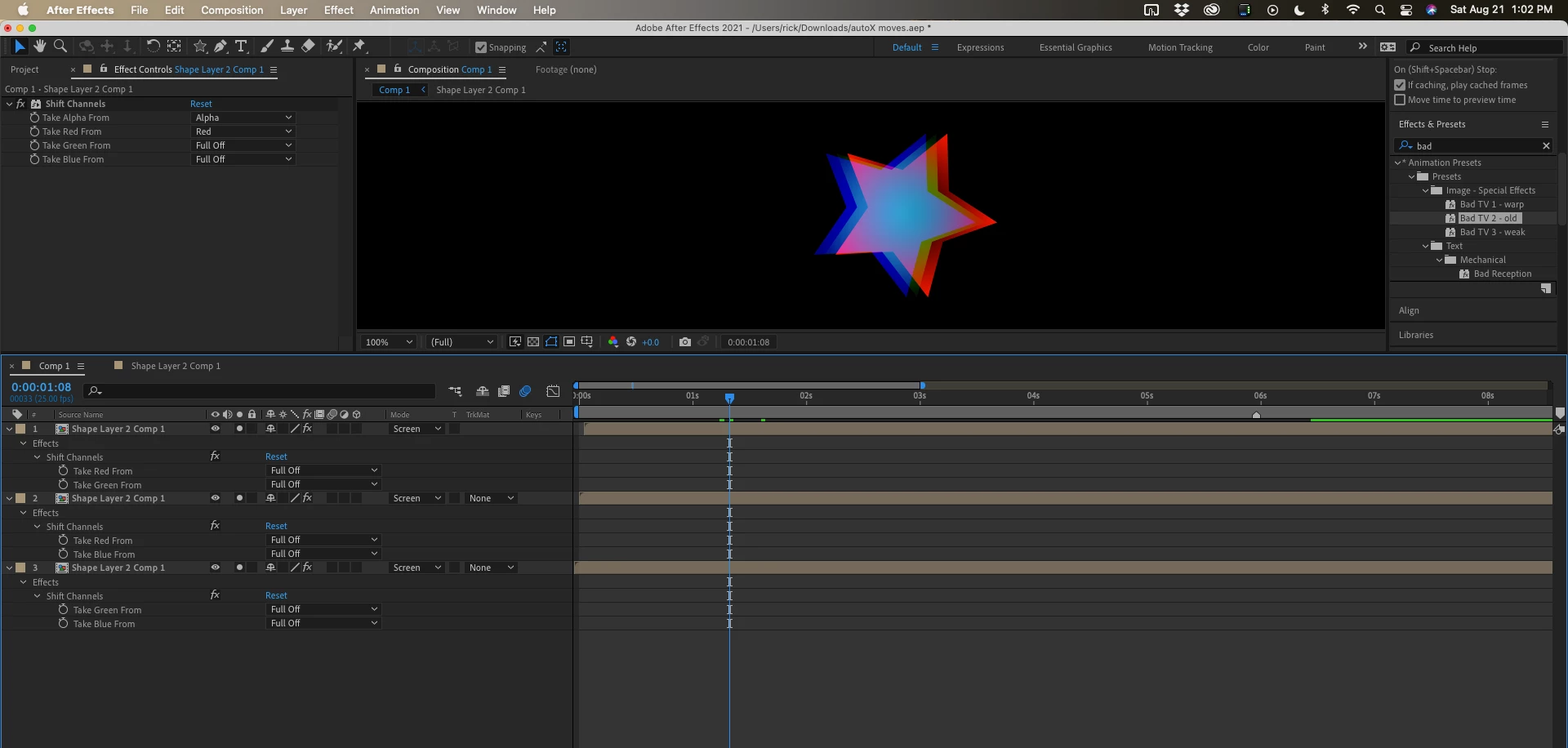
You could apply Shift Channels to all 3 copies, offset each copy in time by one frame, change the blend mode to Screen, then set the first copy to use only the red channel, the second to use only the blue, and the third to use only the green. That would give you something like this with the colors overlapping.

That is just a shape layer moving from right to left, offset by one frame. I'm showing you everything I did to the layers.

2 replies

Mylenium
Legend
August 22, 2021

You may need to pre-compose the layers and experiment with the blending modes. That and as per Rick's suggestion you may simply need to rebuild it from scratch manually to accommodate your scneario. Your messing with the Min/Max effect and others may affect the layer's Alpha in unexpected ways because the transparency is not clean in the first place and the partial opacities of multiple effect instances add up. You may need to add extra steps to unmultiply/ reapply the source Alpha using Shift Channel, Channel Combiner or similar effects.


Mylenium

Participating Frequently
August 22, 2021

Unfortunately, even when I create a new, simple Audio Spectrum with no effects or other kind of layers, the whole layer turns black when I add the effect.. maybe because its a VR effect, other effects like this got the same problem.

Community Expert
August 22, 2021

Don't use VR Chromatic Aberration. Use 3 copies of the layer offset in time by one frame each and then set up the way I did in the screenshot and explanation using Set Channels and then use Blend modes to get the overlay to look right.

Rick GerardCommunity ExpertCorrect answer
Community Expert
August 21, 2021

The rest of the clip looks like you have applied a chromatic aberration effect to shift the red, green, and blue channels a little bit in time. If you applied the effect to the layers below your Audio Spectrum effect try pre-composing the Audio Spectrum and a copy of the audio track, then use the same technique for offsetting the color channels. 


You could apply Shift Channels to all 3 copies, offset each copy in time by one frame, change the blend mode to Screen, then set the first copy to use only the red channel, the second to use only the blue, and the third to use only the green. That would give you something like this with the colors overlapping.

That is just a shape layer moving from right to left, offset by one frame. I'm showing you everything I did to the layers.

Participating Frequently
August 21, 2021

Wow thank you, u are right ! I will try tomorrow to get this glitch-effect on my audio spectrum..