Participant
March 27, 2026
Answered

Wiggle groups individally

  • March 27, 2026
  • 2 replies
  • 40 views

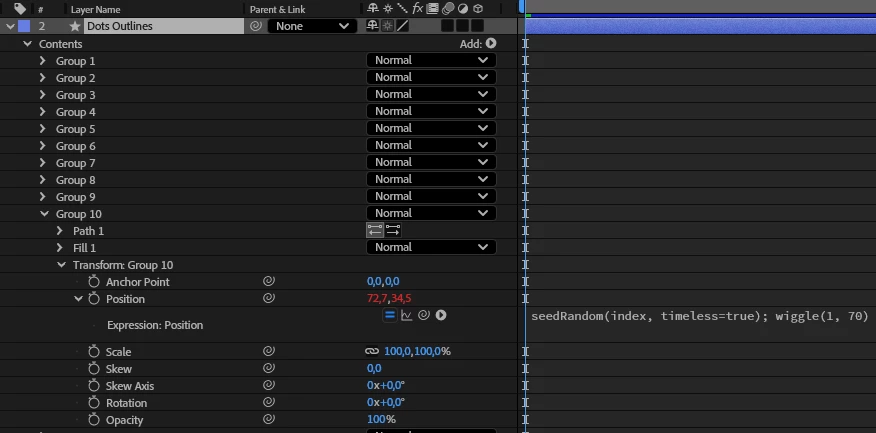
I have imported an Illustrator document into After Effects. Each layer consists of thousands of dots in a certain pattern. I created shapes from vector layer in After Effects resulting in a few layers, where each layer consists of thousands of groups (= dots). Now I want the dots to wiggle individually – not as a layer. Is there a way do this, without manually paste the expression in each group (and losing my mind in the process)?


    Correct answer Warren Heaton

    Hi ​@Elin_SE:

    To make pasting the expression a little easier:

    1. Copy the Position Expression to the Clipboard.
    2. Maximize the Timeline panel by double-clicking tab or pressing the tilde (“~”) key
    3. Show the Position property for each group by entering “Position” in the Timeline panel text field.
    4. Select each Position property that you want to apply the expression to and then paste.

    Yes, step 4 will take some patience, but something that will speed it up is using command option a, Mac or control alt a, Windows to select all visible properties and then paste.  If your list of Position properties extends beyond the visible area of the Timeline panel, click directly below the scroll slider at the right to page down to the next visible range of properties, select all visible properties again, and then paste again.  Repeat until you’ve dong down the entire list of Position properties.

    I’d save a few times as you go in case something doesn’t go as expected while doing this.

     

    2 replies

    Warren Heaton
    Community Expert
    Warren HeatonCommunity ExpertCorrect answer
    Community Expert
    March 29, 2026

    Hi ​@Elin_SE:

    To make pasting the expression a little easier:

    1. Copy the Position Expression to the Clipboard.
    2. Maximize the Timeline panel by double-clicking tab or pressing the tilde (“~”) key
    3. Show the Position property for each group by entering “Position” in the Timeline panel text field.
    4. Select each Position property that you want to apply the expression to and then paste.

    Yes, step 4 will take some patience, but something that will speed it up is using command option a, Mac or control alt a, Windows to select all visible properties and then paste.  If your list of Position properties extends beyond the visible area of the Timeline panel, click directly below the scroll slider at the right to page down to the next visible range of properties, select all visible properties again, and then paste again.  Repeat until you’ve dong down the entire list of Position properties.

    I’d save a few times as you go in case something doesn’t go as expected while doing this.
     

    Elin_SEAuthor
    Participant
    March 30, 2026

    Thank you so much! This really helped! 😀

    Nishu Kushwaha
    Community Manager
    Community Manager
    March 27, 2026

    Hi there,


    Thanks for writing in. Here’s what could work-

    1. Split each dot into individual layers: Here’s how. Go for the Release to Layers (Sequence).
    2. Import the AI file in After Effects, and you’ll get every dot in its own layer. Now you can apply the wiggle effects to a layer and customise it and then copy and paste the effect to the rest of the layers.

    Let me know if there are any other questions.


    Thanks,

    Nishu

    Elin_SEAuthor
    Participant
    March 30, 2026

    Thank you taking the time to respond and for your suggested solution. I realize now that I forgot to mention that I would like to keep the dots in their layers so I also can animate them as a group (except for the wiggle effect).