
samuelb401926446337500
Participant
July 1, 2019
Question

Won't preview animations

  • July 1, 2019
  • 3 replies
  • 3967 views

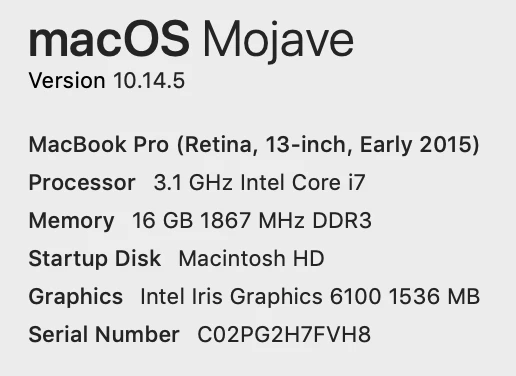
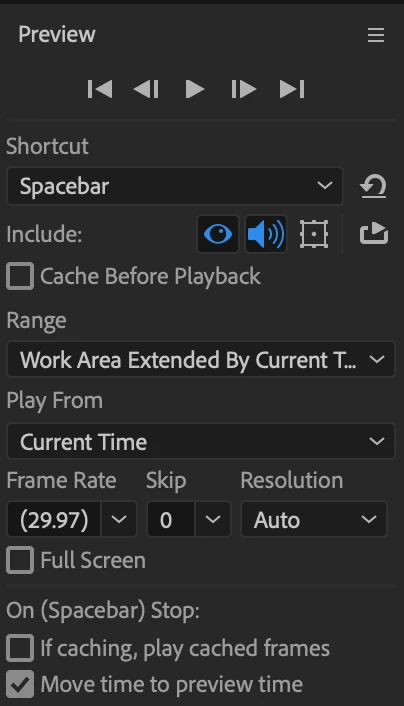
This is my first After Effects project. It's basically a bunch of graphics (text and images) that I want to appear in various locations on the screen with animations. Sort of like those drawing animations that visualize a speech. But no drawing involved, just graphics appearing. When I started the project, it worked fine. Even the dynamic link with Premiere Pro was working and updating as I made changes. Then it seemed to hit a wall and the previews took longer and longer to work. Now, only the first 3 animations work and the whole project is incredibly slow and glitchy (I don't see the animations even trying to work). Also the dynamic link isn't working anymore. I looked through other posts that talked about machine specs and preview settings, so those are below. The project has 36 layers, each one with a graphic and animation. And my MBP has 240 gb available (though when I started this project it only had 40 gb available and I did a bunch of clean up, with no change on this project). Thanks for any help!!!
    This topic has been closed for replies.

    3 replies

    Dave_LaRonde
    Inspiring
    July 4, 2019

    There is a lot we don't know about this project:

    • The dimensions of the comp
    • The frame rate
    • The expressions being used, which can add a lot of needless evaluation time
    • The previewing techniques you're using, and there are very many
    • Most importantly, what you're expected to DELIVER, in precise detail; e.g. a 3815 x 3324 image can slow down previews in a 1920x1080 comp
    vikashk503
    Participating Frequently
    July 1, 2019

    Hi,

    The issue highlighted seems to be related to performance. After Effects unlike premiere pro utilizes Ram and Processor for most of its functioning.

    While your system seems fine for basic editing and usage, when it comes to working on complex projects with more layers, contents, graphics, videos, animations, it may lag behind during rendering and editing and you may experience sluggish performance. Also, you do not have a dedicate graphic card to share the burden  but a generic GPU which being honest with you has minimum impact in performance.

    Here is the official KB article for minimum requirements for After Effects. You may see what you have is the minimum one which can only do basic work and small rendering but to do more, you need to have recommend configuration :

    After Effects System Requirements

    Here are certain steps you may try to find out :

    1. Try a new project with few layers and contents and see if issue still persists.

    2. Try changing renderer to GPU from Project settings window.

    3. Try cleaning cache

    4. Try launching latest auto save project and see what can be done.

    I hope it helps.

    samuelb401926446337500
    Participant
    July 2, 2019

    Thanks for the reply. I made a new composition, added more layers, then some transitions and I did notice that as I added transitions, performance slowed down. The original comp had 36 layers. The new one has 18. I put 4 transitions in and thought I noticed a difference. When I got to about 8 transitions, I definitely noticed. Is it possible to add some layers with transitions and then render that much, add more layers and render and keep going?

    Also a second question came up. I had assumed that transitions would happen at the beginning of the layer, but that appears to be wrong. Many of the transitions defaulted to about 15 second into the layer. Is there a way to control that? That will help my troubleshooting as I had assumed that the transition showing up that far in was part of the lagging. That and also because it wouldn't actually transition, it would just appear.

    Thanks again.

    Community Expert
    July 2, 2019

    What kind of transitions are you using? It sounds like you are editing in After Effects. That is almost always a really bad idea. Without seeing a timeline that includes the modified properties of the layers that are giving you problems it is almost impossible to diagnose the problem. For a full diagnosis, we need a detailed description of the workflow, the source footage specifications, a flow chart that is fully expanded to show effects if you have a bunch of nested comps, and the modified properties of layers that are causing problems.

    Community Expert
    July 1, 2019

    How long is the comp? What is the frame rate? What is the frame (comp) size? What kind of images are you using? Are the images at or near 100% scale sometime in the timeline? What is the Composition Panel Magnification Factor? Is the Comp Resolution set to Auto?

    Generally, when using Dynamic Link, if the shot you are replacing is longer than just a few seconds or the animation is complex and could take a long time to render the best approach is to undo the Dynamic Link in Premiere Pro immediately after the AE comp is created, do the work on the comp, render to a visually lossless production format, and then drop your rendered effects shot above the original shot in the Premiere Pro sequence. Complex AE projects take longer to render in Premiere Pro than they do in the Render Cue and they can slow things way down. The average comp in my workflow is seven seconds or less because I do not edit in AE, I use it to create shots that I cannot create in an NLE, then I edit in the NLE.

    Preparing graphics for video is a critical step. There are a lot of things that newbies and amateurs do wrong. I would spend some time studying that process.

    Until we see a timeline with the modified properties of your comp revealed it is going to be really difficult pinpoint the preview problem. Your system is just slightly above the minimum system requirements and may even fall short when it comes to screen resolution so you can't expect too much from it, but with properly managed projects and efficient workflows you should be able to be productive.