guy.cruls
Inspiring
Dec 27, 2016 7:11 PM UTC
Answered

your disk cache folder is on a drive that does not have enough available space...

When I start After Effects, a dialog pops up, stating that my cache folder is on a drive that does not have enough available space to safely store the full amount specified in your preferences...

How do I resolve this?

I have never used the software before, so it's not as though I tampered with the setting...

I used Windows 8.1

PC is a Dell XPS 15 with 16Gb RAM

[Moved from non-technical Forum Lounge to specific Program forum... Mod]

[Here is the list of all Adobe forums... https://forums.adobe.com/welcome]

Roei Tzoref
Roei TzorefCorrect answer
Legend
Dec 27, 2016 7:23 PM UTC
When I start After Effects, a dialog pops up, stating that my cache folder is on a drive that does not have enough available space to safely store the full amount specified in your preferences...

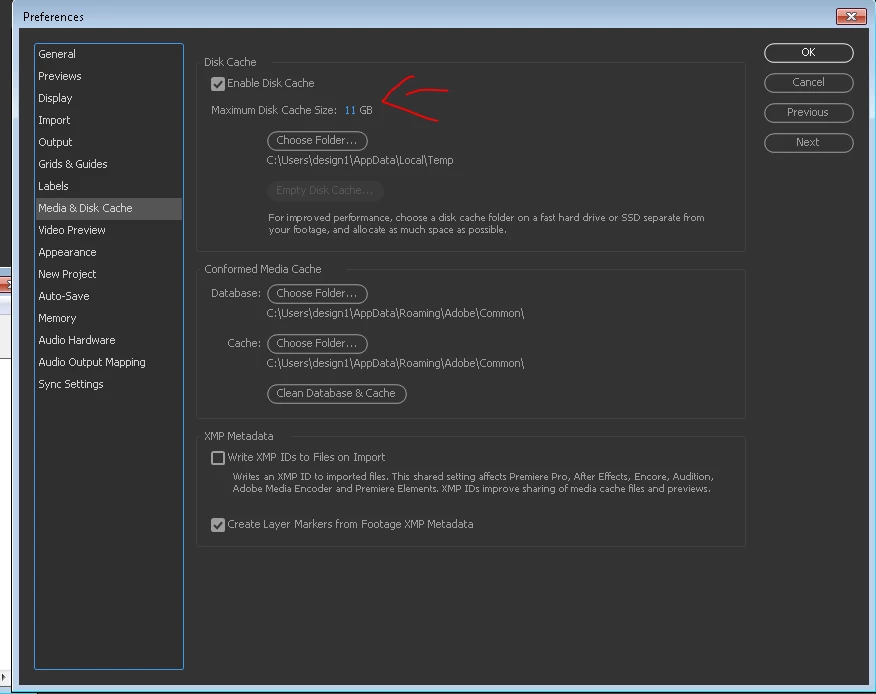
This warning appears if you have the disk cache size set to greater than 80% of the available space on the drive. To make the warning go away, set the disk cache size to 80% or less of the free space on your drive, or like most of us - just click "don't show again" and don't bother with it. of course the exception is if you are using a system folder for a cache disk that is very low on disk space. you don't want to empty the system disk because of cache files.

the settings are here:

more about disk cache here: Memory and storage in After Effects

I have never used the software before, so it's not as though I tampered with the setting...

pace yourself and start here: After Effects tutorials . this is not a software you want to intuitively figure out for yourself.

11 replies

Inspiring
Nov 27, 2024 6:18 PM UTC

So the only way to really find a work around this bug seems to set disk cache the same size like RAM.


https://community.adobe.com/t5/after-effects-discussions/disk-cache-doesn-t-have-enough-space-warning/td-p/10095767

Translate
Participant
Sep 30, 2023 8:35 PM UTC
P.M.B
Legend
Dec 23, 2021 6:08 PM UTC

Even if you do set your cache to 80% you might still ocassionally get this warning as sometimes AE screws up and uses more space than you've allotted.  At least that's my experience.  I have 120gig ssd drive with 80gigs allotted but occassionally AE will 90 or even 100 gigs.  When the message pops up just dismiss it and make sure all your caches are good.  And newmaterial is right as well, occasionally I get the warning even when all my chaches are empty.  

Translate
~Gutterfish
CEJLLC
Known Participant
Mar 27, 2018 3:31 PM UTC

Roei-Thank you for your reply/answer.  I have seen this answer on much older Q and As.  Here is my concern with the warning:

  • I have a dedicated 500gb SSD Disk Cache drive with 465gb usable space
  • 80% of 465 is 372gb
  • My settings allocate 350gb cache size.  That is roughly 75%
  • Currently the available free space on the drive is 334gb

I still get this warning.  Should this be escalated to Adobe?  The only benefit I experience is that I regularly check when the warning pops up.  Clearly this warning is an error.

Translate
Known Participant
Mar 12, 2021 9:48 AM UTC

Yeah me too. 1tb free on dedicated cache drive with cache set to 300gb in AE and I still get the warning every time.


Running AE v17.7.0 on macOS Big Sur 11.2.3 (however this has been quite a longstanding AE fault for various older versions and systems)

Translate
Participant
Dec 23, 2021 5:21 PM UTC

This a bug that has been around for years. The warning appears even when there is 500% space left on the drive. The next time you see it, you can just check the box to “Don’t show again”.

Translate
Roei Tzoref
Roei TzorefCorrect answer
Legend
Dec 27, 2016 7:23 PM UTC
When I start After Effects, a dialog pops up, stating that my cache folder is on a drive that does not have enough available space to safely store the full amount specified in your preferences...

This warning appears if you have the disk cache size set to greater than 80% of the available space on the drive. To make the warning go away, set the disk cache size to 80% or less of the free space on your drive, or like most of us - just click "don't show again" and don't bother with it. of course the exception is if you are using a system folder for a cache disk that is very low on disk space. you don't want to empty the system disk because of cache files.

the settings are here:

more about disk cache here: Memory and storage in After Effects

I have never used the software before, so it's not as though I tampered with the setting...

pace yourself and start here: After Effects tutorials . this is not a software you want to intuitively figure out for yourself.

Translate
guy.cruls
guy.crulsAuthor
Inspiring
Dec 27, 2016 10:16 PM UTC

Many thanks for a helpful response.

Translate
Roei Tzoref
Legend
Dec 28, 2016 12:10 AM UTC

you're welcome. thank you for making me memorize what this annoying message actually means.

Translate
Szalam
Community Expert
Community Expert
Dec 27, 2016 7:19 PM UTC

The message is not going to cause an issue with your use of the software. That being said, it would be good to go into your preferences and set up your cache settings appropriately.

Translate