Cauê SilvérioCorrect answer
Participant
April 28, 2025

This error thorn me apart and stressed me out to tears. It took me days to "solve" it. After hours with an Adobe specialist, he didn´t solve my problem at all. I kept doing tests by myself until I was able to save my project by cuting all my used assets from original folder and copying them to a new folder. Then I opened my AE project and relinked all footage. I don´t consider it being solved because I have no ideia why this error appeared and why I was able to solve it. Pretty frustrating Adobe.

I´m pretty sure that the error was caused by a cineware layer connected to a C4D lite scene. The 3d scene was pretty simple with some extruded lines. Anyway, the project is working now but I have a feeling that something bad will happen again. 

4 replies

Cauê SilvérioCorrect answer
Participant
April 28, 2025

This error thorn me apart and stressed me out to tears. It took me days to "solve" it. After hours with an Adobe specialist, he didn´t solve my problem at all. I kept doing tests by myself until I was able to save my project by cuting all my used assets from original folder and copying them to a new folder. Then I opened my AE project and relinked all footage. I don´t consider it being solved because I have no ideia why this error appeared and why I was able to solve it. Pretty frustrating Adobe.

I´m pretty sure that the error was caused by a cineware layer connected to a C4D lite scene. The 3d scene was pretty simple with some extruded lines. Anyway, the project is working now but I have a feeling that something bad will happen again. 

Translate
Kevin J. Monahan Jr.
Legend
January 20, 2018

Hi DheerajS,

Fix is in the works. Need info? Here you go: Re: Copy shapes from Mocha AE to AE 2018

Thanks,
Kevin

Translate
Kevin Monahan - Sr. Community and Engagement Strategist – Adobe Pro Video and Audio
Mylenium
Legend
January 9, 2018

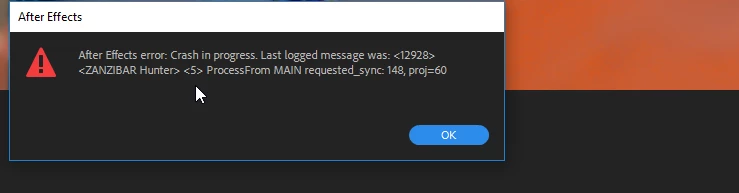
Nobody can tel lyou anything without actual system information or a proper explanation as to when the error actually happens. You can#t just shove screenshots of warning messages in our face and expect that we can guess everything.

Mylenium

Translate
Inspiring
January 9, 2018

As Mylenium said, there's no helpful information there. A ZANZIBAR error means that the Render Thread and the UI Thread are out of sync, which is something that shouldn't be happening. Sometimes a simple restart can fix this, but if it's reproducible, you should file this as a bug with as much information as possible. Feature Request/Bug Report Form

Translate