
David_Casalgrandi
Participant
July 1, 2026
Question

Zigzag régulier entre différents points

  • July 1, 2026
  • 2 replies
  • 0 views

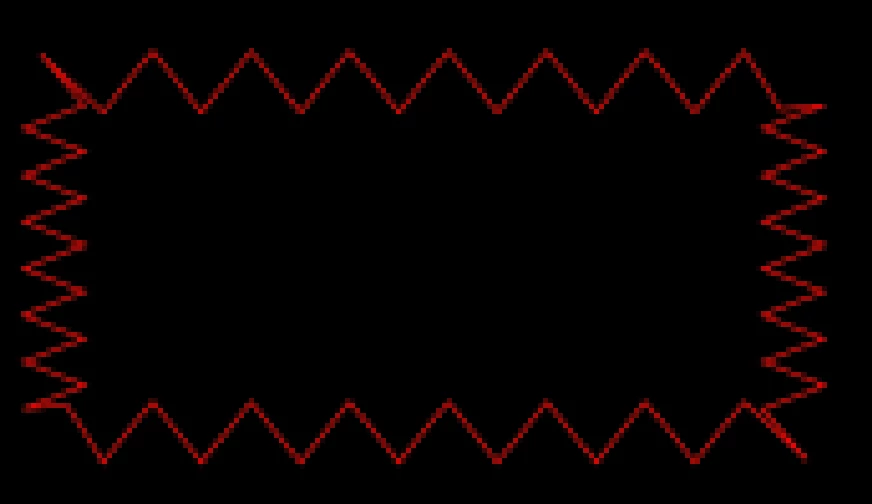
Bonjour, comment rendre réguliers des zigzag entre chaque point selon que ces derniers sont éloignés ou rapprochés? Exemple bien moche pour un simple rectangle ! Merci d’avance
 

2 replies

David_Casalgrandi
Participant
July 1, 2026

Merci pour votre retour. J’ai donné comme exemple un rectangle pour faire simple…mais ma forme est une bouteille avec des points à différents endroits. Je ne comprends pas Adobe qui se contente de faire “simpliste” quand il suffirait de cocher une case pour avoir un zigzag uniforme sur un filet ouvert ou fermé. C’est la même histoire dans Illustrator ; c’est frustrant et navrant ! En plus je veux animer le tracé…


ShiveringCactus
Community Expert
Community Expert
July 1, 2026

Oh no!

Going back to the cog / gear, there was a tutorial many years ago which used a text layer and a mask to create the wheel so that each tooth was the right size.  I wonder if you could find a triangle or zigzag character / font which would allow you to do the same?

ShiveringCactus
Community Expert
Community Expert
July 1, 2026

I have had another idea:

  • turn off zig zag temporarily 
  • use the dash option in stroke to add dashes.  These should be able to space apart evenly.
  • use the add points tool in  masks / path and add new points along the path to match the spacing of the closest existing points using the dashes as a way to measure the distance.   I think this should create sections of equal length.
  • remove the dashes and turn zig zag back on.
ShiveringCactus
Community Expert
Community Expert
July 1, 2026

This reminds me of the cog wheel issue, as if you take an image of a cog, duplicate and scale up the cog wheel, the teeth no longer align.  


The problem with Zig Zag is that there is only an option for ridges per segment, so you cannot get anything even unless the ridges are all the same size.

I can think of two options:

  1. I’d suggest creating a zig zag, for a line, and duplicating it for each side.  You can create a single chevron, then use the repeater.
  2. Create a square, add the zig zag, then use trim paths to only show the top half.  Then duplicate this, display just the bottom line using trim paths and move it up.


Example of the second option:
