



A new way for After Effects to guide you: Coach Marks
Greetings!
After Effects is a BIG application. Here on the After Effects development team, we know that when we introduce a new feature it can sometimes become lost, like trying to find a newly sprouted tree in the forest. We do our best to announce new features via Adobe.com and our social media accounts, but the best way would be for After Effects itself to tell you what's new and changed.
Starting today in After Effects Beta, version 22.3 build 72, you will see new notifications when you click on certain parts of the UI. We call these coach marks, as they can help point you towards new features, introduce you to changed functionality, or even help you improve your workflow.
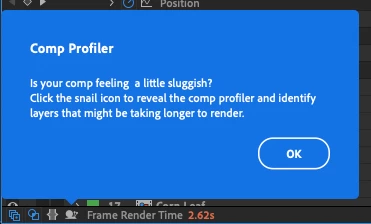
Right now in After Effects Beta, you'll see just a few coach marks sprinkled around After Effects that point you towards some of the newer changes to rendering performance and 3D workflows.
What we'd like to know from you is:
- Do you like having these little pop-ups tell you about what's new?
- Is there anything about them you'd like to see changed or improved?
We're considering a few different ways these coach marks could be useful, so please think about the general use of this type of notification. Don't focus too much on what the current coach marks are doing. (But do tell us if the new coach marks are problematic in any way!)
As an example of something we're thinking of: instead of having a coach mark show up when you click on an individual feature, you might instead see a series of coach marks the first time you launch a new version of After Effects to get a tour of the new and changed functionality.
What do you think? How would you use these notifications to help introduce features in After Effects? Are there specific features that you would point other users at towards so that they can improve their workflows?
Coach marks are common UI elements across all sorts of apps and web sites. We understand that not everyone likes them, so we made it easy to disable them in After Effects. Simply go to Preferences > General and check the Disable Coach Marks box, and they'll never bother you again. Here you can also click the Reset Coach Marks button, in case there was a coach mark that you want to read again.
Please let us know what you think about coach marks. Thanks!


 AdChoices