





Close panels slow downs for timeline comp windows
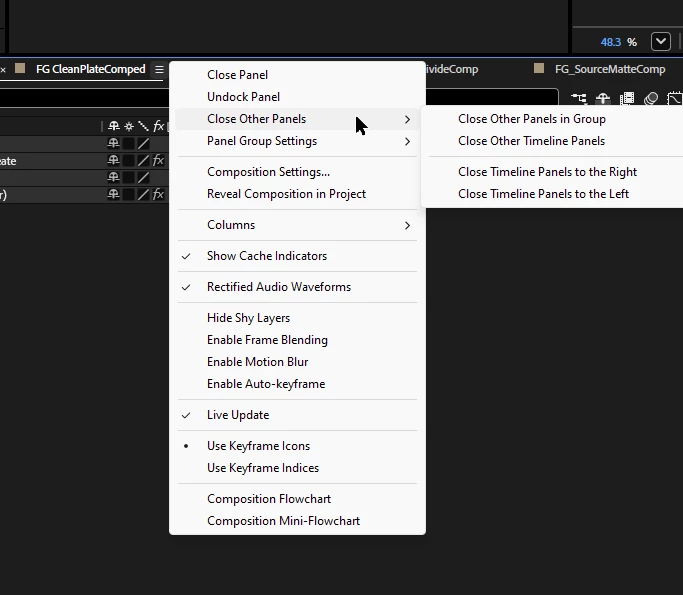
Please revert the imo completely unnecessary compression of the Composition Timeline context menu. This trend was set in Premiere's rightclick menu with heavy backlash for sensible reasons.
Now looking at the AE beta, the same practices are layed out in the timeline menu where Close Other Timeline Panels/ Panels in Group has been moved to a sub-menu along with other options.
This functionality is one that I use incredibly frequently to keep my open comp windows organized but now I have to navigate to a second area with the mouse after the initial location.
To make things worse, I cannot even train myself to use a keyboard shortcut instead because there is no entry for it.
It's implementation also contraditcs non-timeline panels where the Close Other Panels in Group option remains on the main menu level.
There is also a rediculous amount of space left vs display resolution in this menu compared to the previously heavily compressed right-click menu of Premiere so I don't even see the point of this implementation here.
Please:
1. Put all entries in the main list, or at least the one that closes all panels in group so it's consistent with other panel groupings.
2. Provide keyboard shortcut possibilities for all entries.
 AdChoices