





Continued design issues Advanced 3D Renderer
The Advanced 3D Renderer is making slow but steady progress. However there are really two main areas I’d like to highlight here that severely limits artists to leverage having decent 3D renderer native in AE.
HDRI Workflow
Using an Environment Light with an HDRI assigned has limitations.
- You can’t rotate the environment inside the Environment Light
- You can't utilize the HDRI layer's effects to influence the Environment Light as it reads source only.
- You can precomp your HDRI and manipulate it before hand but now AE does not know that the data should be kept linear instead of the automatic gamma conversion for the purposes of the Environment Light. You can linearize the data manually, but now there is a new problem where if you want to use the same HDRI also as a backdrop, you cannot apply the gamma again because for Compositions, effects applied on it's layer in the maincomp DO get taken in to account for purposes of Environment Light where as the direct HDR file as a layer does not have this behavior. This is an inconsistency issue that needs user control or at least repair. I'd prefer to have an option to use Effects & Masks or Source just like you can with reading layers inside effects which is a familiar mechanism.
- Setting up an Environment Light including having it's appearance as dome/sphere in the BG is incredibly cumbersome to set up. There needs to be a mechanism that allows for assignement to an Env Light, be able to rotate it, and adjust FOV while all is seamlessly linked and correctly aligned.
- Some HDRI images with very high values cause specks/fireflies in the render. (Sun with value of 95488.0 float in example below)
- Lots of rendering issues with shadow not rendering fully and/or being cut off on objects halfway. (v26.2.0b32)
-
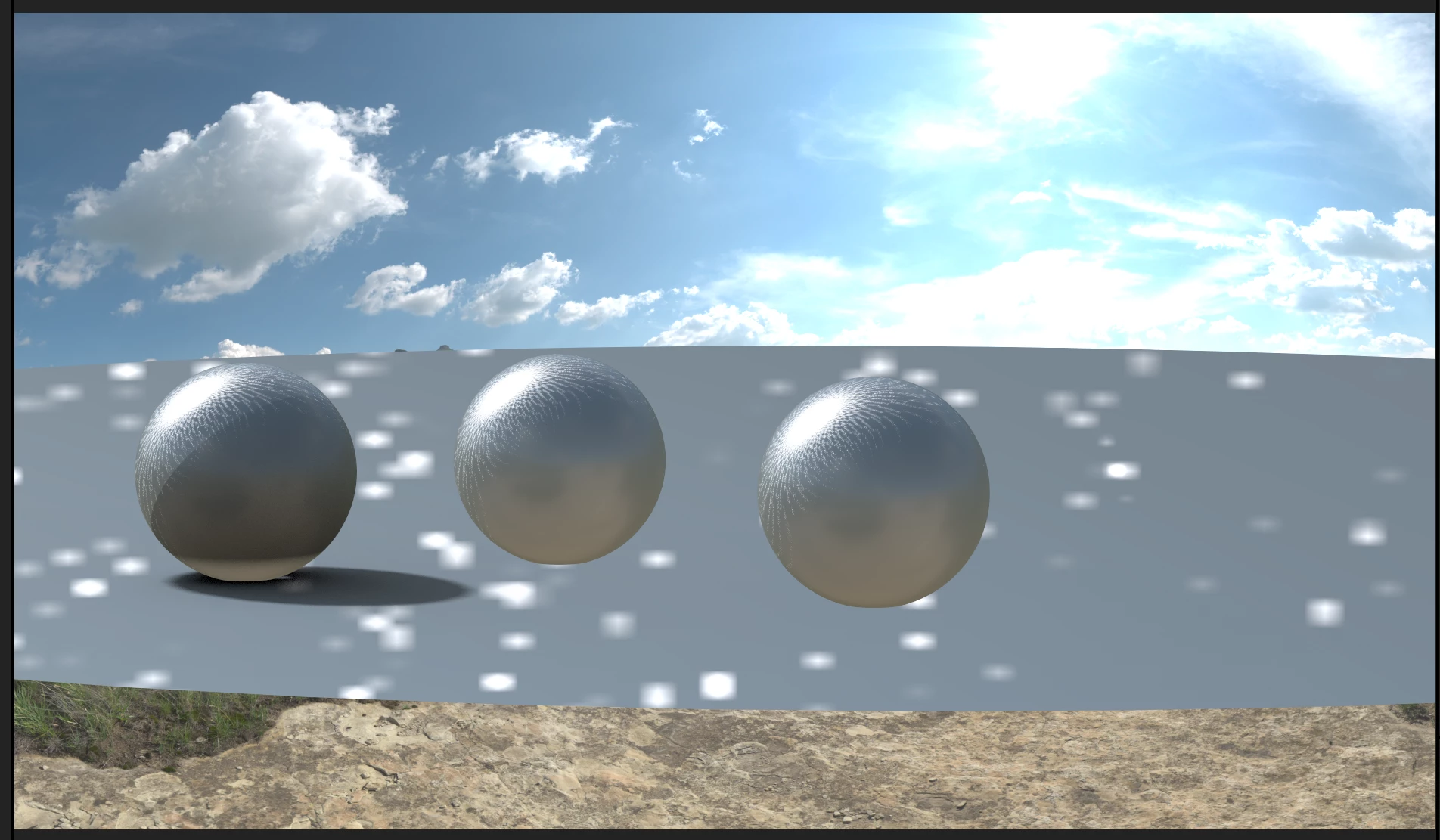
Image showing the fireflies and shadow cast issues
‘Hybrid’ 3D rendering limits image quality and professional finishing
Something I immediately highlighted when the new engine was first launched was that there seems to be no access to the renderer's linear color data. There is a forced internal process that after rendering turns the data to the working gamma regardless of how AE's color management is set up.
Evidently the goal here is to provide users the capability to work in 16 or 8bit integer while still being able to leverage the 3D renderer accurately which is a novel idea. However there are severe issues around this current implementation.
The renderer applies a conversion to the working gamma (2.2 or 2.4) and then spits out a clamped 0-1 image. Any value above 1 is simply lost. The problem is that an HDRI image that you use for background is still linear or unclamped ‘gamma corrected’ so there is a mismatch in the image quality. It gets worse when camera footage comes into the mix which we never only ‘gamma correct’ but apply image sweetening to like tone mapping.
Because of the clamping it is also impossible to return to the linear image state from the native rendering so true scene linear workflows become impossible. This means we cannot bring multiple different sources into one common domain in their relative scene ratios and apply a single image transformation to make the rendering look nice. It is for the same reasons also impossible to utilize 3D with OCIO ACES or similar configs where the idea is to work scene-referred up till the final display rendering.
Solution:
I would propose the following:
- Remove the clamp from the default image output so if desired the whole scene can be made linear again if working in 32bit.
- Add an option to not ‘gamma correct’ the renderers’ image output and keep it linear.
- For the context of using OCIO we'd need the ability to define the input color space for color data for .sbsar files or maybe force the whole renderer to be considered as a particular color space so you do not run into wide gamut issues with missing conversions.
Future development:
- If there is a desire to keep it ‘user/beginner’ friendly I would also highly suggest to have the internal renderer apply some form of tone mapping. AE Adobe Managed still needs to upgrade it's stuff ideally in parity with Premiere's color management otherwise that becomes another hell hole, so adding those tone mapping options would make sense.
I'm really interested in the new 3D capabilities of AE and trying to find use cases for it for actual commercial work, but immediately run into the issues presented above that makes it a very hard sell.
 AdChoices