



JohnColombo17100380
Community Manager
Community Manager
December 11, 2023
Answered

Copy & Paste Keyframes Across Multiple Layers

  • December 11, 2023
  • 10 replies
  • 6688 views

Hello Beta users! 

In the latest Beta builds of After Effects, you are now able to copy and paste keyframes across multiple layers. This new functionality is available in After Effects (Beta) 24.2.0.38 or later. We have been working on this feature for quite some time and are very excited to share it with all of you!
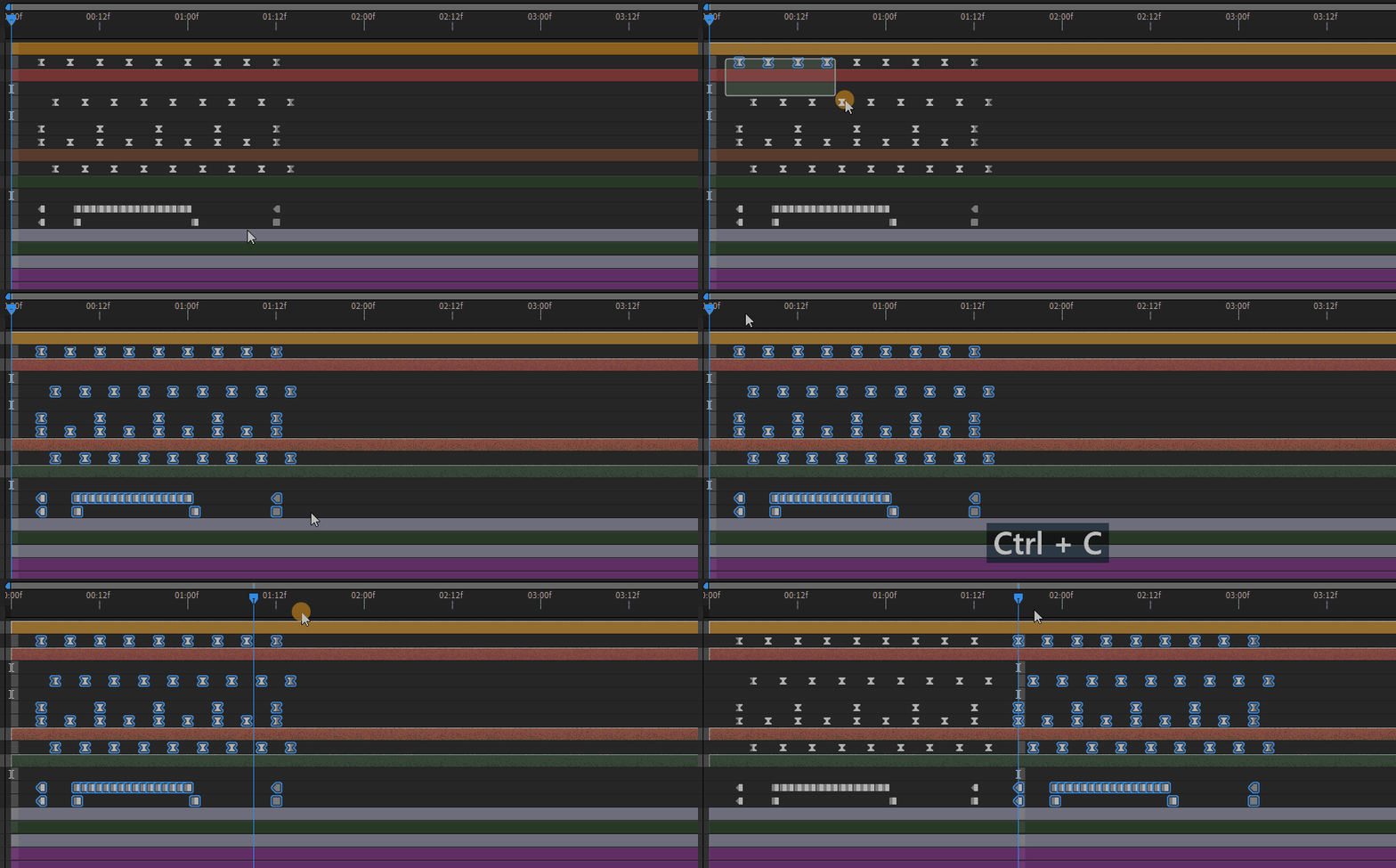


We know this functionality is highly requested, so we'd love to hear your feedback.

Correct answer JohnColombo17100380

Hi all,

The ability to copy/paste keyframes across multiple layers and Paste Reversed Keyframes has shipped with the 24.4 update to After Effects. Thank you all again for your requests and feedback while this feature was in Beta!


Cheers,

- John, After Effects Engineering Team 

10 replies

JohnColombo17100380
Community Manager
JohnColombo17100380Community ManagerAuthorCorrect answer
Community Manager
May 14, 2024

Hi all,

The ability to copy/paste keyframes across multiple layers and Paste Reversed Keyframes has shipped with the 24.4 update to After Effects. Thank you all again for your requests and feedback while this feature was in Beta!


Cheers,

- John, After Effects Engineering Team 

Participant
March 18, 2024

That's a great feture John!

Any chance to make the copy/paste function by Alt + click and dragging the keyframes? (Like any other adobe software)
This video is a great example of how it could be implemented!
Thnak youu!
https://vimeo.com/137401276

Community Expert
March 18, 2024

Good idea, voted

JohnColombo17100380
Community Manager
Community Manager
March 18, 2024

Hi all,

Thank you for your feedback on the copy & paste improvements for keyframes! In response to your feedback, we've now added a new menu command for pasting keyframes in reverse, available in After Effects (Beta) 24.4.0.20 and later. The new command also works when pasting keyframes across multiple layers.


Please let us know how the new command is working for you.


We are also seeking feedback on potential keyboard shortcuts for the new "Paste Reversed Keyframes" command. Cmd/Ctrl + Shift + V is often requested—how many of you often use the existing mapping of Cmd/Ctrl + Shift + V to "Hide Other Video"? Would you prefer "Paste Reversed Keyframes" in the default keyboard assignments?


We hope this is beneficial to your work!

Szalam
Community Expert
Community Expert
March 18, 2024

I have never, in the history of AE, used "Hide Other Video" and would be on board with that being the paste reversed command instead.

Rene Andritsch
Community Expert
Community Expert
March 20, 2024

Same here. Also Jake Bartlett even shows this in his lates Video about the new BETA-features and immediately assigns SHIFT+V to this command. So I think this might be a good default shortcut.

Manaus
Inspiring
January 18, 2024

That's a great addition! The old copy-paste was annoying and time-consuming, so well done, AE Team!

Hopefully, we can see more QoL features for the timeline panel.

Community Expert
December 25, 2023

Finally... would be useful if we have also the option to paste reversed keyframes.

Inspiring
December 30, 2023

I mapped ctrl + shift + r to time reverse keyframes. Makes that at least just one more keystroke instead of a right click menu. 

Community Expert
January 6, 2024

No, pasting reversed keyframes will give you a different result than reversing after pasting. Immagine that the keyframes form an upward ladder, paste reversed keyframes will paste a downward ladder, a complete inverse of the whole original keyframes; while normal paste will paste another upward ladder, then if you reverse those keyframes you will have the same upward ladder with reversed keyframes of individual properties (hope that makes sense).

Shebbe
Community Expert
Community Expert
December 21, 2023

Thank you for implementing such a highly necessary QoL feature. Hope to see more of that caliber soon.

anders_hattne
Inspiring
December 13, 2023

Funny how MT. MOGRAPH – MOTION 2 has been doing this for years..

Inspiring
December 13, 2023

Seems like this version is a bit smoother running than the later stable builds. Need to do more testing but so far it seems promising!

Inspiring
December 13, 2023

Hallelujah 

Warren Heaton
Community Expert
Community Expert
December 12, 2023

I haven't tried it yet, but I'll definitely use this.