



Question
Error Dialog Aggregation, now in After Effects
In our ongoing aim to make your After Effects experience better, we have made some changes to the way we display error and warning messages. These changes were introduced to the beta in 23.2x28.
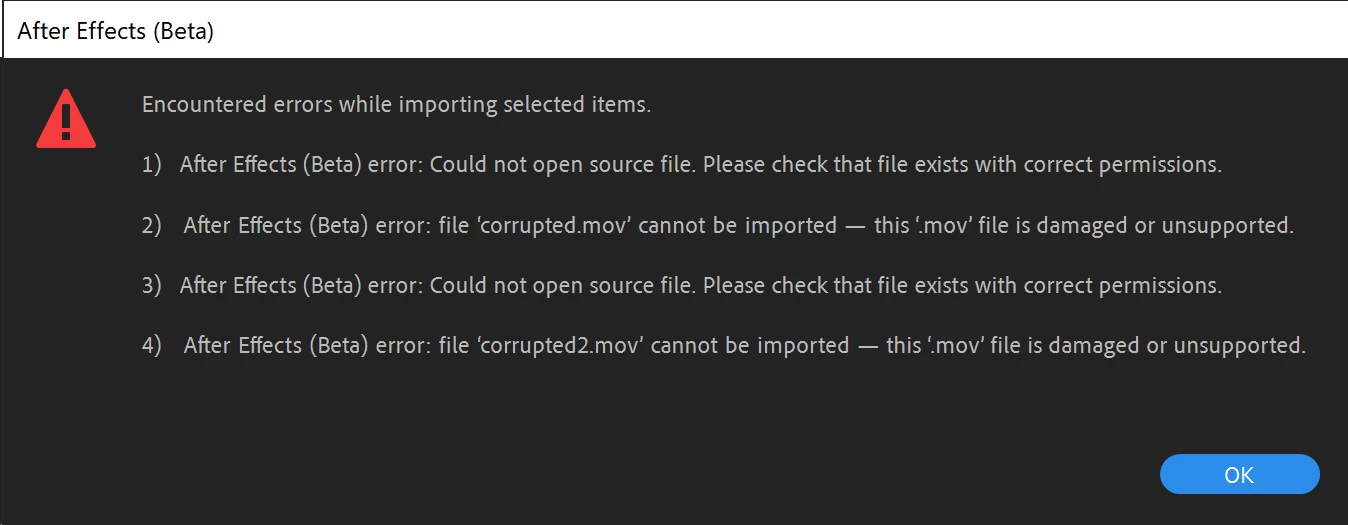
Have you ever run into issues where repetitive error dialogs kept appearing and it was too hard to dismiss them? We've heard your feedback! This feature should help you view and dismiss multiple messages at a time, allowing for fewer clicks to get back to work.
Example aggregate dialog
Here is an example of one of the new aggregate dialogs:
Supported Scenarios
Error dialog aggregation works by delaying the presentation of all error and warning messages until a given operation is complete. Operations supported so far are:
- Importing files
- Opening a project
- Reloading updated footage
- Applying an effect
Right now we present one aggregation dialog for errors, and one for warnings. Informational messages are not yet aggregated. In our experience so far, this feature can reduce the number of dialogs from an unbounded number down to just a handful. We're interested to see how it works for you!
Providing Feedback
Any and all feedback is welcome. It would be particularly great to hear your thoughts on the following:
- Do the aggregate dialogs improve your experience with After Effects?
- Are there any cases where error dialog aggregation makes it harder to understand the errors you are seeing?
- Are there other scenarios that we missed that could benefit from dialog aggregation?
Thank you all in advance for any feedback you can provide!
 AdChoices